Bruner Week 1

My name is Keira Bruner and I am a sophomore Environmental Science and Botany major with a minor in Sociology/Anthropology. I took 291 just last module and I am taking 292 to get a bit more comfortable with GIS software in general while exposing myself to more of the online system. Outside of academics, I am a member of Philosophy Club and choral arts society and I really enjoy crafting and being outside!

I have done all of the things for this week

Comments on Account Features and the Website:

I have previously been on the online ArcGIS website, but I have never poked around on the profile links. I think the help tab will be very helpful when I am lost, and the training may be helpful in the future, if I were interested in taking a couple of courses just to get better used to the software. There is a Forest Regression Analysis course, which seems interesting, but it requires another course to take first. I may or may not take that prerequisite soon. Another course that interest me is Working with Imagery. The description mentioned some of the many uses it has, including forestry and disaster management, and that sounds interesting.

Comments on the Read-Through:

From the reading (and also from my brief experience with the website), I am getting the general idea that ArcGIS Online is just an extension of ArcGIS Pro, except it allows for easier mobility and sharing/collaborating on work. I find that a lot of the categories I read on were things I spent a small amount of time working with in 291. Although, I have never worked with apps or notebooks. I am still not entirely sure how apps work or what they …really are from the description, but I will likely learn during the tutorial when I see them.

Comments on the tutorial:

It is quite reassuring to see that most of the tools in ArcGIS online are pretty intuitive, and I probably will not struggle to decipher which features do what. From seeing what the reading meant by apps, I realize that they are another thing I have worked with. Overall, this tutorial is more of a review from the first 3 chapters of the GIS tutorial from 291.

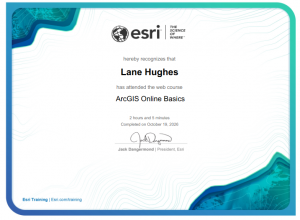
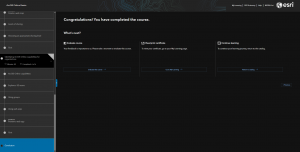
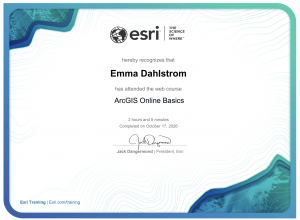
ArcGIS Online Basics_Certificate_10232026

Application Examples:

*For whatever reason, this website is not letting me attach the photos of these visuals, so I will add them in my email.

One application is to asses how different social problems interact with each other. This example looked at domestic violence as it interacted with quarantine/stay at home orders. An advantage of using ArcOnline for this would be that people who look at the map are able to interact with it and see how it changes over time.

source: Shariati, A., & Guerette, R. T. (2023). Findings from a natural experiment on the impact of covid-19 residential quarantines on domestic violence patterns in New Orleans. Journal of family violence, 38(2), 203-214.

Another application I found was involving invasive plant mapping for a national park. The advantage of using ArcOnline here, again, is that it is interactive for anyone who wants to look at it. It is easy for viewers to look into specific features and areas that would otherwise be harder to see in a simple image of a map made with ArcGIS Pro.

source: Randall, J., Inglis, N. C., Smart, L., & Vukomanovic, J. (2022). From meadow to map: integrating field surveys and interactive visualizations for invasive species management in a National Park. ISPRS International Journal of Geo-Information, 11(10), 525.
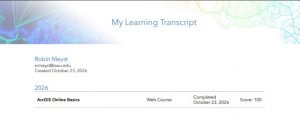
 

Meyst Week 1

I have finished all assignments for this week! 

Hello! My name is Robin, and I’m a sophomore majoring in environmental science and minoring in zoology! I’m from Westerville, Ohio (only 30 minutes from Delaware, I’m local! Feel free to ask me about what’s fun to do around in the Columbus area!) and have always been incredibly passionate about conservation and preservation of the beautiful nature and delicate ecosystems we have here in Ohio 🙂

I have taken GEOG 291, and have overviewed and updated my profile, along with overviewed the website and its functions.

In the ESRI online resources,  I learned about the different uses of ArcGIS Online, especially in certain applications I did not consider. Specifically, I did not consider the use of ArcGIS Online for field research, since most portable devices are unable to run or store all of the needed data for ArcGISPro. Additionally, sharing data from ArcGISPro is fairly difficult if another researcher does not have a Pro license, and ArcGIS Online could be used to share that data.

The course was fairly easy and faster to complete than expected. Having previous knowledge from GEOG 291 already made me familiar with some of the functions and terminology, so I found this course quite helpful in fully understanding ArcGIS Online.


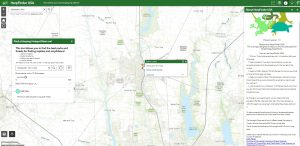
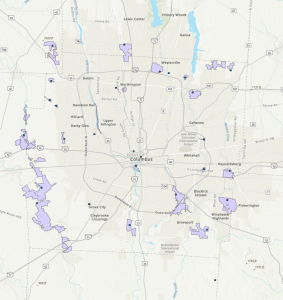
I am someone who loves going herping (or trying, given the fact central Ohio can be lacking in herpetological biodiversity), so I was able to find an ArcOnline map dedicated to finding popular herping hotspots! This map filters for distance from starting location, and type of reptile or amphibian you are looking for (crocodilians, etc.) it is very fun to use!

Source: https://www.arcgis.com/apps/webappviewer/index.html?id=28b37c8772254de18d168d46fd367535

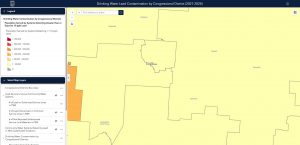
Additionally, my TPG project I did for ENVS110 was based on lead contamination and hereptology, so I started looking into maps focusing on sources of lead polution in the United States. This map was made specifically for the general public to access and see the data on the amount of lead in their drinking water, and was able to learn the drinking water in my hometown had around 1-50,000 ppb of lead in the drinking water. It was a very fascinating map to explore and look into.

Source: https://experience.arcgis.com/experience/9e0800c2fcaf40da82a36864f0155743

Ramirez Week 1

Note: I completed the quiz, and I completed the other work in GEOG 291.

Introduction: Hello! I am Natalia Miranda Ramirez, and I am a sophomore at OWU. I am from Columbus Ohio and a commuter student. I am also an Environmental Studies and International studies double major. Currently, I am thinking of pursuing a career in environmental law, but that could still change. Outside of class, I have a part time job which means I am either working or doing school work. I also hope that GEOG 292 will help me get a better understanding of GIS software. I had some technological difficulties in GEOG 291, but I hope to do better in this course. 

Comments on Exploring ESRI Account: I like that there are a lot of resources and that I have access to my personal information which I can edit. Plus, there are a lot of collaborations among different areas of study which makes it possible to connect with others. Additionally,  I know there is a lot of  stuff regarding GIS that can get confusing, but thankfully the training page simplifies all the categories and facilitates learning. I also appreciate that there are free courses that teach the fundamentals and basics of GIS. Furthermore, I appreciate that there is a large variety of stories from different fields that one could use for personal reference when it comes to research. 

Examples of GIS in Research:

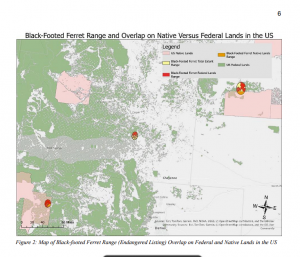
  1. I found this short research paper that compares federal regulations and Indigenous regulations for endangered species in the U.S. This study used GIS mapping to keep track of certain species such as the Black footed Ferret and the Mojave Desert Tortoise. There is some overlap among both regulations when it comes to certain species.  Additionally, there also seems to be a notable pattern, where a lot of these ranges are larger on the west side of the country than the east side. This study is important for comparing land regulations for animals and its  main conclusion is to emphasize the importance of land management in the country. 


Source: https://api.mountainscholar.org/server/api/core/bitstreams/88b1174b-4fd7-405e-86e1-395a4d69c7e5/content

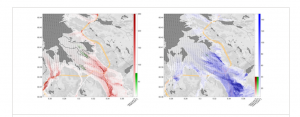
  1. The second example of GIS in research I found was about sustainability development in Norway. In the study, the researchers specifically looked at environmental factors influenced by climate change such as air quality and how to improve it. The study elaborates on the layers, data and specific GIS web that they used to create multiple maps regarding their research. Additionally, this study also analyzed the geography of the country and where and why some places are more polluted than others. It takes into account natural vegetation and anthropogenic factors such as car pollution. Overall this GIS study is helpful when it comes to studying and finding solutions for improving air quality in Norway. 

Source: https://onlinelibrary.wiley.com/doi/full/10.1002/sd.2787

Comments on ESRI Reading:  I like that I can private my maps, especially if it is something I am continuously working on. That way I don’t confuse the public or even community members who want to see my GIS study. I also like that there are tutorials that explain how to use the GIS software. I believe that there are also some video tutorials that can visually demonstrate how to do a certain feature. I really like those step-by-step guides and I believe that they will be helpful. 

Comments on Training:  I learned about the ArcGIS Apps and external websites that can be helpful to expand one’s current GIS content. I also liked how they demonstrated how to turn a 2D map into a 3D map. Throughout the training, I noticed that there are a lot of terms that are similar, when it comes to using the GIS software.  I remember that some of these functions and terms were confusing for me in GEOG 291, especially at the beginning of the course. Thankfully I learned throughout the course but, nonetheless, I really  appreciate the definitions of the functions, maps, and layers. 


Pichardo Week 1

Introduction

My name is Andrea Pichardo, and I am a senior Environmental Science major at Ohio Wesleyan University. I have experience working with GIS and spatial data through my coursework and a summer internship. I’m interested in learning more about how GIS can be used to better understand environmental issues, especially land-use change, conservation, and natural resource management.

Exploring My Esri Account

While exploring my ArcGIS Online account, I noticed that Esri offers several resources to help users improve their skills and find answers when they run into problems. The Training section provides courses on different GIS topics, while the Help and Community sections offer support and information from other users. I think these resources are useful because there is always something new to learn when working with GIS.

What Is ArcGIS Online?

ArcGIS Online is a web-based GIS platform that allows users to create, manage, analyze, and share geographic information. One thing I found useful is that maps can be shared with other people without everyone needing to use desktop GIS software. I also learned that content can be shared privately, with an organization or group, or publicly, depending on who needs access to it.

ArcGIS Online Basics Training

The ArcGIS Online Basics course covered different ways to work with and share geographic data. One thing I learned was the difference between basemap layers and operational layers. Basemaps provide background information and geographic context, while operational layers contain the data being displayed or analyzed.

I also learned more about the different ways geographic information can be presented in ArcGIS Online. Web maps are useful for displaying and exploring spatial data, while web scenes allow users to visualize information in three dimensions. Apps can also make maps more interactive and easier for people to use.

Esri Training Courses of Interest

Two Esri courses that interest me are ArcGIS Online: Creating and Styling a Map and ArcGIS Online: Performing Analysis. Since I have some previous GIS experience, I would like to build on my existing skills and learn more about creating effective web maps and analyzing geographic data. I think both courses would be useful for environmental projects involving land-use change, conservation, and natural resource management.

GIS Applications

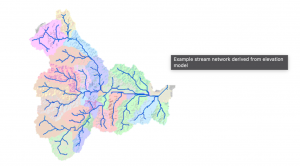
  1. Watershed Mapping and Hydrology

Image:

GIS can be used to map streams, identify watershed boundaries, and study drainage patterns. These maps help environmental scientists understand how water moves across a landscape. This information can be useful for water resource management, studying runoff, and identifying areas that may be vulnerable to flooding. GIS tools can also use elevation data to determine how water flows through an area and identify the boundaries of a watershed.

Source: Esri, Hydrologic Analysis Sample Applications.

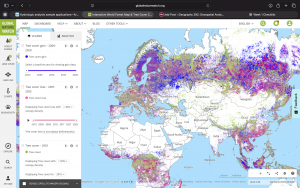
  1. Deforestation Monitoring

Image: 

Another application of GIS is monitoring deforestation. By comparing satellite imagery and forest-cover data from different years, researchers can identify where forests have been lost and how land cover has changed. This information can help scientists understand the effects of human activities on ecosystems and support conservation planning. Global Forest Watch is an example of a resource that uses interactive maps and satellite data to help users monitor forest change around the world.

Source: Global Forest Watch, Interactive Forest Monitoring Map.

Conclusion

Overall, this week’s activities helped me review the capabilities of ArcGIS Online and explore how it can be used to share geographic information. Since I already have some GIS experience, I am interested in learning more about the platform’s online tools and how they can be applied to environmental research and real-world projects.


Lane Hughes Week 1

My name is Lane Hughes. I am a senior Environmental Studies major. When poking around in my account I saw that there are training options available in eight different areas. I used this time to update my profile a little bit because my name changed. I also saw that there are forums, including a Young Professionals forum. ArcGIS Online was developed by Esri and will allow for the creation of maps on a web browser. This information can be used for analyzing and measuring location information. By using a web browser, data can be collected with mobile tools. ArcGIS Pro is integrated into ArcGIS Online. 

From this I learned that ArcGIS Online will allow you to create, manage and share the data. Layers are the primary way to work with the data. Operational layers display information like trees, roads, and bicycles routes and basemaps provide information and context. Creating and styling a map also sounds interesting. 

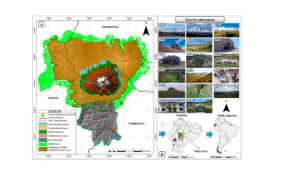
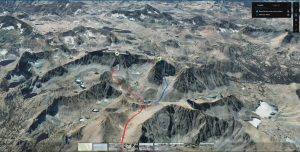
Using Google Scholar I looked up ArcOnline and Climbing Routes in Ecuador. I looked this up because I am going to be mountain climbing in Ecuador at the end of this semester. 

Castillo-Vizuete, D., Gavilanes-Montoya, A., Chávez-Velásquez, C., Benalcázar-Vergara, P., & Mestanza-Ramón, C. (2021). Design of Nature Tourism Route in Chimborazo Wildlife Reserve, Ecuador. International Journal of Environmental Research and Public Health, 18(10), 5293. https://doi.org/10.3390/ijerph18105293

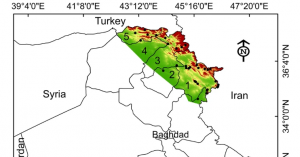
I also looked up ArcOnline and Porcupines and found the following source and map:

Khwarahm, N.R., Ararat, K., HamadAmin, B.A. et al. Spatial distribution modeling of the wild boar (Sus scrofa) under current and future climate conditions in Iraq. Biologia 77, 369–383 (2022). https://doi.org/10.1007/s11756-021-00936-1 

w

I completed the quiz for week 1!

Elliott Week1

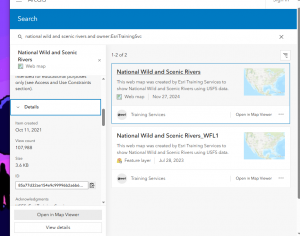
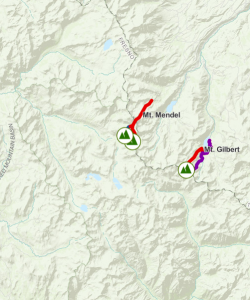
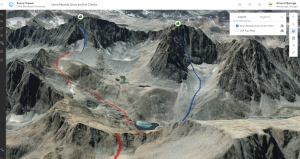
When I went to my ArcGIS Online account and viewed my profile, I first edited my Bio and put a brief description of myself. Within this description, I included basic information about my school: OWU 2028 and a few interests of mine like my hobbies and that I have pets. Intro to ArcGIS Online reading, I took away that ArcGIS  has compatibility with use in the field. And in the “Be Mobile In The Field’ section states how you are capable of creating these maps to be able to be used offline which I found fascinating since I love being outdoors and access to offline maps when there is no internet could be beneficial. I also took away that you can expand your work past just the basic ArcGIS software and use the other range of products that enable you do use other features and tools. The training I found to be very simple and a refresher of what I learned in Geography 291, where I viewed ice climbing routes for a mountain range in Nevada, which I was able to apply to real-world interests of mine like mountaineering and rock climbing. I found that you can use this software to download routes that I may play ongoing, and you can view how long the approach is, descent, and the actual desired route which I will use in the future. I also learned about using the preview app tool to view the app before doing all the work which makes things faster and easier.

What I picked for my own GIS application areas are rock climbing routes in the Smoky Mountains National Park and dog-friendly parks. The first application, rock climbing routes in the Rocky Mountains, is something I can see myself actually utilizing Arc GIS so I can plan the trip and how long the approaches to the routes are as well as how many pitches there are. I use the preview map option to briefly look over the map and inspect the different routes. The second application, dog-friendly parks, I chose because I have dogs and not all parks are inclusive to pets, so being able to view which ones are and plan accordingly with that would be helpful.

https://www.arcgis.com/apps/mapviewer/index.html?layers=be14734a894c41bfbbd9061a2243bb9b

https://www.arcgis.com/apps/mapviewer/index.html?webmap=cb847e2e4a824bd69e8fad1e683f1014 


Redman week 1

I completed all of the assignments for week 1

My name is Kylie Redman, and I am a junior here at OWU. I am majoring in zoology and hope to be a zookeeper at the Columbus zoo. I am taking this course because I think it would be helpful to know how to make maps and interpret them for conservation work. I have used ArcGIS online to make map presentations before, but did not understand much of how they work.

Comments on the online page:

  1. The training tab is very interesting. I did not know that there is so much involved in making maps. This is a very informational site that would be helpful for independent learning and general curiosity. It would also be useful if stuck on a topic, as it would teach how to get through it.
  2. The Community and Forums tab seems like a great way to collaborate with others and share ideas.

Intro to ArcGIS online comments:

  1. Being able to collaborate with others on maps if a great way to ensure the maps are easy to understand
  2. It is very interesting that these apps can be downloaded for use in the field where there may not be a connection. This is a great feature of ArcGIS online.

Online training comments:

  1. I learned a lot in this training course about different ways to share maps and other aspects of the data.
  2. This course was a very helpful tool to learn how to navigate the website and use it effectively.

 GIS Applications:

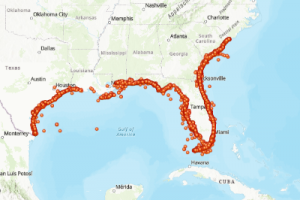
  1. NOAA Fisheries and state agencies use ArcGIS online to track information about sea turtles(health, nesting…) researchers look for and input information into ArcGIS about nest sites, egg clutches, and rescue points across the regions where sea turtles lay their eggs to evaluate population trends and threats caused by humans.

Source: National Oceanic and Atmospheric Administration Fisheries. (2026). Sea turtle stranding data [Feature layer]. ArcGIS Online. https://tucworkshop3.maps.arcgis.com/home/item.html?id=5e3d124258934114a7208ef0aab70dc6 

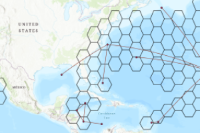
  1. Scientists use GPS satellite tags on sea turtles to follow movement across the ocean. The tag sends location updates, and the software connects the locations dots over time to show turtles traveling to eat, mate, and lay eggs. This helps marine planners to see if there are a lot of turtles overlapping with where there are a lot of fisheries or shipping lanes to better protect them.

Source: Gulf of Mexico Coastal Ocean Observing System. (n.d.). Loggerhead sea turtle movement analysis [Map]. ArcGIS Hub. https://seaturtleatlas-gcoos.hub.arcgis.com/maps/83d16bf85ce24e799804e5dcf5071b03 

Njoroge Week 1

*Has completed all assignments for Week 1*

My name is Ariana Njoroge, and I am a Junior here at OWU. I am double majoring in Environmental Studies and Geography, with a minor in Psychology. Some of my favorite things to do include reading, listening to music, drawing, crochet, and hanging out with my friends 🙂


While looking around My ESRI account, I found that the site had a lot of useful information to help get you familiar with not just ArcGIS Online, but the ArcGIS Pro app itself, which I had not expected to find. Additionally, I enjoy how collaborative ArcGIS Online is compared to ArcGIS Pro, which does not allow you to collaborate with others on maps and projects as easily.

During my read through of Get Started: What Is ArcGIS Online, I found it interesting how demand levels for certain web map layers (eg. hiking routes in Sierra Nevada) can change can change how much of your internal resources you can use. In addition, I also found it interesting that you can also use ArcGIS API for Python using ArcGIS Notebooks to run data science scripts to get insight into your data. I have been interested in getting into coding while I am in college, so this may be an application I utilize often.

While doing Web Course: ArcGIS Online Basics, I found it interesting how operational layers can be manipulated to less of a degree than within the ArcGIS Pro app, which makes sense due to the fact that ArcGIS Pro can process much more data than ArcGIS Online. Additionally, I found it interesting how you choose to share your content (eg. organizationally, within a group) is something that should be taken into account, depending on the kind of map you are making.


ESRI Courses of interest: Build Immersive Experiences with ArcGIS and Game Engines + Geographically Weighted Regression Analysis Using ArcGIS Pro.


ArcGIS Applications:

  1. Mapping the hydrology of a particular watershed, as well as mapping different stream orders and changes in these stream orders over time
  2. Tracking deforestation by observing changes in Land Use Land Cover.

Source: Source: Purwonegoro, B. Setiawan, Y. Webgis Application For Monitoring Land Use Change In Indonesia, 2022.


Robinson Week 1

*Have completed what was required for the week.*

My name is Darren Robinson, a new Ohio Wesleyan University student starting my first semester here. I transferred from Columbus State Community College after completing the Associate of Science Program in May of this year. One of my favorite things to do is to learn. This can take the form of reading books, watching informational YouTube videos, and my all-time favorite: going to museums. More specifically, natural history or historical museums!

In this mid-semester course, users will focus on ArcGIS Online. In which, I have used it before, but not extensively.Looking around, My Profile is your run of the mill profile and account settings. Forums and blogs are a more community centric medium, like Reddit or Twitter. Before really diving in, it’s important to know what you are getting yourself into. ArcGIS Online has a Get Started page that provides an overview of the platform, information on account creation, and how to work within the online application. Most, if not all, of the material when it comes to working with maps or scenes, content, and data has been mentioned previously in GEOG 291. ArcGIS Online offers training courses for a variety of things. This course requires us to take the Basic Online course. Teaching users the fundamental aspects and what those can potentially offer. Overall, this course was very useful and showed us how to navigate the platform.

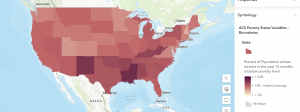
This cloud based software as a service platform can display various things. For example, it could show the percentage of people considered in poverty. Using varying shades of red from dark to light to represent high and low percentages, respectively.

Source: “ACS Poverty Status Variables – Boundaries.” (https://webgis.dor.wa.gov/portal/home/item.html?id=0e468b75bca545ee8dc4b039cbb5aff6&sublayer=0)

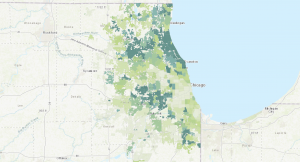
Another use case could be to show the cover of tree canopy in a given area. Using varying shades of green from dark to light to represent high and low coverages, respectively.

Source: “Community Tree Canopy Summaries” , The Morton Arboretum (https://mortonarb.org/plant-and-protect/chicago-region-trees-initiative/community-tree-canopy-summaries/)

Dahlstrom Week 1

*I reviewed the course syllabus and schedule to complete the GEOG 292 Quiz. I also have access to an OWU ArcGIS Online account from GEOG 291.*

Hello! My name is Emma Dahlstrom and I am from Lexington, Kentucky. I am a sophomore this year at Ohio Wesleyan University. Currently, I am a declared Environmental Science Major and intend on eventually double majoring in zoology. Although I do not know exactly what I would like to pursue after school, I have always been interested in working in the field of conservation. I am taking GEOG 292 because I am interested in learning more about GIS after taking GEOG 291. Outside of my classes, I am on the university’s softball team and a member of Women In Stem.

Comments On ArcGIS Online:

  • If I ever get stuck when mapping with ArcGIS Online, the training tab would be a good place for a refresher on the basic map making skills of the program. The training tab includes a variety of web courses and even has an area where you can request to talk with a training expert to answer any questions you might have.
  • The help tab will also be useful for any of my ArcGIS Online needs. It allows you to look up a variety of things dealing with GIS and can filter the results that will be most beneficial to you. I feel like it serves as a search engine that covers all the different tabs available in my account.

Comments on Get Started: What is ArcGIS Online:

  • ArcGIS Online has everything you need to create web maps, 3D web scenes, web apps, and notebooks. 3D web scenes allow you to visualize and analyze scenes that present geographical information in an interactive 3D environment. Web apps help you interact with maps and data in your organization. Web notebooks are the place for data analysis. Through notebooks, you can perform an analysis, automate workflows, and immediately visualize data and analysis results in geographic context.
  • In the working with maps section, the article introduces us to a variety of basic navigation tools and components of the different possible map characteristics. This included the basic tutorial of how to use the map viewer, a legend, pop-ups, time maps, floor-aware maps, directions, measurements, and locations.

Comments Web Course:

  • ArcGIS Online uses the software-as-a-service (SAAS) model. The SAAS model allows users to connect to and use cloud-based apps, like ArcGIS Online, over the internet.
  • I learned a lot about the sharing aspects of ArcGIS Online from this tutorial. The different methods of sharing include private, group, organization, and public. I also learned about which method of sharing is best for different situations.

Interesting Online Trainings: Visualizing Data Using Charts in ArcGIS Pro, Forest-Based Classification and Regression Analysis Using ArcGIS Pro

Application 1

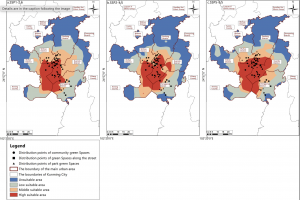
This application identifies areas of habitat stability and priority conservation zones for butterflies. Since the diversity of butterfly communities and their interactions with plants are highly sensitive to environmental change, human activity has caused a drastic decline in many species of butterflies. This is harmful to ecosystem health because without their presence, many plants would not be pollinated. To address this issue, researchers used GIS to map priority zones of habitat conservation for butterflies. This map shows the distribution of suitable habitat areas from 2021 to 2040.

Zhang, Xiaoli, et al. “Spatiotemporal Prediction of Ideal Butterfly Habitats in Kun‐Ming’s Urban Green Areas: Enabled by Maxent and ArcGIS.” Ecology and Evolution [HOBOKEN], vol. 15, no. 10, no. 72300, Oct. 2025, https://doi.org/10.1002/ece3.72300.

Application 2

This application evaluated manatee sightings and mortalities with the intention of changing the Manatee Protection Plan to better suit their movement patterns. In the area of this study, manatee mortality from boating incidents were not declining and the restrictions set to protect them were not being followed. To address this issue, the researchers used GIS to compare manatee trends in relation to vessel traffic. From this map, they concluded that the manatees were being harmed by both non compliant speeding vessels and high traffic. This allowed them to make revisions to the Manatee Protection Plan to better serve the manatees and the people living in the area.

Agosto, Ines. “Using Geographical Information Systems (GIS) to evaluate manatee protection and management in Miami Dade County.” Miami, 1 Apr. 2019, scholarship.miami.edu/esploro/outputs/report/Using-Geographical-Information-Systems-GIS-to/991031447688302976.