Aslam WEEK 2

Chapter 1:

Chapter 1 is primarily focused on the introduction of the basic concepts of Web GIS and how it is different from other traditional GIS systems. In this chapter, the reader is made aware of the fact that Web GIS is not only about making maps but is more about connecting data, tools, and people through the internet. One of the major ideas presented in this chapter is that the field of GIS has moved from being static and desktop-based to being interactive and web-based, like ArcGIS Online. Another significant idea presented in the chapter is that of web GIS as a system of content, capability, and users, which is vital in the sense that it indicates the fact that GIS is not only about the application but is a complete environment in itself. In the chapter, the reader is made aware of the fact that maps are no longer only about the visualization of the data but also about the interface of the data. In the context of maps and visualization of the same, the concept of layers is presented in the chapter, where the reader is made aware of the fact that different kinds of information can be stacked and turned on and off as per the requirement of the person using the map. Another significant idea presented in the chapter is that the data can be obtained from anywhere and can be shared with anyone.

The tutorial part of this chapter assisted in this learning because we were able to learn and understand how to use ArcGIS Online. By creating maps and viewing maps, I learned that it is quite easy to combine information and display it in a meaningful way. I also learned that symbols can influence how information is interpreted. One of my thoughts while learning this chapter is how much control the user has over information being displayed. This chapter has helped me learn that Web GIS is not only about mapping. It is about communication and collaboration.

Chapter 2:

Chapter 2 is a continuation of the concepts learned in Chapter 1. This chapter is more focused on how information is visualized and analyzed. One of the main concepts learned in this chapter is smart mapping. This is a feature that helps users choose the best way to display their information. This feature is quite helpful because it does not allow users to randomly choose symbols and colors. This feature ensures that maps are more accurate and easier to understand. This chapter also shows that there is a variety of information that can be used. This information includes counts, categories, and continuous values. By using color gradients when dealing with numerical information, one can better understand such information.

Another important concept is the significance of data classification. The way data is classified can affect how it is mapped. This helped me understand that maps are not entirely objective, as they can be affected by decisions taken in the process. Another new concept is expressions. These allow users to personalize data. Even though this part was a bit hard to understand, it helped me understand how flexible GIS is in dealing with different data.

The tutorial in this chapter required more attention to detail compared to Chapter 1. Every small step, like choosing the right field or changing settings, was very important to the final result. Completing the tutorial in this chapter also showed how Web GIS tools can assist users while still offering opportunities for customization. One thing that was not clear to me while working through the tutorial in this chapter was how different map styles might influence how a person interprets the same information. This chapter was beneficial to me in terms of helping me understand the connection between visualization and analysis in GIS.

Application:

One of the applications that can be done based on the concepts learned in chapters 1 and 2 is creating a map that shows my weekly schedule. I can input my locations such as my classes, work, and home. I can also use symbols and color to represent my activities. By using smart mapping, I can visualize my schedule and see how my time is allocated to various locations. This can help me understand my schedule better and understand my routines such as how often I go to work.
Aslam WEEK 1

My name is Kainaat Aslam and I am a senior in school at OWU. I am excited about data analysis and GIS because I believe that spatial data is something that can be extremely useful in helping us understand the world around us, especially in areas such as public health and social issues. I look forward to being able to learn more about how I can use ArcGIS Online in a practical sense.I have completed all of the assignments for this week, such as reading the course blog, completing the quiz, and making my way around my ArcGIS Online account, reading the “What is ArcGIS Online?” section, and completing the ArcGIS Online Basics course. I have already taken the GEOG 291 course, so I know a little bit about some of the basic concepts and tools. When making my way around my ArcGIS Online account, I noticed that it is a very interactive and user-friendly website. One thing that I thought was kind of interesting is that it is very customizable, especially in the profile section where it allows you to connect to training resources, forums, and the ArcGIS community all in one place. Another thing that I noticed is that it has a lot of tools and data available, so it is easier to be able to use it for projects without having to gather all of your own data.

When reading the “What is ArcGIS Online?” section, one thing that stood out to me is that ArcGIS Online is useful in that it allows users to create, analyze, and share maps in a collaborative environment. This is useful for individuals and organizations. Another interesting thing is that it allows for real-time data, and this can be useful for things such as weather and emergencies. As I went through the training in the ArcGIS Online Basics course, I learned how to make maps, how to add various layers, and how to customize my visualizations. One thing I found interesting is that I learned how to symbolize my data in different ways. Another thing I found interesting is that even though this is a very powerful tool, it is also very easy to learn how to use it, especially if I follow the tutorials. As I went through some of the other available training courses through ESRI, I found two that I think I would find interesting. One is called “Spatial Analysis Using ArcGIS Online.” I think this would help me become more proficient in using this tool for more complex analysis. The second one I found interesting is called “Cartography.” I think this is important if I want my maps to look good and be easily understood by my audience.

As I went through some of the GIS applications using ArcGIS Online, I found two interesting ones. One is using GIS in public health, for instance, by tracking diseases such as COVID-19. These maps help us track how this disease is spreading and where I am more likely to get it. The second one I found interesting is using GIS in environmental mapping, for instance, by tracking how much of our forest is being destroyed and how climate change is affecting us. These maps help us visualize some of the changes that are occurring in our environment. I found this week interesting as I got more familiar with ArcGIS Online and its capabilities, and I am looking forward to learning more throughout this course.

Another interesting application I came across is environmental mapping. An example is the monitoring of deforestation and the effects of climate change. In this case, the changes are monitored using GIS. It is possible to track changes in forest areas using the technology. It is also possible to identify areas of concern. For instance, organizations like Global Forest Watch use ArcGIS tools to analyze the patterns of deforestation. Such data is useful for conservation.


Sources:

https://coronavirus.jhu.edu/map.html

https://www.globalforestwatch.org/


Gist – Week 3

Chapter 3-

This chapter focuses on the ArcGIS Experience Builder. It teaches users when and how to use it, the terminology behind it, the workflow for creating apps, widgets content and style, triggers and actions, and more. The purpose of the Experience Builder is to let you create unique web experiences with more flexible layouts, content, and widgets that act around 2D and 3D data. This gives you lots of creative freedom if creating an app. To begin, you can choose between a premade template or create your own. This also allows you pick the theme of the app and add in the GIS data. You can also include widgets that change function and style based off what your desired action is. The widgets include basic and layout. Basic is mainly for app tools and include map, legend, query, filter, edit, chart, elevation profile, and more. Layout are created to help organize them onto pages or windows. These can also perform different actions: message and data. It can also be altered to fit any screen size based off what the users will likely access it on. The main thing that stood out to me during this reading was how much more advanced the projects on WebGIS appear to be. They also seem to be more audience focused compared to the desktop GIS application. The reading also explains the editions of experience builder which include developer, ArcGIS Online, and Portal for ArcGIS. The tutorial of this chapter focused on creating a web experience of hurricane and earthquake data.

An idea of a project that I could complete using the Experience Builder is an app focused on traffic in populated areas. The experience would take average commuter time, traffic data, and accident density within the area. The app could also include interactive portions that could have live updates of where accidents are to help users find the most efficient route. This app created through the Experience Builder would be aimed to help people living in cities know how the commute time will change based of time of day, and can help them save time.

Chapter 4-

This chapter is all about Mobile GIS. It first explains the advantages that Mobile GIS has over the traditional desktop version. These include mobility (being able to take the device anywhere), location awareness through GPS and cellular data, easy data collection, real-time information, more users, and being overall more versatile. The advantage that has directly impacted me this class has been the mobility. It is much more efficient to do work when I can take my laptop anywhere, rather than having to create a set time to go work in the computer lab. To elaborate off the advantage of more users, a layer is added into Mobile GIS that allows you to alter who can view your project. There are additionally different approaches that come with Mobile GIS. These include browser-based, native-based, and hybrid-based approaches. The browser-based allows users to access through mobile web browsers and can reach all mobile platforms. Native-based requires more developer skills and is an app you download onto your device. While this leads to better performance, they often can not run on all platforms and are more expensive to develop. Finally, a hybrid-based approach uses native components and HTML and JavaScript to build native applications. This loads the data into a native app and lets you have deeper integration onto the platform. The chapter also develops on VGI, VR, and AR and how those work within the software. The most interesting tutorial in this chapter was the one describing how a university wants students, staff, and public to report nonemergency incidents on campus. I found this one interesting because it was very similar to my application idea of last weeks assignment, and was a base of how I could achieve that.

An application idea based off this chapter would be creating a community environmental app. This is similar to an app I used in my Biology class that let us take pictures of native plants and upload them into the app to get a better idea of what plants grow in a local area. My idea to add onto this would be an app that lets people take pictures and add when they plant or create a native garden. This would allow community to see where and how people are doing this, and could promote more people to plant native rather than the typical invasive plants. This specifically uses the advantage of real-time data, mobility, and more users.


Payne Week 2

Payne Week 2 

Chapter 1 describes how Web GIS has made geographic information more accessible and widely used across different fields including form government and business. It highlights how the system works by organizing data into layers, maps, and apps, allowing users to analyze and share information easily. The chapter also explains key concepts like hosted data and non-hosted data. In addition, it introduces different types of users and roles, showing how people interact with GIS in various ways. The difference between 2D maps and 3D scenes is also emphasized along with the tools used for analysis and visualization. Overall, the chapter demonstrates how Web GIS is a flexible user-friendly system that supports collaboration, data management, and decision-making. 

Chapter 2 focuses on how Web GIS can be used to present and communicate data more effectively through mapping and storytelling tools. It explains smart mapping, which helps users choose the best visual style, such as heat maps or comparison maps to match the message they want to convey. The chapter also introduces pop-ups and ArcGIS Arcade which is a built-in expression language that allows users to customize data, labels, and displayed information. Another key feature discussed is the ArcGIS Living Atlas, which provides a large library of data for maps and layers. The chapter also highlights storytelling tools like StoryMaps where users can combine maps with text and multimedia using different content blocks. 

Application: A cool application of this could be to create a story telling map about your heritage and where your ancestors are from to form a sort of family tree map. 


Villanueva-Henkle Week 2

Reading/Working through chapter 1 was a nice review from ArcGIS and week 1. Having a chance to remember all the features that GIS can offer was a good way to get back into the mindset. It was also interesting to learn how WebGIS has evolved with cloud based computing over time, going from stand alone units, to one way communication, to full communication, and finally more complex networks managed by portals. Some of the terms and links in the website have changed since the publication of the book, but nothing unsolvable.


 Chapter 2 was again a nice review of the intro module from week 1 and showed a lot of expansion onto those ideas. The living atlas looks like it will be a very valuable tool and I’m guessing I’ll be using it often. Tutorials went the same as the first chapter, no big problems.


Based on these chapters, I had an idea for an app that records wildflowers and their locations in parks using crowdsourced data. Users could upload a picture to the app, and their phone would record the coordinates, automatically uploading that data as well. It could also be linked with an app like Inaturalist to identify the flowers. This could be used for hobby naturalists or Natural Resources workers or anything in between

Askill Week 3

Chapter 3: This chapter was fun to complete to show the differences between 2-D and 3-D maps, specifically having them side by side. Doing simple GIS tasks also lets you learn about the world around you. I learned where the natural disasters happen around North America and actually on the GIS system, I learned how you can select certain points to view them easier. I was able to follow the instructions and pictures scattered throughout the chapter. 

Application: From chapter 3, I would like to create a 3-D map showing the world’s tallest buildings and where they are located. 

Chapter 4: Within these chapters, I have enjoyed working with different types of ArcGIS online systems. I really enjoyed making the survey. I didn’t know that was possible on GIS. This chapter is going to be really handy with regards to making maps of places and pin pointing certain locations and where they need to go. For example, making an amusement park map cellular would be a good example of a time to use this chapter’s learnings in. Also, simple paths can be made with a system like this to get from one place to another.  

Downing Week 5

Chapter 7 was neat in the sense that it taught us how to make our flat GIS map into a 3D one, and that was exciting! One of the main concepts was 3D Web Scenes, which is how the 3D maps are created. You can use WebGIS and ArcGIS Pro to create the maps, which can also be interactive. The chapter also explained how we can create, share, and interact with the geographic data through the different web platforms. From what I understood, the web scene is the 3D equivalent of a web map, which made it a lot easier to understand! You can use it to create different landscapes, such as elevation and topography, buildings, and even clouds! I did have to look through each tutorial carefully in order to get all this information, but it wasn’t bad once I did that. It seems like the web scenes are also really helpful for big data sets, which would be nice for large organizations to display their data; as discussed in previous chapters. 

Chapter 7 continued with talking about the application and the creation of certain 3D maps. You can create a 3D map using ArcGIS Online, and you can do that by changing the feature values of the height of different objects. One of the tutorials highlighted this, and that was helpful to see. I thought it was cool that you could also adjust the shadows of different objects! That is something I’d want to use in my project. Another thing that they discussed was analysis in 3D, such as shadow features and how the features interact in space. I think this would all be helpful in environmental planning and architecture, especially in urban environments. There are some really neat tools described in the tutorials as well, and I definitely did not know how to use them until I went through the tutorials, so that was something cool I learned. I think an application I would use from this chapter would be using the 3D Web Scenes feature to compare the height of trees and houses in close proximity within Delaware, Ohio. I think this could be useful because then we could see the amount of space that is being used for development and how those houses could impact sunlight exposure in different neighborhoods.

Roberts week 2

As someone who had some difficulty using the desktop GIS, I had some high hopes that web GIS would be more straightforward as it did not require a whole software system nor an external hard drive. However the first week of learning the ropes of web GIS proved me VERY wrong.  Though map and scene creation was significantly easier for me, I found the uploading and copying of data onto the map and the logistics of the layers to be rather troublesome to learn. I’ll have to devote some extra time to learn the ins and outs of this software this week.

One hope I do have for web GIS is that the final project would not be limited strictly to activities within Delaware County, as I found that to be a rather frustrating limitation when I was working on my project last unit.

Ogrodowski Week 3

Chapter 3: ArcGIS Experience Builder

The introduction of this chapter describes ArcGIS as more than just an app: like the name suggests, it is an experience. Its various facets can be curated and combined into whatever application your specific project needs, and because every step is completed through the ArcGIS platform, combining these different steps and components is seamless.

The flowchart showing the connections between data sources, the ArcGIS Online Enterprise, and client apps has appeared in every chapter, but seems to fit well into this discussion. You can take data sources in the form of shapefiles, geodatabases, photos, and the like from any source, and use ArcGIS desktop tools to turn them into ArcGIS layers and tools and perform analytics. Then, this information (as processed by ArcGIS) can be turned into an app using more ArcGIS apps and templates.

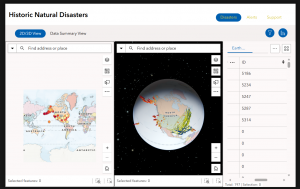
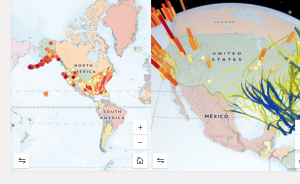
I ran into a few issues during this section. When I selected a line of text below the 2D and 3D map views to change its size, the entire section of text was deleted and undoing the action did not retrieve the text, so I had to recode the hurricane and earthquake summary. Additionally, when I selected hurricane and earthquake locations in the table, all of the locations remained on the map, but those selected were highlighted in blue. Maybe I missed some steps, but those two (albeit minor) issues stood out to me.

Figure 1: The Live View of my completed ArcGIS Web Experience for Historic Natural Disasters.

Chapter 4: Mobile GIS

As the name suggests, this chapter discusses the importance of online GIS, and its increasing prevalence today. Nowadays, everyone has mobile devices, and being able to access GIS apps and experiences on your phone, on-the-go, means that GIS can play a much larger role in our everyday lives. According to the chapter, mobile GIS is more accessible, versatile, location- and time-accurate, and can withstand a larger volume of users as compared to traditional desktop GIS. Mobile uses can also appeal to a wider variety of users, from individual consumers to entire organizations.

Another aspect of Web GIS that seems pretty interesting is the fact that editing capabilities can be modified to include people in the same group or organization. Similar to Google Docs, you can collaborate in real time and track editing history. Now, like any group project, I’m sure there are ups and downs to this, but it is certainly a feature advantage over desktop GIS. It certainly makes GIS a useful tool for citizen science! I find ArcGIS Indoors to be a neat application as well. There are so many busy indoor places that can be hard to navigate, such as malls, stadiums, offices, and campus buildings. It only makes sense that they would have navigation services as well!

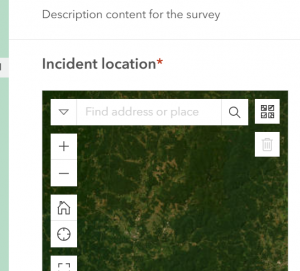
While creating the survey for Tutorial 4-1, the interface felt like a slightly upscale version of Google Forms. The rest of this chapter wasn’t too bad either–it was kinda fun to explore all the different ArcGIS apps!

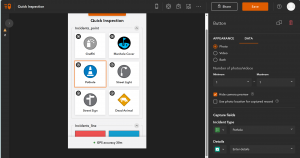
Figure 2: The web view of my QuickCapture app.

Application using these topics:

I think it would be really cool to create a birdwatching app using the QuickCapture app. When you’re out birdwatching, you can snap a quick picture of the bird, then send it to the database for all users to see. This might even help map migration and population patterns in the long term!


Evans Week 2

The beginning of chapter 1 sounds like an advertisement. Looks like its written by an Esri employee, so that makes sense. The more I learn about GIS, especially ArcGIS Online, the more I realize how much stuff is made using this software. I really enjoy working in StoryMaps, since its so intuitive. I find the creating expression portion difficult though.

In 1.1, the instructions for adding photos doesn’t match with the wording of ArcGIS Online. Working further, it seems like a lot of the instructions for this don’t match up, so ArcGIS Online has probably updated this stuff since the book was published. I think it helps me stay engaged to have to figure out which tool will do the thing I’m trying to do, since it isn’t too hard to figure out but I do have to think for a moment. I find it interesting that the web maps don’t automatically save, since most apps like this do. Does arcgis online count as an app, or a software? I’m not tech savvy, so I’m not sure exactly what the difference is.

An idea for an application based on Chapter 1&2 is a map and story map exploring parts of the world that I have been, where I recommend going, and places I want to go. I think that would be a pretty easy one. It could be a StoryMap that first goes through places I have gone and recommend going, including pictures and extra information linked in the pop-ups, and then go though places I want to go.

Another idea is something to do with countries that are trying to get their pieces back from museums in other places and who has succeeded in getting reparations and who has not. That one would take a lot more research, but it would probably be more interesting and could be helpful to my art history minor. A swipe block would be an interesting way to show that information, to allow the maps to be compared more easily.