Application 1:
Form here:

Application 2:
Geography 292: Geospatial Analysis with Web GIS
Module 2: 10/19/2026 - 12/11/2026, OWU Environment & Sustainability
Application 1:
Form here:
Application 2:
Chapter 7:
3D web maps are called web scenes or 3D scenes. Photo-realistic scenes try to make objects look as accurate as possible. Cartographic are often used for display information like population density and zoning laws.
Surfaces: continuous measurement, typically elevation, often referred to as digital elevation model (DEM), digital terrain model (DTM)- bare ground, or digital surface model (DSM)- ground surface and objects on it.
Features: On, above, or below surfaces. May be 2D or 3D. Operational layers of the 3D map.
Textures: covers of 3D features
Atmospheric effects: lighting, fog, etc
3D object scene layers: represent and visualize 3D objects
Building scene layers: shows complex digital models of buildings that you can interact with – materials, properties, locations.
Point scene layers: cached point scene layers are thinned so that certain details are only visible at certain zoom levels to display large amounts of point data that wold take too long as a point feature layer
Voxel scene layers: multidimensional spatial and temporal data in 3D volumetric visualization
I struggled for a minute to find where Elevation mode and Absolute Height could be configured in the Style pane because they are now under Layer Properties rather than Layer Style. Once I figured out where those were, figuring out where everything else is was pretty intuitive.
My computer is really struggling with the 3D scenes, especially the last one since someone has put a giant helicopter in the publicly edited scene.
Application:
A potential application of chapter 7 is to create a tour of where I grew up, since I’d like to show my friends, but it’s too far away for me to bring them there in person. I would use the OpenStreetMap Style 3D Basemap and add paths and way-points that show pictures that I have of some of my favorite places.
Chapter 5:
Raster tile layers are large and can take a long time to render, but once they are created, they are an important piece that works well as a base for other projects.
Vector tile layers are smaller and can be updated easier because it generates tiles based on data density.
Map image layers are mostly used for large datasets that need server-side rendering.
Map layers aren’t reusable because it’s rare for two map requests to cover the same data. All map requests read from the database and generate after the request, so they take the most time. Raster and vector tiles don’t read from the database because they are already cached or generated on the web server, so they are faster. Feature tile requests must be generated the first time they are requested, but will then be cached in the web server and faster to load.
Raster layer: the labels don’t rotate to stay upright, it is less clear, and it doesn’t display when zoomed too far. Vector layer: the labels stay upright when the map is rotated, it is clearer , and it displays at closer zoom levels.
Chapter 6:
Spatiotemporal data is observations of objects and events that change over time.
Moving: something that moves such as live feeds of vehicles.
Discrete: something that “just happens” such as earthquakes, geotagged feeds, criminal incidents.
Stationary: stands still but values change such as wind speed and direction from a weather station, highway traffic speed.
Change: change or growth such as perimeters of wildfires and floods.
Application based on 5 & 6:
I could make an application that tracks when the trees around campus drop their leaves, grow new leaves, grow flowers, grow fruit, drop fruit, etc. Pairing it with a gauge noting how many are flowering, growing fruit, etc. a list of what types of trees they are, and a map that shows where they are on campus.
Chapter 3:
I may have made some mistakes with the instructions for tutorial 3, since its not a very visually appealing app, but I couldn’t figure out where I went wrong with it when looking back through the directions. I had trouble figuring out the configuring for the 2D and 3D maps because one of the buttons I needed that was referenced in the book was within another section that wasn’t mentioned in the guide. I had to search for the answers, but it ended up being very simple; it was just in a group I couldn’t see. I like the look of the 2D map and 3D map next to each other. I also like the page sidebar because it makes it really easy to organize everything and its similar to working with ArcGISPro.
Chapter 4:
I had a lot of trouble with figuring out how to set a rule so that I could open the recyclables section with only a specific answer. The set rules button doesn’t show up when selecting the question, like is shown in the textbook; it is shown next to Behavior. The mobile apps portion of this chapter didn’t work well with my phone, since my location accuracy is pretty low. Luckily, I was still able to complete most of the mobile portions.
Application based on 3&4:
The work with mobile apps in chapter 4 seems like a fun way to add interactivity to a project. In thinking about art history again, I could create an app where people could note what their favorite pieces in a museum are, where they are, and add details about the pieces or their opinions through QuickCapture and AuGeo. Another idea is an app where people could report accessibility issues on campus, since there are quite a few, but different needs means that people notice different issues. Having a catalog from many different perspectives could provide helpful information for future work on campus.
The beginning of chapter 1 sounds like an advertisement. Looks like its written by an Esri employee, so that makes sense. The more I learn about GIS, especially ArcGIS Online, the more I realize how much stuff is made using this software. I really enjoy working in StoryMaps, since its so intuitive. I find the creating expression portion difficult though.
In 1.1, the instructions for adding photos doesn’t match with the wording of ArcGIS Online. Working further, it seems like a lot of the instructions for this don’t match up, so ArcGIS Online has probably updated this stuff since the book was published. I think it helps me stay engaged to have to figure out which tool will do the thing I’m trying to do, since it isn’t too hard to figure out but I do have to think for a moment. I find it interesting that the web maps don’t automatically save, since most apps like this do. Does arcgis online count as an app, or a software? I’m not tech savvy, so I’m not sure exactly what the difference is.
An idea for an application based on Chapter 1&2 is a map and story map exploring parts of the world that I have been, where I recommend going, and places I want to go. I think that would be a pretty easy one. It could be a StoryMap that first goes through places I have gone and recommend going, including pictures and extra information linked in the pop-ups, and then go though places I want to go.
Another idea is something to do with countries that are trying to get their pieces back from museums in other places and who has succeeded in getting reparations and who has not. That one would take a lot more research, but it would probably be more interesting and could be helpful to my art history minor. A swipe block would be an interesting way to show that information, to allow the maps to be compared more easily.
I am Claire Evans, a second year Environmental Science major and Art History minor. I took GEOG 291 last quarter.
I created my account for accessing the Community page and found that the link to ArcGIS Blog leads to a 404. The Help page seems like it will be helpful if I forget something basic from the first course and want to re-learn it.
The Notebooks creation seems interesting, though I don’t know any Python so I doubt I’ll use it. I’ve learned that a floor-aware map is a map that shows different levels of a building, such as the polygon of the general building shape and the floor plan inside. I’m interested in architecture, so this seems like a fun tool to play with.
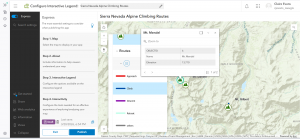

It’s interesting that you must turn off searching only within the organization; it’s useful if you are working with organization specific data but less helpful when learning the program. When I accidentally clicked out of the course, it made me start from the beginning again, so that’s something I’ll have to keep in mind.
Integrating CAD data with ArcGIS seems neat to me because I remember thinking that the CAD integration in GEOG 291 was cool. The Systems Approach to ArcGIS: Architecture Pillars sounds cool too because I like architecture. Python 101 for AcrGIS could be a useful course, since I don’t have any coding experience and it could make me a more competitive job applicant.
Applications of ArcGIS:
Using GIS and Open Web Resources the Reconstruct Great Tang Records of the Western Regions
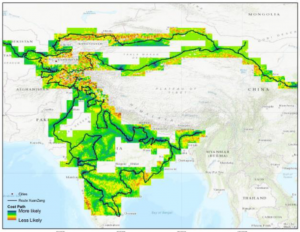
This paper uses ArcGIS and the biography of Buddhist pilgrim XuanZang to map the locations of many city states and monasteries and uses topographical information to see what routes he likely took between them based on what would require the least amount of climbing mountains or particularly rough terrain.
Generation of a Multi-Scale Historic BIM-GIS with Digital Recording Tools and Geospatial Information
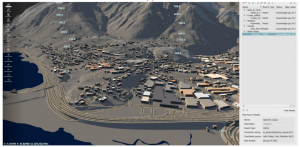
This project used ArcGIS and BIM to 3D model a historic Romanesque town in Italy for UNESCO information and further analysis, since it was difficult to properly model the town using more basic tools due to the large size of the land area and the unusual features of the buildings.