Gist Final Applications

App 1: Delaware’s Native Gardens

URL: https://experience.arcgis.com/builder/?id=d0205f5e5afe47c19cc651576aefcddf&views=page

Description:

This project focuses on the information from weeks 1-4 of class. The project contains real-time information and is available to all mobile users with the URL. The focus of this project is to promote local biodiversity and sustainable planting. The app works by including a map for users to view, with red dots that represent logged plants. On the left side is a survey, which utilizes the WebGIS feature, to fill out if you planted a local garden and want to show others what types of plants and the location. This also includes a few questions: where the plant was located, if it was native, where it was planted, and the species. This information is available to all users after clicking one of the specific red dots.

App 2: Park Locations Within Delaware

URL: https://experience.arcgis.com/builder/?id=2fbe28e0b5ec4820a783af842787599b&views=insert

This project focuses on the information learned in weeks 5-7 in class. This project includes the data collection from Chapter 5, WebGIS sharing from Chapter 6, and the integration we learned about this week in Chapter 7. The focus of this project is to allow both runners and walkers to view where trails are in Delaware. This project includes two types of trail: pavement and gravel, based off whichever surface the user prefers. Users can select a trail (marked in purple) and see the attribute data of what the name is and the specific trail type. This information is public and available to anyone interested.


Gist – Week 5

This week only had one assigned chapter, number 7, which was focused on 3D web scenes. The objectives include being able to understand web scenes, knowing how and what scene laters are, learning the Scene Viewer tool, understanding 3D in different scenarios, and creating feature layers with z-values enabled. The purpose of 3D in WebGIS is to bring extra dimension to the map. This is especially useful for urban planning, architectural design, storytelling, filmmaking, and more industries. What interested me about this was how broad the uses of this software are, it feels like every chapter I learn a new way this could be used. The two types of 3D images are cartographic and photorealistic which can be used depending on your purpose for the map. Feature layers can be added over top of web scenes and can be configured to show a 3D image. This was super interesting and the book gave the examples of using 3D symbols to show a park bench, rock, or a streetlight. This chapter also discusses VR, XR, and the metaverse. These features bring location to users and allows them to interact and discover. These features are relatively newer technology developments and continue to be used by more people every single day. All these features are integrated into the WebGIS systems which is super cool! It also explains how 3D mapping is being used in urban planning and BIM. The tutorials of this chapter show how to create web scenes and 3D web apps. This includes creating a 3D map of the country and adding 3D object signals into a park. This chapter really opened my eyes to how creative you can be with WebGIS.

An example of a project that could be done utilizing the 3D web scenes would be to create a VR experience of the dorm rooms at Ohio Wesleyan. This would be using a photorealistic map with specific 3D symbols to showcase the desk, chairs, beds, and dressers that come with the different rooms. This could be helpful for incoming freshman attending the campus to view what their dorms would look like instead of relying on the set up dorms at orientation. New features could additionally be added that let you take specific measurements to know if your personal furniture would fit, however I am unsure how I would make that possible with my limited knowledge.

Gist – Week 4

Chapter 5 focuses on caching and on-premises in WebGIS. This focuses on making a secure and private WebGIS using ArcGIS enterprise. This chapter explains tile caching, which enhances map performance by rendering tiles at different scales rather than just drawing maps when it is requested. By caching the maps being used, they load much faster. This is especially the case when large datasets are being used. I found this to be a super cool feature and would help not crash your personal device. This is helpful in the web version because a large desktop computer that is more efficient is not the device being handled. Although the performance is much faster there are still tradeoffs. This tradeoff being that it gets harder to update data dynamically. One question I have after this chapter is how organizations decided to used cached data rather than real time data that we previously learned about. On-premises is when the GIS infrastructure is hosted on your own private server. This additionally adds to the map being more secure and customizable. The catch to this feature is that it requires more knowledge on IT compared to the typical GIS server. These are helpful for organizations to create private maps and have full control over over the infrastructure. This also can assist companies in following their strict regulations for the GIS maps. The tutorial explains how to create a portal and compare raster and vector tiles on top and side by side. This chapter was much more confusing compared to the last few weeks, but it was explained well throughout the textbook.

An application that could be created using this chapter is a map of a local park. This map would include all the features, including where each individual tree, bench, bush, etc is located. By using the tile caching explained in this chapter the map would not need to be re-rendered each time a user zooms in and out. This is very similar to how Google Maps works, but would be smaller and have more specific data for the location being mapped.

Chapter 6 is focused on spatiotemporal data and real-time GIS. Spatiotemporal data is data that combines time and location. This allows for users to analyze how things change over time. With how long the term is, I was pleasantly surprised with how simple the concept of it was to grasp. Real-time GIS systems create live data streams. It explains IoT, which is a network of things (a variety of sensors on things such as cars, planes, biochips, and security cameras). IoT is utilized for smart cities, infrastructure management, environmental quality monitoring, management, and precise agriculture. This also includes connected cars, health, and smart homes. This was interesting to see how random objects that many people have acquire data and transform it into useful information. A specific example the book provided was extensive routing through smart cars. This led me wondering how much of our world and technology we use is a part of GIS. However, like the last chapter there are additionally many challenges with real-time data. This include managing the large volume of data, fast processing and visualization, and making sure the data continues to stay accurate. The tutorials of this chapter take you through finding data and fitting it into the functional requirements they want the map to include. It also includes how to create a dashboard app based off the web map created.

An application idea for this chapter is tracking deforestation with spatiotemporal data. This could be done in an urban area, for example Columbus due to it being the closest large city.  The real-time data could be utilized to alert city planners when too many trees are being removed rather than replanted. This can ensure further construction in the area considers parks and small gardens within the city to keep the nature alive in the area.

Gist – Week 3

Chapter 3-

This chapter focuses on the ArcGIS Experience Builder. It teaches users when and how to use it, the terminology behind it, the workflow for creating apps, widgets content and style, triggers and actions, and more. The purpose of the Experience Builder is to let you create unique web experiences with more flexible layouts, content, and widgets that act around 2D and 3D data. This gives you lots of creative freedom if creating an app. To begin, you can choose between a premade template or create your own. This also allows you pick the theme of the app and add in the GIS data. You can also include widgets that change function and style based off what your desired action is. The widgets include basic and layout. Basic is mainly for app tools and include map, legend, query, filter, edit, chart, elevation profile, and more. Layout are created to help organize them onto pages or windows. These can also perform different actions: message and data. It can also be altered to fit any screen size based off what the users will likely access it on. The main thing that stood out to me during this reading was how much more advanced the projects on WebGIS appear to be. They also seem to be more audience focused compared to the desktop GIS application. The reading also explains the editions of experience builder which include developer, ArcGIS Online, and Portal for ArcGIS. The tutorial of this chapter focused on creating a web experience of hurricane and earthquake data.

An idea of a project that I could complete using the Experience Builder is an app focused on traffic in populated areas. The experience would take average commuter time, traffic data, and accident density within the area. The app could also include interactive portions that could have live updates of where accidents are to help users find the most efficient route. This app created through the Experience Builder would be aimed to help people living in cities know how the commute time will change based of time of day, and can help them save time.

Chapter 4-

This chapter is all about Mobile GIS. It first explains the advantages that Mobile GIS has over the traditional desktop version. These include mobility (being able to take the device anywhere), location awareness through GPS and cellular data, easy data collection, real-time information, more users, and being overall more versatile. The advantage that has directly impacted me this class has been the mobility. It is much more efficient to do work when I can take my laptop anywhere, rather than having to create a set time to go work in the computer lab. To elaborate off the advantage of more users, a layer is added into Mobile GIS that allows you to alter who can view your project. There are additionally different approaches that come with Mobile GIS. These include browser-based, native-based, and hybrid-based approaches. The browser-based allows users to access through mobile web browsers and can reach all mobile platforms. Native-based requires more developer skills and is an app you download onto your device. While this leads to better performance, they often can not run on all platforms and are more expensive to develop. Finally, a hybrid-based approach uses native components and HTML and JavaScript to build native applications. This loads the data into a native app and lets you have deeper integration onto the platform. The chapter also develops on VGI, VR, and AR and how those work within the software. The most interesting tutorial in this chapter was the one describing how a university wants students, staff, and public to report nonemergency incidents on campus. I found this one interesting because it was very similar to my application idea of last weeks assignment, and was a base of how I could achieve that.

An application idea based off this chapter would be creating a community environmental app. This is similar to an app I used in my Biology class that let us take pictures of native plants and upload them into the app to get a better idea of what plants grow in a local area. My idea to add onto this would be an app that lets people take pictures and add when they plant or create a native garden. This would allow community to see where and how people are doing this, and could promote more people to plant native rather than the typical invasive plants. This specifically uses the advantage of real-time data, mobility, and more users.


Gist – Week 2

Chapter 1 focuses on getting started with WebGIS and introduces the basic concepts and workflows. It explains that this system can integrate data and software to allow users to create and share the geographic information. One thing I found interesting is when it explained historically GIS was limited to desktop and could only be accessed by specialists. Now, WebGIS expanded the access to way more people to use through their own mobile devices. While WebGIS seems more accessible, I found it cool that now ArcGIS pro is used by many more people and students today. It also adds further into what we learned last week and explains how collaborative the web version is. It does this by allowing for data sharing in real time and sharing through your organization. By being more accessible and interactive, this is crucial for projects like environmental response, natural disaster response, and urban planning.

Chapter 2 goes through more of the structure and what makes up WebGIS. The tools they described were web maps, services, layers, and portals. The web maps allow users to both visualize and interact with the spatial data provided. Layers are structured to organize different information including roads and weather. And finally, web services are created to deliver data for people to use without using specialized software. This is very similar to the previous desktop GIS, in the sense of how customizable each step is within the system.

One project that could be done using the information in these chapters is creating an Ohio Wesleyan campus safety map. The layers needed for this would include residential and academic buildings, parking lots, sidewalks or paths, and roads that run through campus. The web services would provide real time updates which could include any alert needed, closures, and could be as simple as marking which sidewalks are dangerous during the winter months. To get more in depth, the web services could dive deeper and include weather updates and alerts, reminding students to bring umbrellas or coats to class if needed. From this chapter, this project focuses on the collaboration portion, of allowing the information to be accessible and updated to all students on campus. It also highlights using real time data through the spatial data that is a big portion of WebGIS.

Gist – Week 1

Hello, my name is Reghan Gist! I am a first year majoring in Environmental Science, and am planning to add Zoology as well. I run both cross country and track here at Ohio Wesleyan. This is my second GIS course, I took the Desktop class earlier this semester.

I completed the quiz, and took Geog 291, so I did not schedule an appointment for weeks 2 and 3. I also already have access to my OWU ArcGIS online account from earlier this semester!

After looking around at my profile once I logged in there were a few notable findings. The first one is that in My Esri you are able to add the organizations you work with and both store payments and purchases. The second thing I found was located in Resources and Support and had training and videos that allow you to sign up for different types of courses that teach you how GIS works. This would be helpful for if you were not learning GIS through a class, and instead were expected to figure it out on your own.

The next activity of this week was reading through Get Started: What Is ArcGIS Online. The first thing I noticed was how it is different from WebGIS. The first difference I noticed was that you can add collaborators and share content with people outside your organization. Another difference that I noticed was that WebGIS allows you to collect data and monitor projects, supporting field activities. Through synchronization you can be offline and still see the latest update to the project which is a very convenient feature!

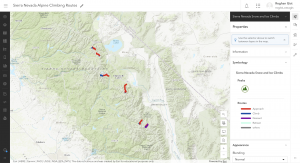
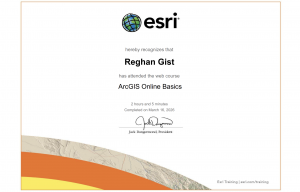
Next, I completed the ArcGIS Online Basics course. The first comment I have after this course was that the app section was confusing but a really interesting tool. The second comment I have was this is much easier to navigate and use than the desktop version earlier this semester. Pictured below is my certificate of completion alongside my example map that the course had you create.

The final activity of this week was to use both Google and Google Scholar to find two examples of ArcOnline for projects.

1. Mapping Arcadia

https://www.proquest.com/docview/3105916469/abstract/B4E12BF5984E4987PQ/1?accountid=40547&sourcetype=Dissertations%20&%20Theses

This first article explained the benefit that community gardens have on certain communities. They explained how it is important to have clear ways to find suitable sites for the gardens to be grown. This study continues to explain by using public parcels you can find potential community garden sites. This idea is super interesting and could be relevant to many communities looking to improve their local biodiversity.

2. Sea Turtle Tracking App

https://www.esri.com/about/newsroom/arcnews/tourists-become-citizen-scientists-with-sea-turtle-tracking-app

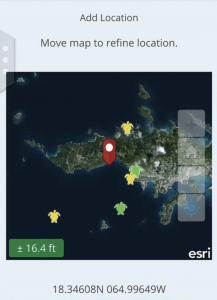
This second example I found on Google and was located through Esri. This example was a researcher who built an app that tracks sea turtles called TURT. This app allows tourists, scuba divers, and snorkelers to upload different photos and information on sea turtle sightings. This allows them to add information including the area, weather, date and time to the sighting. The information is then used by conservationists to analyze trends to observe the lives of multiple sea turtle species. What interested me about this project was how it was aimed for the public to have fun to use, and then can be analyzed by scientists later. I love sea turtles and would be super interested to download the app next time I go on a trip! Included below is the image provided of what the app looks like.