Johnson Week 2


Chapter 1.Introducing GIS-

 GIS gives just about unlimited access to the information of a place without having to physically go there. For example, identification of land features, climate, boundaries, population, resources and other things can be accessed just from the web using a geographic information system. Different analyses can be formed as well based on information gained from using GIS, like evolution, anticipation of future conditions based on current ones, finding locations for different needs, tracking diseases and starting points of spread, and many other examples. GIS allows room for exponential growth in terms of tracking, discovering and examining data. Usage of layers on GIS on maps also lays down the foundation for unique and hyper detailed viewing of certain characteristics that would otherwise be difficult to map, such as transmission lines, coal basins, shapes of geometrical forms, and other geographic features. With this, zooming, shrinking are at the fingertips of all users of GIS. 

Chapter 2. Introducing ArcGIS-

On GIS, there are feature layers, raster layers, scene layers, service layers, query layers, selection layers, subtype layers, voxel layers and graphics layers. Layers can be overlaid with one another and the result differs based on interaction with other layers. ArcMap- GIS application for analyzing and creating maps. ArcCatalog- application for management of data, deals with organization and documentation of spatial data. There are also different uses of ArcGIS for different people, such as ArcGIS for developers, professional usage of ArcGIS, and ArcGIS apps. Along with this, ESRI data is also available for use, things such as Smart Mapping, which is ESRI’s interactive program that enables users to quickly and efficiently navigate and spread data that has been inserted into maps. And Tapestry, which is ESRI’s segmentation data and divides different areas of towns, such as neighborhoods, into divisions based on socioeconomic and demographic characteristics and factors. 

Application-
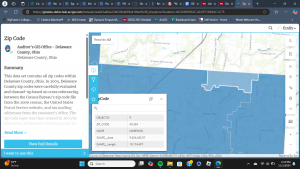
My application based idea would be to include more detailed areas of surface elevation, higher and lower around Ohio, but specifically Delaware Ohio. I think that doing this would not only be beneficial for construction agencies, but also the people that live and interact with these areas frequently. For example, roads such as Elizabeth Street, South Liberty Street, South Washington Street, and South Sandusky street are all on higher elevations of hills that people in wheelchairs or physically handicapped may be unable to venture due to said elevation. Along with that, construction would be increasingly expensive as proper tools, infrastructures and supports need to be included for safe projects to be completed. 


McNichols Week 1

Hi! I’m Ethan McNichols, I’m a senior Environmental Studies major and a double minor in Data & Society and Social Justice. I play Dungeons & Dragons, I’ve operated a discord server to centralize folks who play on campus so they can find games and other players. Its been in various conditions of activity and functionality over my four years here, currently working on cleaning that up so it can be handed off to an underclassman when I graduate because I think having that infrastructure is important. I also play Magic: the Gathering,  which just recently got an official club! I’m the treasurer for that now. I’m learning HTML on my own time to potentially end up making my own website/blog since I’m getting pretty fed up with the direction large social media sites are moving. I’ve also been listening to Ginger Root’s new album Shinbangumi a lot, I highly recommend it!

I’m going to try and stay ahead of my work in 292, it wasn’t awful to get caught up in 291 but it’ll be better to not have to deal with that at all on the latter half of the semester. (Written 10/16 lol. Didn’t finish this post before I was on a 3 day trip for Cross Country. *now* I’m going to try and stay ahead of my work).

I confirmed my new GIS account. With a budget of 1000 credits that I found in my settings I’m curious what all we’re gonna do. Just from reading the “getting started” section the notably different features seem to include a favorite system and a comments/rating system, as well as integration with social media sites to be able to share things. Floor-aware maps seem like an interesting function but I don’t know how much we’re going to be working with interior spacial details.

The training button seems to be broken. Everything below that seems to as well. They all open a new tab which fails to load. I ran into this last week and it seems to still be an issue a week later, on a different computer. I’ll send an email to Krygier about it.

For the google scholar stuff I looked up “Ohio climate” because I’m interested in how this is being used for local climate change. Turns out there’s a 2022 senior thesis from Wooster about how up to that point there was not a centralized place for this data, so they’ve been working to update some of Wooster’s server infrastructure to serve as the beginnings of a centralized ArcGIS dashboard for managing and visualizing local climate data.

Edit:

It loaded, I did the training. This page is also stalling out on me. Its late so I’m not waiting for the certificate to load.

O’Neill Week 1

Hello all, my name is Adam and I am majoring in Psychology and Data Analytics. I have never taken a class on geography before, but I love satellites and playing Geoguessr so I figured this would be a fun class!

While poking around my ArcGIS profile I found out that qualified institutions (and their students) like OWU get discounts through the Esri Nonprofit Organization Program. Meaning the cost of the accounts for the students taking this class isn’t as abhorrent-seeming, at $4,200 for the general consumer.

In Get Started: What Is ArcGIS Online I gained a general understanding of ArcGIS and its different capabilities. I didn’t understand a lot of the course, but considering how much ArcGIS can do, I can see why.

I then took ArcGIS Online Basics and completed it. This little course was a lot of fun and showed me hands-on how to manipulate the software in a few ways, like navigating the menus and utilizing bookmarks. It also taught me most of the lingo I think I’ll need to know. I also saw some Esri instructor-led courses that seemed to cost a large amount of money (i.e. a $960 for a course that lasts the length of an 8-hour workday)

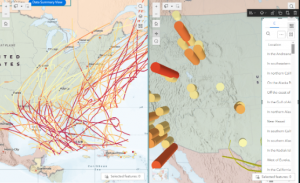
I then searched up “ArcOnline forest” on Google Scholar (because I figured ArcOnline had some environmental applications and like forests) and came upon an article on siting for wind power which I found interesting. The image is a map of areas in the Southeast where wind power capacity can be installed with minimal disruption to wildlife and sensitive ecosystems, showing that ample land remains available for wind energy development despite the Southeast’s limited wind power development due to poor wind resources, competing energy sources, and political opposition, advancements in turbine technology and the growing demand for renewable energy suggest that significant wind development is possible in the region.

Feng X, Li S, Kalies EL, Markus C, Harrell P, Patiño-Echeverri D. Low impact siting for wind power facilities in the Southeast United States. Wind Energy. 2023; 26(12): 1254-1275. doi:10.1002/we.2868

I then found a publication that used ArcGIS online to show its capabilities in the field of Natural Resources Management. I thought the article was pretty interesting, here is an image of ArcGIS that they included:


Zhang, Yanli; McBroom, Matthew W.; Grogan, Jason; and Blackwell, Paul R., “Crowdsourcing with ArcGIS
Online for Natural Resources Management” (2013). Faculty Publications. 20.

Keckler Week 1

Hello; my name is Emily Keckler. I am a freshman majoring in Environmental Studies. I did not take GEOG 291, so this is going to be a fresh experience for me- especially since I have very little background with geography in general.

Looking into my account I found that I have 1,000 credits to use, and- looking further- I found that there are certain online courses that require an exchange of these credits. This is particularly interesting and peculiar to me as using this program already costs a decent chunk of cheese, so it tickles me that there are additional exchanges in order to access certain “premium” content- even after purchasing a “premium” account. 

There is also a robust GIS community on this platform- blogs, forums, community posts, articles, etc. I intend to take advantage of these for questions and other troubleshooting when I inevitably encounter something new.

In “Get Started: What Is ArcGIS Online” I read into the basics of viewing scenes and maps. Now, I can have a better idea of the different capabilities that I have when interacting with media on this platform. From there, I read into the different types of maps including time and floor-aware maps.

I also began to look into the process of making an app. There are many aspects to consider when putting one together including: the type of app, audience, creating a map, inclusion of photos and text, etc. Collaboration and engagement are a particularly critical aspect in utilizing GIS to distribute information within an organization, group, or publicly, so extra emphasis is placed on that throughout the overall reading.

When I did the “ArcGIS Online Basics” web course I was introduced to some GIS terms, and I was able to familiarize myself with different types of layers alongside their sources. In addition, I made a map of mountain trails, got a little bit of experience with navigating a map, and I learned some of the various app builders under the ArcGIS umbrella. Upon completion of the course, I was left feeling a bit lost on navigating maps.

Since I did not feel very confident in my understanding of GIS from the first course that I took, I decided to take a second one- “Exploring GIS Maps.” This second course revisited some of the aspects of the first which made me feel more comfortable in being able to navigate maps and placing bookmarks on certain locations.

For GIS application areas, I decided to look up “ArcOnline Superfund Sites,” and I found a master’s thesis on the acid mine drainage around superfund sites within the Bonita Peak Mining District (Dorsk, 2020).

From: “Using Rare Earth Elements and Geochemical Patterns as In-Situ Groundwater Tracers at the Bonita Peak Mining District Superfund Site”

I also chose to search “ArcOnline Trap Neuter Release Cats.” An article that piqued my interest used information from a Central Virginia Trap, Neuter, Release (TNR) program of feral cats trapped within areas also populated by people to assess the risk of feral cats transmitting diseases (such as rabies) in local parks, schools, etc. (Taetzch, Bertke, & Gruszynski, 2018). 

From: “Zoonotic disease transmission associated with feral cats in a metropolitan area: A geospatial analysis”

Dodds week 1

My name is Ellie Dodds. I am a senior environmental science major and history minor. I took GIS 291 two years ago (back when it was 191!) but I am excited to take the second part. I love envs but I am more of a hands on field work kind of person but I like the idea of being able to use GIS to better do field work. Here is me in Japan looking at soil!

While poking around on the website I noticed training courses that deal with coding and that peaked my interest! I did some coding in high school but haven’t been able to apply it here at OWU. I am most interested in the Python courses but Java and JavaScript are what I worked with before.  The community forums also looked helpful for later on in this course.  I found the scene viewer page on the Get Started: What Is ArcGIS Online to be a nifty cheat sheet on the different icons. I noticed an elevation tool which looks cool because I love topographic maps. I definitely intend to work that into my gis this semester if possible. I found the clickable links to be helpful for navigating this much information.

The training was easy to follow and  I didn’t run into any hiccups.  I found this to be much easier than the desktop version. I loved working with the scenes, I didn’t realize that it would be in this course.  It had super specific instructions.


Online I found many applications relating to birds. I found someone working on an online bald eagle location map based on crowdsourced data.

Lukei Jr, Reese. “CREATION OF A NATIONAL REGISTRY FOR BALD EAGLE COMMUNAL ROOSTS.”

I also found one that used museum collections and arconline to map about bees.

Day, Baylie Lenora. “Thematic Mapping of Apidae Holdings Within the University of Arkansas Arthropod Museum.” (2024).

Kelner Week 1

Hi I’m Hayden Kelner, I’m a sophomore majoring in Zoology and Environmental Science. I took the 291 module at the beginning of the semester so I’m excited to continue learning about how to utilize GIS. While poking around in the training tab I found a tutorial on migrating data to help make field maps. I love field work compared to sitting in a building so making the transfer of that data a more seamless experience caught my eye. I then looked at the Community Forums and that excited me because one of my biggest struggles in 291 was finding things. With access to the forums it’ll make troubleshooting a lot easier. I also enjoyed scrolling through some posts and seeing how recent they were uploaded.

When looking at the ‘Get Started: What Is ArcGIS Online’ page, I found a section on floor-aware maps. It mentioned that there are certain datasets in the system that show no only the buildings on the map but also a map of the building’s floors. Along with that I found the tab on Scenes and while clicking through I noticed a section that talked about adding weather overlays onto the scenes so I am excited to see how that can be used later on.

While doing ‘Web Course: ArcGIS Online Basics’ I enjoyed making the map in Module 3 and getting to see how this program works in comparison to the desktop version we used in 291. I also enjoyed getting to see how to use scenes because the 3D aspects of online mapping has always been something I’ve thought was very cool.

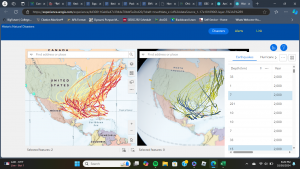
For my research on Google Scholar I looked up “ArcOnline Migratory Birds” I found an article on migratory eagles in Northeastern North America. It’s pretty cool seeing their routes collected by GPS data and then seeing their routes mapped out. I also found an article on mapping the migration patterns on Wilson’s Snipe. I’ve always loved birds so getting to see their migratory patterns and routes that they follow is always interesting. It’s also cool to see where they fly over and how that relates with their food sources so we can help preserve these feeding areas so the birds can continue to successfully migrate in the future.

Links:

Mojica, Elizabeth K., Bryan D. Watts, and Courtney L. Turrin. “Utilization probability map for migrating Bald Eagles in northeastern North America: a tool for siting wind energy facilities and other flight hazards.” PLoS One 11.6 (2016): e0157807.

Cline, Brittany B., and Susan M. Haig. “Seasonal movement, residency, and migratory patterns of Wilson’s snipe (Gallinago delicata).” The Auk 128.3 (2011): 543-555.


chlebowski final

first web app is a story map of a compilation of ornithological research papers that talk about various topics like migration, sexual selection, social behavior, etc.

https://arcg.is/rXDb4

second web app is a slider of U.S. co2 emissions from transportation from 1970-2020

https://owugis.maps.arcgis.com/apps/instant/slider/index.html?appid=4de788ec6fac45faaa2033c9dbbce69a

i tried my hardest to get labels for each point on the map to show the numeric amount but they were being super strange and either doubling for some years or freezing on certain years so i just scrapped it

Miller Final

Final Part 1: For my first part of the final, I created an attachment viewer app that consisted of 4 historical points at Ohio Wesleyan University. My project consisted of 4 attribute fields, which were the name of the building, a brief description of the historical significance, the latitude, and longitude of where the building is located. All the information on the descriptions came from the Ohio Wesleyan website. I was able to map out the points and was able to use the instant app to display these points. Overall, it is a more simplistic version of the interactive map on the Ohio Wesleyan website. 

https://owugis.maps.arcgis.com/apps/instant/attachmentviewer/index.html?appid=0857c7e956b14798ba646e65c6e79939

Final Part 2: For my second part of the final, I used another set of data from chapter 6. Specifically, I looked at the weekly trends of vaccination administered in certain parts of the United States. I first downloaded the data and was able to upload the data points on maps. Using what I learned in 6.5 and 6.6, I followed those steps to help me with this portion of the final. Overall, it was quite neat to see the final results, as it shows the gradual increase of vaccinations throughout the US. It also shows which regions where people were being vaccinated at higher rates. That overall trend tended to relate more to areas that had higher populations.

https://owugis.maps.arcgis.com/apps/instant/slider/index.html?appid=df3a0a599c4a48db95f1a33d9f49bd8b\

Miller Week 6

Chapter 7: This chapter covered 3D web GIS, which seems like a really unique and informative concept in GIS. 7.1 had me explore web scenes using a scene viewer. This section was a good introduction to the materials, as it showed me the basic tools of 3D web GIS. Section 7.2 had me make a thematic web scene. The direction that had me search for the living atlas did not work. Therefore, I used data that worked from GEOG 291, and I tried to make it as similar as possible to what the book wanted me to do. 7.3 had me create a web scene and add 3D features to the scene. This section took awhile, but it was really fun to figure things out. Section 7.4 had me work with elevation, as I added items both above and below ground. This section was quite easy and more review form the previous section. Section 7.6 had me add 3D objects to the map and showed me how to use the slice tool. A potential assignment for this chapter would be for me to create a 3D scene of a fun community, where the location would be here at Ohio Wesleyan University. I would add multiple similar objects, where some would show real items such as trees and cars. Other objects would be on the more imaginary side.