App 1: https://owugis.maps.arcgis.com/apps/instant/basic/index.html?appid=c9ff5b96be594b5599fca5146a738841
App 2: https://owugis.maps.arcgis.com/apps/instant/3dviewer/index.html?appid=59948f8a6c5b43639d6c26d60c508537
Geography 292: Geospatial Analysis with Web GIS
Module 2: 10/19/2026 - 12/11/2026, OWU Environment & Sustainability
App 1: https://owugis.maps.arcgis.com/apps/instant/basic/index.html?appid=c9ff5b96be594b5599fca5146a738841
App 2: https://owugis.maps.arcgis.com/apps/instant/3dviewer/index.html?appid=59948f8a6c5b43639d6c26d60c508537
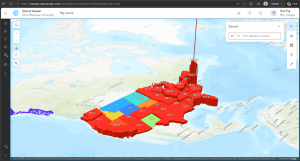
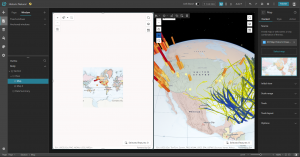
Chapter 7 covers the 3D uses and types used in ArcGIS. 3D maps allow for a better understanding of presented data, improving communication, visualization, and analysis. There are two types of 3D map types in ArcGIS: cartographic and photorealistic. Each of these types have their own uses in different cases. Photorealistic provides a direct, real-world view of the presented area and would be more useful in areas such as architecture or infrastructure, while cartographic is better at portraying abstract ideas or values, being more useful in cases covering a larger area, such as showing populations of counties or states. 3D mapping has a multitude of uses with both visualization types (photorealistic and cartographic) and can be utilized in a wide variety of cases. From interior design, interactive digital situations, plumbing, game design, artistic interpretation, environmental protection, and many, many other situations. There are endless possibilities and utilizations of not only the basic 2D mapping in ArcGIS but also the more immersive and complex 3D mapping and visualizations.
The ideas introduced in Chapter 7 can be applied by combining a cartographic map of an apartment complex’s resident population and a photorealistic map of the lots. This can help provide a landowner with an idea of why certain locations are more sought after than others. Things like the apartment’s view, closeness to highways/major roads, ease of entry, and other factors can play into this and be seen from the photorealistic map. The cartographic map will help with seeing trends of desired locations around the complex.
Chapter 5 of the book continues by introducing and going into ArcGIS Enterprise, which is a more private version than its ArcGIS Online counterpart. ArcGIS Enterprise allows its users to manage their own infrastructure or choose which cloud providers manage it, unlike ArcGIS Online, where all cloud and data is managed by Esri, which allows users more flexibility and privacy with the ArcGIS programs. ArcGIS Enterprise is a program that contains multiple different ArcGIS components that, in turn, allow for its flexibility and use in more private cases. With ArcGIS Enterprise, as shown in one of the figures in the chapter, organizations that are separate but closely related can hold their own private ArcGIS programs while also sharing necessary information and mapping, increasing communication ease and flow. Overall, Chapter 5 goes into the more technical and realistic properties of ArcGIS and ArcGIS Enterprise beyond mapping and app creation. Looks like the tutorials of this chapter utilize ArcGIS Pro, which was covered in GEOG 291 if you have taken that course. ArcGIS Pro, I find, has many more options for mapping utilities and is a more in-depth version of ArcGIS Online, with ArcGIS Online being more accessible for publishing projects.
Chapter 6 of the book covers spatiotemporal and real-time data uses and implications within ArcGIS Online. This chapter covers the four types of spatiotemporal data that can be utilized by GIS systems: moving (transportation or other actively moving objects/beings), discrete (events that just happen), stationary (not moving but changes in value, like wind speeds), and change (the area covered by something, such as building parameters or flood covered land). Time duration of mapped events can be a point in time (short, direct) or a duration (length of time).
A real-world application of the ideas covered in chapters 5 and 6 is a real-time updating map system for tracking fire spread, area, and severity, or for tracking crime locations and types within a community. These maps can then be used by the relevant department (fire or police) to implement the appropriate protocols for such situations and shared with government officials or environmentalists (in the case of wildfires) to address potential problems in the area for recurring instances.
Chapter 3 introduces the ArcGIS Experience Builder, aka ArcGIS Webapp builder. This platform is designed to be an all-encompassing tool for GIS creation, enabling flexible, easy production of visual aids for a wide variety of cases. ArcGIS Experience Builder is defined in a few simple steps, including choosing options from pre-made templates and layouts or creating your own to suit your situation. This tool, like ArcGIS Online, also has a sharing function and can be designed to work with a variety of different devices, including mobile phones. I find this really neat, as I feel, or have always thought of, GIS tools as needing heavy software or desktop computers to function properly, but this opens up a whole new world of GIS capabilities and use cases. It was interesting working with this area of GIS, as it is not something I typically think of when I think of “GIS,” but the presentation and digital uses of GIS mapping are just as important.
Chapter 4 goes on more with this topic, explaining why GIS accessibility, especially on mobile devices, is important and how it can be used for a slew of different cases. Interestingly, I have always thought of GIS as some kind of big, scary program, but things we use daily and carry around with us in our pockets, like smartphone GPS apps, are GIS too. I’m surprised at just how many simple things that I would not have thought of before include GIS programs and are a utilization of GIS results. Chapter 4 reviews some of these uses and how GIS can be implemented using mobile devices flexibly and conveniently, allowing for GIS production on the go. ArcGIS Online on mobile devices allows for simple editing and layering, which is a very neat and convenient tool. I think these tools can be very useful for things like environmental scientists tracking landforms and future business owners marking possible shop locations.
Chapter one introduces ArcGIS Online as an affordable and communal GIS resource that is good for both community sharing and private use cases. ArcGIS Online is an easy to learn, easy-to-use, and easy-to-maintain site that allows public access to GIS tools and programs. The author describes GIS as a tool with a large variety of applications, including government resources, businesses, scientific data, scientific research, and uses for daily life or travelers. ArcGIS Online is run by ArcGIS Enterprise, which has four components for different use cases and steps in processes. These are Portal for ArcGIS, ArcGIS Server, ArcGIS Data Store, and ArcGIS Web Adaptor. Each of these components allows for the creation and sharing of ArcGIS Online materials. This chapter also goes through some of the simple functions that ArcGIS shares on its website and were included in last week’s tutorial, such as layering, sharing features, and basemaps. A lot of the information in the tutorials of chapter one is the same as the information we gathered in last week’s tutorial.
Chapter two covers the importance of layers and the different kinds of layers utilized in ArcGIS Online services. Smart mapping, or the idea that a map should be visually proper and in the correct format for the data’s intention, is also covered in this chapter. It shows us many examples of different mapping formats and their use cases, such as pinpoint locations or gradient style maps, which can be used for displaying all the cafes of an area or the area’s predicted temperature, respectively. Labels and pop-up information are also important parts of ArcGIS online, allowing more information about a specific point to be shown when desired, as opposed to constantly obscuring the rest of the map’s data. Chapter two also goes into the importance of storytelling and how data should be displayed in the manner most appropriate to its intended audience.
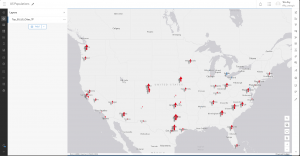
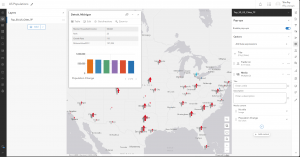
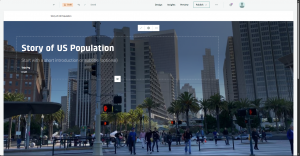
Hello! My name is Trin Fry, a sophomore at OWU studying Environmental Science, Zoology, and Philosophy. I was in the GEOG 291 Desktop GIS course during the first half of this semester, so I feel I have a solid foundation for this course. Looking at the ArcGIS Online home page, it seems that there are a lot of different options for visual creation, including ArcGIS Storymapping, which I have personally used before in a water conservation externship. There are also many other tools, such as help and group features, and tools that allow for the publication of final creations. As expected, ArcGIS is advertised in the “Get Started” section as being a useful tool for mapping and data analysis. However, it also lists data collection and collaboration as features of the site, which I find particularly intriguing, especially that of the field work data collection. It looks like GIS programs continue to expand beyond what I thought of as their primary uses.
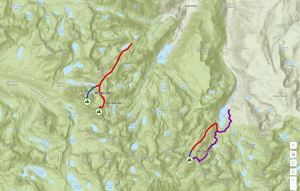
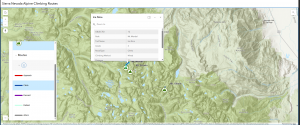
I found the ESRI ArcGIS introduction course very useful. Even though I have knowledge of the ArcGIS desktop software, the uses and data control of the ArcGIS online and desktop versions are quite different. The desktop version, at least on the surface, as we have not gotten deep into the online version yet, is much more complex than the online version. I also like the idea of utilizing three-dimensional or topographic mapping as a form of GIS and can see its uses in many case scenarios. I am excited to explore this programming more and continue to compare it to the teachings of the GEOG 291 course.