I’m Trinity Fry, a second-year student majoring in Environmental Science and Zoology (most likely majoring in Philosophy and minoring in Neuroscience soon as well). I am recently back from a wildlife rehabilitation program in Guatemala, hence the delayed post.
Reading:
I found the reading quite interesting, informative, and relatable. As an Environmental Science and Zoology student, I did not think the use of computers and codes was something I would have to familiarize myself with. However, I am quickly seeing that change as the uses of GIS and computer programming are broadening every day. As the text states, GIS is a monumental tool for all kinds of fields. From tracking the natural world to mapping human populations to company advertising, GIS is an extremely useful tool. “Students flock to GIS classes in colleges and universities; on-board navigation systems are the mark of a luxury car; police officers are routinely trained in GIS; organ donation has been rationalized using GIS; epidemiologists use GIS to
identify clusters of infectious disease; archaeologists use it to map sites; and Starbucks is reputed to use GIS to site its very successful coffee shops. Indeed, the list of GJS uses is extraordinarily comprehensive; the technology pervades many aspects of modem life.” (Schuurman, 2004, pg. 1). While this tool may seem straight forward, Schuurman does emphasize that simply having the programing is not sufficient, and like any other application, you must know how to implement its uses to understand and use it to its full potential. This text made me more exited to learn about GIS and its applications in my field of interest. This will be a very helpful tool to me in my future career, and I can’t wait to apply it to real-world case scenarios.
Schuurman, Nadine, “GIS: A Short Introduction” Ch 1, pg. 1-20, (2004) schuurman_gis_a_short_intro_ch_1.pdf
GIS Case Study:
1)
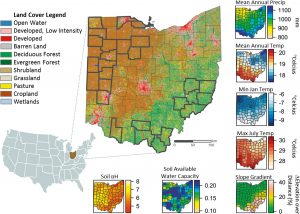
In this case study, GIS was used to map out the landscapes and forest changes in Ohio. This research was done to track the widespread disturbances and land changes due to the urbanization of highly populated areas, especially those initially settled in the 17th-18th century. GIS and historical records were used to map out landscapes prior to colonization urbanization and track the changes over time up to modern day. The changes Deines saw included the switch and change of dominant species of areas along with the migration of species to new areas. The mix of urbanization, modern agriculture of Ohio, and introduction of invasive species has drastically changed the land the last few centuries.
Jillian M. Deines “Changes in Forest Composition in Ohio Between Euro-American Settlement and the Present,” The American Midland Naturalist 176(2), 247-271, (1 October 2016). https://doi.org/10.1674/0003-0031-176.2.247
2)
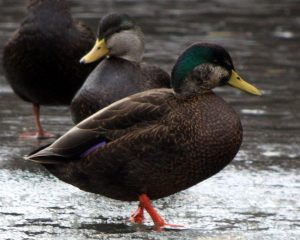
GIS can also be used to track the biodiversity and overlap of species populations. This would be important as urbanization drives populations to overlap and compete, or copulate, in more condensed areas. For example, mallard ducks and black ducks now overlap territories, although these species are behaviorally and genetically differing, they are close enough in relatedness to produce crossbred offspring called the mule duck. GIS can be used to track where these populations overlap and where these hybrid individuals are showing up to see if forced close quarters are causing this interbreeding.
Atlas, “GIS Use Cases- Biodiversity”, n.d. Biodiversity – GIS Use Cases | Atlas
Lavretsky P, Janzen T, McCracken KG. Identifying hybrids & the genomics of hybridization: Mallards & American black ducks of Eastern North America. Ecol Evol. 2019 Feb 27;9(6):3470-3490. doi: 10.1002/ece3.4981. PMID: 30962906; PMCID: PMC6434578. Identifying hybrids & the genomics of hybridization: Mallards & American black ducks of Eastern North America – PMC