Mason Week 3

Chapter 4

Chapter 4 further describes the different types of maps one can use when creating maps on GIS. One map listed is the Density map, which is useful for people who want to map areas that vary in size, considering the presence of differing concentrations. On the subject of density maps, the reading makes it clear that there are different types of ways to use a density map, such as mapping specific features or the variables associated with those features. One question that arises from this topic is: Is it possible to combine feature maps and feature value maps to create a larger picture of data? This chapter feels quite relevant to my mapping plans for the class, which is the distribution of a specific insect species, for which I could use a dot map. Dot maps represent density based on how close or far the dots are from each other. GIS seems to make it relatively user-friendly to understand how to read and create density maps, as when it comes to the defined area maps, the higher density areas are within darker colored boundaries, while the lighter areas are lower density locations. Another question that this chapter prompts me to wonder is whether one can toggle between dot maps and shaded maps, as they are both typically pictured together when presented in the textbook. I found it interesting that the application gives the user so much freedom with customization, as you can even determine how many features a single dot represents, which could definitely help simplify a map if the data is immense but congregated. A common theme I have noticed throughout the chapter is that GIS provides a lot of support when it comes to mathematical calculations, as it can aid in the numerical calculation of density for any given feature. One other feature of notability is the choice of cell size, which is how big a plot is on the map, which can help broaden the options between a detailed and broad map. 

Chapter 5

Chapter 5 appears to be delving into the boundaries of a map and the relevance of what occurs within those boundaries. I find it important to note the different types of boundaries one can use, such as a single area, a buffer that surrounds a specific zone or feature, and a natural boundary. In consideration of my own future map, if I choose to map an insect with aquatic larvae, then I could use the buffer map type, so that I can observe how far an aquatic insect may migrate from its watershed of origin. Two types of boundaries can be made: discrete, which are clearly defined zones, and continuous, which are more loosely defined and are typically natural structures. The boundaries are frequently determined by the purpose of the data, like the mapping of a floodplain in an urban area, or the distribution of types of trees in protected areas. There are three ways one can go about creating borders: freehand drawing, selecting the features within the boundaries, and overlaying the features. Chapter 5 references previous chapters by bringing up the statistical analysis strategies of count, frequency, as well as bar charts and piecharts. I also find it interesting that it develops on the content of chapter 4 by describing how you can combine overlay and drawn maps for a more complex map. One question that arose when reading this was: Should one use different data analysis techniques for different types of bordered maps? One topic to note is the usage of the raster method, as it can create calculations that deduct what the areal extent is on the map. The vector method is similar, but more precise, which can lead to more effort required on the user’s end. These methods can also aid in analysing data. 

Chapter 6

An important factor to consider when collecting or presenting data for a GIS map is what qualities or factors are present within a boundary. A term to monitor this is the travelling range, which can be measured through three different metrics: cost, time, and distance. The travelling distance can be used in conjunction with multiple metrics, such as the time it would take to travel a particular distance within a particular boundary. One question that comes to mind when considering this is: Is this type of GIS method used to track the distance at which particular species migrate, or would the distance and method of travel be too complex to map in this way? Based on the reading, money seems to also be a frequent use of urban mapping, as people calculate how long it will take to travel from one place to another. When calculating the travel distance, two methods can be used: the planar method, which is for smaller, flat parcels of land, and the geodesic method, which is for larger, less linear pieces of land. The chapter specifies that different geometric features within a boundary prompt different statistical methods for data analysis, such as a list, a count, and a summary statistic, also known as a total count. I find it relevant to note that there are also different scales at which you can produce a border to show a range of travelling distances. These can include inclusive rings and district bands, which perform similar functions with just a different viewing option. I think it is interesting that GIS, to some degree, can even calculate the travel costs for the user, according to the textbook. One can also create a feature called a buffer, meaning that they can create an expanse of area around a particular variable on the map.

Mason week 2

Chapter 1

Chapter one provides a well-thought-out breakdown of the process one may need to go through when using GIS, which gives me a better understanding of what kind of steps I, myself, may use when taking this class. Additionally, the different steps prompted me to start thinking about what kind of method I would like to use when coming up with my subject or question for my GIS project. The primary definition of GIS as a whole is: a tool for understanding patterns in a geographic context. I found it interesting to read that there were certain tasks I should do in preparation for my usage of GIS, in order to have a smoother experience when using the application, such as familiarizing myself with different geographic structures that may appear in the mapping system. I definitely find it useful to know that there are different types of mapping, which will help me to better visually demonstrate my topic of choice. It is important to note that discrete maps measure specific, pinpointed locations, continuous maps measure data that can be found in any location, and summarized maps measure a quantifiable number of a specific phenomenon occurring within a boundary. One question that this chapter made me think about was what kind of variables I will have to consider when choosing my topic. The reading also let me know that there is much more to this mapping platform than I previously expected, as there are various different mapping options available, such as the vector and raster models. The vector model depicts data in a rigid, bordered representation, while the raster model is more flexible, with the data in a continuous area.  It seems to me that the choice between vector and raster models comes down to personal preference; there is a typical pattern that categories and numeric values usually follow. GIS is much more tied to data analysis than I recognized in the past, as it provides various options to create tables, charts, and other representations to help the viewer understand the data from the map. The chapter provides definitions for important concepts such as categories, which are a collection of similar groups, and ranks, which order different features. 

Chapter 2

It seems very important to note that GIS can map multiple different variables at the same time, which can be very useful for the interpretation of correlations between different factors. It seems that a lot goes into the organization of data before information can be implemented into a map format, such as categorizing the type of feature you are mapping, ensuring that you have proper geographic coordinates, and brainstorming what kind of audience the map is designed for. Coordinates for specific geographic features are characterized by free-standing symbols, while linear structures are visualized with lines and borders. GIS allows the user to toggle different map subsets, which are layers commonly featuring different individual locations, to help present the bigger picture when it comes to the interpretation of data. The platform goes further by allowing users to further categorize the individual symbols in the case that one would want to display differences within a singular category. One question I thought of while reading was: what is the extent of the specificity with which you can subcategorize things? While GIS is an intensive digital mapping platform, I found it interesting that it discouraged the overuse of its categorization subsets, as too many different groups can make the data difficult to read. However, the author highlights the balance of the number of categories, as too few categories can leave the data feeling vague. There are multiple ways to group different categories together in order to strengthen the representation of the given information, which I assume is a very helpful feature. It was helpful to learn more about the importance of categorization, as the author made it clear that just using shapes or colors alone is ineffective at conveying differences, but when both are used together, it makes the viewing accessibility much stronger. 

Chapter 3

In order to perform quantitative mapping, one must have an idea of what it means for their factor to be abundant or not, and to know what exactly it is they are looking for. There are multiple ways to display numeric information through GIS, such as: discrete mapping, which is mainly for individual and linear data; continuous mapping is for unbordered areas of data; and data summarized mapping to use shading to indicate differing values, rather than a more linear approach. I find it helpful that GIS offers so many different types of numeric presentations for the map key; however, I am still wondering if there is a certain method to choosing the key types rather than preference? One method of numerical grouping is through ranks, which is a method of ordering features from high to low. Another important feature is classes, which further group categories together based on their similarities. I personally find the subject of numeric data in mapping helpful, as I intend to map different insect populations, which are heavily dependent on numeric values. I appreciate that GIS can automatically run numeric trends with the data, which will help tremendously in the ease with which I create my map’s data charts. There are various types of classification schemes to choose from, with one of them, natural breaks, which identifies gaps between clusters, which I believe may be useful for my future GIS map creation. A very cool feature of this chapter is that it provides a guide for picking a scheme, which I may have to reference back to if my predetermined plan of utilizing natural breaks does not prove useful to me. It was a good idea for GIS to provide ways to deal with outliers, as it helps create more reliable maps to be born from it. The author does well in emphasizing the many options when making a map, but discourages making the map too complex. 

Mason week 1

My name is Natalia Mason, and I am a freshman studying Zoology (B.S) and Environmental Science (B.A) at Ohio Wesleyan University. I am very passionate about Entomology, Zoology, and Environmentalism. As for my career, I aspire to become an international wildlife biologist, with a specialization in Entomology, so I can make a positive contribution to preserving the ecosystems and species of our planet. Furthermore, I also aim to become a professional author and painter, so that I can use my skills to contribute to the environmentalism movement. I also really enjoy talking about insects and other types of arthropods!

Schurmann Reading:

GIS is integrated into many more real-world data analyses than I had previously thought, although, after learning about it, I have grown to see how critical it can be. Going into this class, I knew of ArcGIS as just a mapping platform; however, the reading had allowed me to see the variety of uses that the mapping platform can be used for among professionals, and I found the description of it being a “scientific approach to a problem” (Schurmann 2) very compelling.  It has also made the purpose of GIS clearer by creating a distinction between mapping and spatial analysis.

The article made a frequent point on the uses of spatial analysis in the environmental realm of research, which helped me to contextualize the importance of this application in my field of Zoology. I had seen many distribution maps regarding animals and plants; however, I did not frequently consider the methods that went into creating those visualizations of data. I am realizing that GIS mapping techniques are presumably much more common than I would have thought before.

A point was made that GIS has many roots in older cartography, while conforming into a modern-day digital format that gives the field an opportunity to grow and expand in new ways. It was interesting to learn that the true roots of GIS are harder to gain a definitive understanding of, as it seems pretty fitting for the platform, considering the fact that the range of uses the application has is not static or clear-cut either. The visual aspect of data quantification was made very apparent by the author, which I find to be very important, as it allows professionals to map complex data in ways that can be understood by the public, even when that data is not perfectly clear.

GIS Applications:

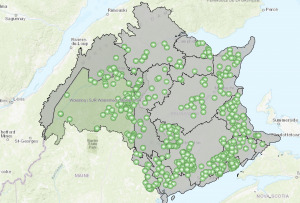
The GIS application I found was a Canadian Database that utilized GIS to map the distribution of Mayflies around different watersheds in Canada, as well as a portion of Maine. The Data trends show that mayflies do not venture very far from watersheds. Because they are a species with an aquatic larval stage and a short adult lifespan, they have to stay near waterways to lay their eggs in a short amount of time.

Source: https://experience.arcgis.com/experience/564d07a04cf6472fb367c702ffe3f4d9/page/Main-Page

My secondary GIS application that I had found was a source covering the occurrence of the first stable population of the invasive Indochina Mantis in Italy. The Researchers covering the article had utilized a platform of ArcGIS to map the localizations of the Mantis populations. An interesting aspect of this study looked at railways and how Mantises are likely being transported along the railway to other urban areas across Italy. This data also gives insight into the hardiness of Indochina Mantises within urban landscapes.

Source: https://bdj.pensoft.net/article/50779/

-I have completed the introductory quiz!