Ogrodowski Week 3

Mitchell Chapter 4

Chapter 4, Mapping Density, shows the mapmaker where the targeted feature is concentrated. Density itself is a ratio, measuring counts (OR amounts) per unit area. Density can be valuable when working with boundaries creating areas of different sizes, like counties or census tracts. Two distinct areas might have the same number of features, like businesses or population, but their difference in size is what determines their densities.

Mapping density is a good way to summarize discrete data. You can plot density graphically as discrete data to get a “bird’s eye view” of feature distribution, then code each area on the map based on the number of features per unit area. This is helpful for understanding overall trends but does not show specific densities within each area boundary. I don’t think this method of mapping is particularly useful for planning; it may be helpful for general trends but not much else. In my opinion, an alternative that seems more ideal is the creation of a density surface with a raster layer. This creates an appearance of continuous shading that transcends boundary lines. Additionally, mapping by features and mapping by feature values can show trends differently. Mapping by features tells you where things are, but feature values (like number of employees) can show trends within the density of the feature.

One thing I didn’t really understand in this chapter was “you often display the dots based on smaller areas but draw the boundaries of larger areas.” In that case, are the dots are not 100% accurately transposed onto the area boundaries? I suppose it doesn’t have to be perfect because the purpose of density maps is just for noticing general trends, not worrying about exact locations.

Finally, this chapter circles back onto topics discussed in previous chapters, like determining the best cell size, ways to separate graduated colors, and contours. I bet that the best method of determining graduated colors depends on each individual map, but in the book’s examples, the natural breaks method seems the most effective.


Mitchell Chapter 5

Chapter 5, Finding What’s Inside, describes ways to look at what is happening inside of a certain area. This area can be on the map boundary already, like a census tract or county, or it can be a natural feature like a watershed, state park, or protected area superimposed onto a layer of preexisting map boundaries.

Density, as discussed in Chapter 4, is a frequent example of “finding what’s inside.” I found it really cool that the GIS can clip out the target area on a map to simplify our view of the continuous data inside of those boundaries, especially when those areas are disjunct. AND it can calculate amounts of land use/type within these specific areas? Sick!

There are three ways to show what mapped boundaries are inside a particular area. You can 1.) superimpose the target area on top of the map’s preexisting features, 2.) highlight parcels with any portion inside of the target area, or 3.) view the target area alone divided into the parcels that make it up. The entire target area is full, and no mapped boundaries beyond the target area are shown. As with most map-related topics, there are merits and drawbacks to each style of mapping here. Drawing the target area on top is a good basic visual, highlighting all included parcels shows a potentially larger scope of effect from the target area, and overlaying the features within the area can help summarize characteristics within the area.

This chapter gives several methods for drawing the target area on top of the map of parcels; the best method of which once again depends on how specific you want your map to be. I like comparing the different methods of color and shading, but all of this study of maps has led me to realize that in many cases, the simpler the map, the better. Using fewer colors and focusing on specific areas typically gives enough surface-level information for a general audience. Then, when more specialized information is needed, conclusions from the more general maps can be used to create the most relevant specific maps. Additionally, GIS software itself can take some of the manual labor out of category-making. One example that seems particularly useful is when one feature on one map splits itself between two features on another layer—the GIS will create two subcategories to split that feature in two.


Mitchell Chapter 6

Chapter 6, Finding What’s Nearby, seeks to help the mapper answer questions like, “What areas will a facility serve?” and “What should the facility expect in terms of service volume?” These questions are affected by “costs” such as distance and time, or literal monetary quantities like gas mileage.

There are three main ways to define analysis of finding what’s nearby: using straight-line distances, finding the distance or cost over a network, or measuring the cost over a surface. As with any other type of map analysis with multiple options, there are times and places for each method.

A straight-line method finds any features within a certain radius of the center. This method provides a quick, simple estimate of features within a spatial constraint, and is often used when determining buffer areas. One type of straight-line mapping that I found particularly interesting was the spider mapping method. This involves drawing straight lines from the center to features within the designated radius. These maps show if there is any skew in location of likely consumers, or if some consumers are in radii of multiple centers and can incite competition. However, this method fails to consider geographical obstacles. A feature may be within the specified distance of one center, but when travel costs are accounted for, another center may be in a more efficient location. 

These instances can be mapped by a method considering distance or cost over a network. This type of analysis is typically more considerate of real-world application, and considers the impedance value, or cost to travel from the center to surrounding locations. Some locations may be nearer than others but have higher impedance values, and a cost over a network method takes this into account. An example I found fascinating was taking different kinds of road turns and junctions into account when planning travel costs in terms of time. For example, a turn at a stop sign takes less time than one at a traffic light. A feature may be outside of a straight-line distance radius but have a lower travel cost than another feature within that radius.

Finally, mapping cost over surface is most commonly used for travel over terrain. It’s sort of a mix of the previous two methods: there’s not really an established infrastructure, but geographical land features are accounted for in travel costs. This method uses a raster layer to display continuous data, and the shading can illustrate differences in rates of change across terrain, showing where travel cost increases rapidly or slowly.

Ogrodowski Week 2

Mitchell Chapter 1

The introductory chapter, Introducing GIS Analysis, builds a basic framework and vocabulary for working with GIS. This chapter discusses types of geographic features that can be captured by GIS, like discrete features, continuous phenomena, and features summarized by area.

I was most intrigued by continuous phenomena, and I hope to learn more about the concept of interpolation, and how GIS develops the values for areas in between the discrete data points given. I’m probably not the only one who would say that data summarized by area is a rather familiar concept. A common example that comes to mind is the electoral college maps we watch on Election Day, where the magnitude of difference in votes between presidential candidates determines the color and shade of the state or county being observed.

This chapter also introduced me to the differences between vector and raster models. Vector models use coordinate points, which makes them ideal for displaying discrete data. Conversely, raster models seem to capture more nuanced variation in continuous data, which I noticed in the book’s orange and red “Elevation” map.

Mitchell also discusses some common geographic attributes of data. I was specifically interested in ranks; I think it is interesting that this category introduces an element of subjectivity. I can see how this feature would be useful but may be unfit for some situations where data is not very variable. I also learned the difference between counts and amountscounts are shown on the map, while amounts are numbers that might be associated with something on the map but not actually shown (i.e. on a map of parks, the parks are “counts,” but the number of benches at each park are “amounts.”)

Finally, Mitchell describes some ways to work with data tables containing the information on the GIS maps. Some of these are reminiscent of high school statistics topics, like the uses of “and” and “or” to broaden data selection. Just reading about all of this vocabulary is a bit overstimulating, but it all seems to be very helpful going forward.

Mitchell Chapter 2

Mitchell Chapter 2, Mapping Where Things Are, describes how to layer and categorize different features on a map, as well as the times and places for differing levels of detail in categorizing features. When developing a scientific research question, perhaps involving a specific hypothesis, it makes sense to use a map with more detailed codes for categories. Also, developing detailed codes as subsets of one category can reveal trends that may not have been visible in the entire data set. On the map of crimes, when all the data points are one category, you can notice some general “hotspots” of crime. However, when you separate the crimes into subcategories, and then isolate each subcategory on a map of its own, you may see that a high concentration of thefts occur on a particular street corner. When planning to solve the problem, a general solution might be deploying more police to the general crime hotspot. However, a more detailed analysis of the GIS data might encourage police to install better security measures like cameras and alarms on that street corner.

The best techniques will vary from map to map, depending on what you are trying to illustrate. When you are looking at a large-scale map, a great amount of detail might make it a little cluttered and overwhelming to look at. However, the general map might spark notice of some basic patterns, which can then be elaborated on in smaller-scale, more detailed maps.

(Side note: I found it interesting how Mitchell mentions that most people can only effectively decipher seven colors on a map at once. I’d say that’s a fair assessment–I’d be curious to do more research on the scientific “why” behind that!)

After reading this chapter and exploring its examples, I can see how GIS is a massively influential tool in analyzing and planning human activity. It seems like land use, transportation routes, and business traffic are three main topics in which GIS can be utilized to maximize efficiency or profit. However, with great power comes great responsibility. Those who use GIS in business or urban planning models must be careful to remember that any alterations to landscape, especially previously unaltered land, can set off a chain reaction of environmental injuries.

Mitchell Chapter 3

Chapter 3, Mapping the Most and the Least, brings topics in the previous two chapters together. It discusses ways to map categories and features, but instead of just looking at where things are or aren’t, Chapter 3 focuses on determining the areas that have the MOST of the target category. This helps the GIS user to determine where to concentrate their focus and efforts.

Mitchell makes an impactful point by stating, “Mapping quantities involves a trade-off between presenting the data values accurately and generalizing the values to see patterns on the map.” I think this is a central question that relates to map-making with the audience in mind. While categories are important to note and map in some cases, many occasions would better benefit from the introduction of category classes. Classes can display areas lying above or below the particular threshold in question, prompting action or study within those areas. For example, there may be several categories for average income within census tracts but sorting those categories into classes above or below the poverty level can convey more helpful information.

This chapter also details the standard classification schemes of natural breaks, quantile, equal interval, and standard deviation. It seems like the optimal scheme for a particular map depends on the qualities of the data set, such as the distribution of features and presence of outliers. 

In addition, Mitchell describes different ways to represent quantities on a map. Through graduated shapes and colors, contours, charts, and 3D models, quantities and their proportions can be displayed. There are benefits and drawbacks to each type, but ultimately, all of these methods can show where the target quantity is concentrated, and where it is not. This can inform the GIS user of where to place phenomena such as an ad campaign, a new store, or support services.

This chapter has reinforced the idea that there is no one correct way to make a map using GIS. The best way to develop a model is to simply evaluate your data sets and make multiple models to determine what works best. There is not a clear route to take…but that means there are multiple solutions!


Ogrodowski Week 1

My name is Lily Ogrodowski, and I am a first-year student from Toledo, Ohio. I’m planning on an environmental major (not sure which one yet!), but I’m also pursuing studies in Chemistry. I may also pick up Sociology/Anthropology, or even Public Health. I have a particular interest in the study of freshwater and lakes/limnology, as well as human geography issues like populations, land use, and urban planning.

Schurmann Ch. 1

In my first week of this class, I completed the introductory quiz which reinforced directives on the syllabus. Then, I read Schurmann Chapter 1, Introducing the Identities of GIS. This introductory chapter has given me a solid introduction to GIS and its uses, history, and impacts. I’ve learned that GIS is more than just digital maps—it emphasizes spatial analysis techniques. While mapping “shows” land features, it seems like applying spatial analysis takes that data and “tells” about patterns the data may reveal. With GIS, spatial analysis can be done while combining many different data sets and maps, proving that GIS is ultimately an interdisciplinary tool with uses that extend far beyond geography alone.

A main focus of the chapter is the comparing and contrasting of the two definitions of GIS: Geographic Information Systems and Geographic Information Science. The author defines GISystems as the mapping and analysis methods coded into GIS programs, while GIScience is the research and theory going on behind the scenes. GISystems are generally accepted and used, while GIScience is the ongoing research and theory development that asks questions about these systems and how they apply in different areas. GISystems are the tools, while GIScience involves taking the tools and tinkering with them.

Additionally, GIScience is most impactful when specific local knowledge is taken into consideration. In the chapter’s example of public wells being linked to cholera cases, a specific understanding of the location of focus inspires a most efficient use of GISystems, thanks to GIScience. However, because GISystems are formulated by people, that means they will inevitably have bias or limited perspectives. The chapter concludes by describing a main goal of future GIS development as involving the integration of multiple ontologies, or conceptual systems of thinking and organization within GIS.

Before reading this chapter, I don’t think I realized how prevalent GIS is in the development of our world. It makes sense that GIS models would be used in agriculture, transportation, energy, and housing, but I did not realize the extent to which GIS plans with efficiency and optimization in mind.

GIS Applications

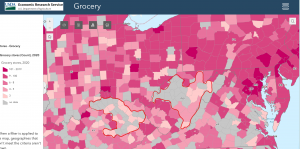
The first GIS application I found was the Food Environment Atlas from the United States Department of Agriculture (USDA) Economic Research Services. I clicked on the Grocery data set, which shows the number of grocery stores in each county. (The darker the shade of pink means more grocery stores.) I found lots of large zones with few grocery stores or no data in the Appalachia region of Kentucky and West Virginia. (I outlined them with my computer’s Draw tool.) 

I know from research in other classes that these regions face very low income rates, and they are home to food deserts, or places with inadequate access to healthy food.

Grocery | Food Environment Atlas

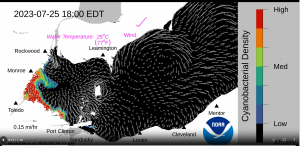
Next, I found an application from the National Centers for Coastal Ocean Science (NCOOS) that forecasts harmful algal blooms in Lake Erie. I went into the archived videos to find a date with high levels of algal blooms and settled on July 25, 2023. This application is a good example of how overlaying different data sets, like cyanobacterial density and wind patterns, is what makes GIS helpful when explaining the reasons for the trends we see. 

Bloom Position Forecast – NCCOS – National Centers for Coastal Ocean Science