Koob Week 3

Chapter 4 

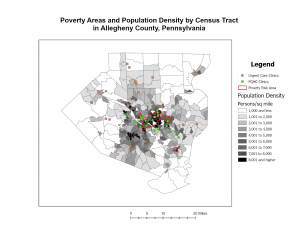
This chapter explains map density and how it can help with seeing concentrated patterns on given areas. Methods such as using a uniform areal unit can allow the distribution to be seen clearly. When it comes to deciding on what to map, it is very useful to think about the features being mapped and the information needed in order to create the map. There is also a difference between mapping the density of features and mapping feature values, such as the difference between mapping the locations of a business versus the density of its employees. Very different data sets.

There are two ways to map density: either based on features summarized by a defined area or by creating a density surface. Mapping by a defined area is recommended if you already have data summarized by area or lines that indicate this. It usually includes the use of dot density maps, helpful for representing the density of individual things such as people, trees, crimes, etc. It also explains further about the different layers for density values and different approaches when it comes to how detailed you may want your map. Its also noted as relatively easier than mapping by density surface. For mapping a density surface, it’s usually made in GIS as a raster layer. Meaning each cell gets a specific density value instead of being grouped into one. This approach is very helpful to use if you have many individual locations or sample points. This precision does require more effort as a result. 

I also learned that some GIS software, such as ArcGIS, lets you calculate density on the fly, or do things like summarize features or feature values for each polygon to make it easier. When reading about how to create a density surface, I did get a little lost, honestly. Especially on cells and their size, plus converting density into their units. However, their different sizes and their important roles in mapping is really interesting. Theres a good balance between big and small to get the smoothest results. 


Chapter 5 

This chapter is mainly about whats inside the map and monitoring it. By doing this, it can be known when action needs to be taken in certain areas or not. For example, how close a crime was committed to a school, and therefore requiring harsher consequences. It is important to define one’s analysis as well, and there are several methods to fit into different types of data sets. Consider how many areas there are, and what type of features are inside the areas. This will help determine finding whats inside a single or several areas. It defines what is found inside a single area, and it allows you to monitor activity or summarize info about the area. For example, the number of calls to 911 within a 1.5-mile radius of a fire station. As for multiple areas, you can compare the data. Such as zipcodes being contiguous (borders touching).

Another aspect mentioned is if the features inside are discrete or continuous. Discrete features would be defined as unique and identifiable. They can beput in a list or summarized numerically, such as crimes, pipelines, streams, etc. Continuous features are a seamless category, and don’t have an easily defined amount; they are more of a summarization. Things such as vegetation or elevation range. They have continuous numeric values that vary across a surface. There are even more different methods for features, such as: Drawing areas and features, quick and easy, but visual only. Selecting features in the area is good for a list or summary, but only for info on single areas. Overlaying the areas and features is very good for displaying what’s within several areas and summarizing by area, just takes more processing. 

Chapter 6 

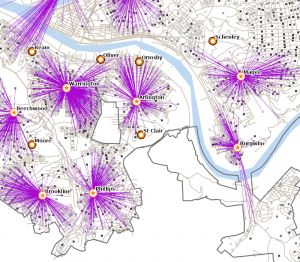
For the last chapter, on finding what’s nearby, it explains how you can use mapping to see what’s within a set distance of a feature. It emphasises that it allows you to monitor activity in an area. Such as finding the traveling range of a feature, which can be done by distance, time, or cost. When finding things nearby, you have to decide how you want to measure the closeness of a location or feature, and what info you need to find a method. Methods could be straight-line distance, measure distance or cost over a network, or measure cost over a surface. Straight-line distance should be  if you’re defining an area of influence or want a quick estimate of travel range. It is simple, a rough approximation. Cost or distance over a network should be if you’re measuring travel over a fixed infrastructure to or from a source. It is more precise; it just needs more accurate network layering.  Cost over a surface should be if you’re measuring overland travel. It gives an area within travel range, allows several combined layers, and just requires some data preparation.

Key terminology, such as network layersare also introduced. Network layers are a geometric network composed of edges,  junctions, and turns. Junctions are the points where edges meet, and turns are used to specify the cost to travel through a junction. The GIS can tell where edges are connected. When creating things like this, you can also use buffers. Buffers are used to define a boundary and find what’s inside it. To make a buffer, you have to specify the source feature and the buffer distance. The GIS draws a line around the feature at the specified distance. The line can be kept as either a permanent boundary or temporarily. More important details like knowing if it is a flat plane or follows the curvature of the Earth, whether its necessary to have a list, count, or summary, etc. There are many repetitive concepts near the end of the chapter, which do help with remembering their functions, but it is difficult to separate the new;y obtained info from the old.

Theres so much information in these chapters I have no idea how to keep it down to 300 words tbh

Koob Week 2

Mitchell ERIS GIS book reading- Chapters 1,2, & 3

Since the publication of Mitchell’s book, the knowledge and application of GIS have increased dramatically. Written for both new and experienced GIS users, it gives a clear format to follow. Chapter 1 first introduces the question of what GIS analysis is, and how geographic features and attributes are related to the programming. “GIS is a process for looking at geographic patterns in your data and at relationships between features.” 

It discusses how data scientists realized the multitude of areas in which GIS and spatial analysis can be used to help aid many of our world’s problems. This ties into the usage of ArcGIS and many platforms alike. It’s a community to join, not just a way to map things. Through GIS, you can find out why things are where they are and how things are related. Framing questions and being specific help make the program run more smoothly. It’s good to have an understanding of how it will be used and who is the one using it. It also emphasises choosing a good method to approach; there’s a difference between precise and broad results.

Results can be displayed as a map, values in a table, or a chart. It shows examples and visuals of geographic features that are discrete, continuous phenomena, or summarized by area. With discrete features, the location can be pinpointed. Continuous phenomena are like a blanket, it can be found or measured anywhere and have no gaps (precipitation or temperature). Summarized by area represents the counts or density of individual features within area boundaries.


In the second chapter, it explains mapping. The helpful features that can be examined by maps, and how it allows people to understand where things are. The chapter gives several real-world examples of how GIS helps multiple professions get a clear idea of different obstacles and specific areas that need attention. By looking at the locations of features, you can begin to explore causes for the patterns you see.

Deciding what to map, what info you’re looking to obtain by the analysis, how you’re going to use the map, and knowing your audience are all key things to remember. Preparing your data is another key step, as there are many layers to categories in mapping. Each method has its own advantages and disadvantages, and the chapter encourages trying multiple views to find the best presentation.


Mapping the “most and least” is explained in the third chapter. But honestly, the explanations in this chapter felt repetitive of the first two. Many smaller, but essential features, of GIS and its mapping. Choosing places that meet the criteria and then applying them to maps. Mapping the patterns of features and knowing the best way to present them. The map’s audience plays a role too, understanding whether the data is being explored or presented by a map. Using ratios to accurately represent distributions, ranking, and creating classes. These help paint a larger picture. The chapter explores more about modeling suitability, exploring how to model suitability for various applications, including site selection and movement analysis.

I feel like I just absorbed so much about mapping and still have no clue what im doing

Cool to learn about though!

Koob Week 1

Hi, Im Jenny Koob! I am a freshman at OWU, and I am planning on majoring in Environmental Science and Botany, with a potential minor in Geography! I’m fascinated by how our ecosystems work and learning more about climate change, as well as the impact humans have on our ecosystems. Aside from my major, I really enjoy being outdoors, traveling, listening to music, playing guitar, and spending a lot of time with my friends.

Schuurman ch. 1 reflection

Before reading this chapter, I didn’t have much idea about the details of GIS. I knew I would figure it out soon enough within this course, but to have it laid out in a chapter actually really helped me grasp it. All of the examples of the usefulness of GIS were already quite intriguing, but to learn that even Starbucks (my literal job) also uses it shocked me! There are so many careers that find GIS so helpful to their work, its actually pretty encouraging. The more I learn about it, the more it makes sense on how it is integrated into so many parts of our world.

It also discusses the statistical side of it, and what questions people have to ask from all angles to work with the computers correctly while getting the data they want out of it. Spatial analysis is considered a completely separate thing from mapping, which is interesting. The development of ESRI was also neat to read about, especially as an envs major. This part: “Although some human geographers claim that CIS is a direct descendant of the quantitative revolution, CIS researchers are loath to accept this simplistic genealogy.” was, again, so shocking to me. I had no idea about all the discourse and opposition geographers faced with the newfound tech. Even if GIS is revered by many, I didn’t expect it to be seen as something to not accept.

As the reading goes on, it talks about how we as people interpret and perceive information, and notes that a majority of scientists argue that people “reason” through imagery. Which is very true in our society; you can see this everywhere: from grocery stores putting imagery of foods and items for buyers to easily interpret, to our road signs, to the way we even learn the alphabet. As a society, we use visuals to absorb and learn information, and I think this is a really intriguing part to note. Plus, I like the topic of “fuzzy lines” because it shows how unrealistic it is to put everything in boundaries and lines (as much as it helps GIS). As the reading wraps up, the distinction between GISystems and GIScience is very confusing, honestly, and I hope I learn more about it.

GIS applications– Coral reefs and the Redwoods

The first application I found with GIS was with the mapping of coral reefs. GIS helps scientists map, monitor, and analyze coral reef ecosystems by combining spatial data from satellites, drones, and field surveys to track changes over time. As climate change, warming ocean temperatures and ocean acidification continues, so does coral bleaching and habitat loss. GIS visualization shows spatial patterns of reef distribution and associated threats like thermal stress or human impacts.

https://cdn.cosmicjs.com/efd06f00-c3ba-11eb-b193-5346a49faa02-Mapping-regions.png

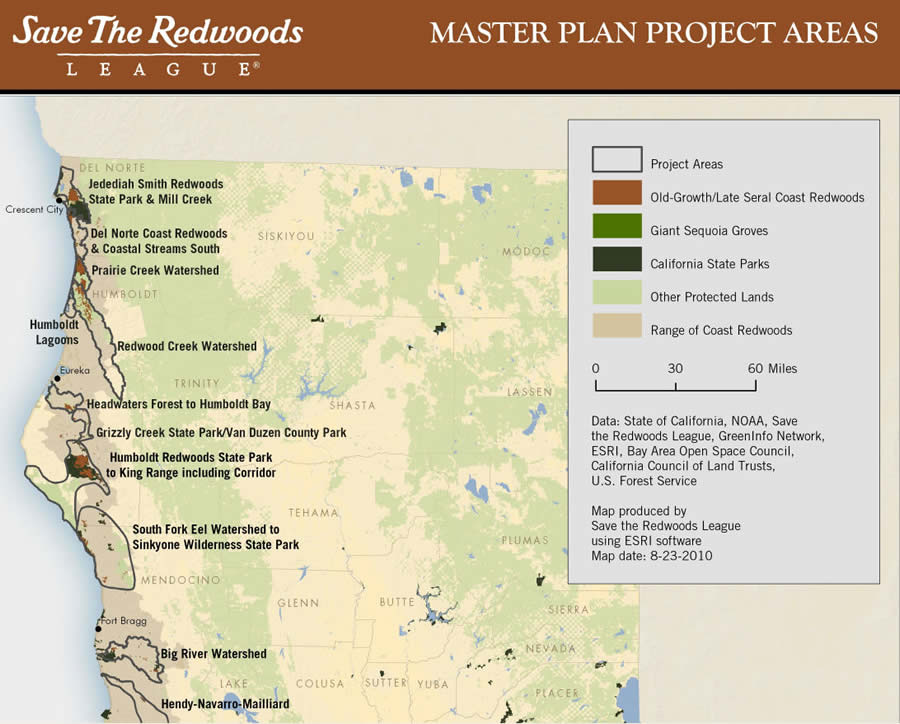
The second application I was able to find was with California’s Redwoods.

GIS is used to map, monitor, and conserve redwood forests, especially along the California coast where the coast redwoods grow. By combining satellite imagery, elevation data, climate layers, and land-use information, GIS helps scientists understand where redwoods exist today, where they existed historically, and where they may survive in the future under climate change. I was actually lucky enough to have seen the Sequoia National Park last year, and hike through the forest of Redwoods. It was truly such an amazing experience, and I am very passionate about what I can do to help protect these trees.

Esri ArcWatch October 2010 - Conserving Earth's Gentle Giants

I also completed Quiz 1! 🙂