Hughes Week 4


Chapter 1

Working through the tutorials has really helped me put these concepts into practice. One area that I struggled with in Chapter one was creating a bookmark. I went through all of the steps several times and it would intermittently allow me to create a new bookmark. I learned how to open and manage a project, explore the map view, and use essential interface components such as the ribbon, Catalog pane, and Contents pane. This chapter also helped me understand different types of data, including vector and raster data, and how layers are organized within a map. Learning how to pan, zoom, and identify features improved my ability to explore geographic information. Overall, Chapter One built a strong foundation by helping me understand both the theory behind GIS and the basic tools needed to begin working in ArcGIS Pro.

Chapter Two

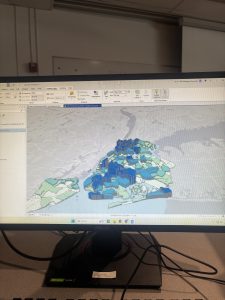
This chapter focused on changing the symbolization on maps and the labels. My favorite part of this chapter was the 3D scenes. I struggled a little with the visibility features and how to make some visible and then not visible when the map was zoomed in and out. I learned about adding data layers, examining attribute tables, and using selection tools to analyze geographic features. I learned how to query data using attributes and location to answer specific questions.

Chapter 3

In this chapter I made some maps and shared my maps. I also used the online version of ArcGIS. The online version makes these maps interactive.  The tutorial taught me how to add and symbolize different data layers, adjust map layouts, and interpret attribute tables to understand geographic information more clearly. I also learned about selecting features, buffering, and querying data to analyze spatial relationships. An important takeaway was understanding coordinate systems and why consistent projections are essential for accurate mapping. Overall, the tutorial helped me see how GIS can be used to visualize, analyze, and solve real-world problems. It helped me be more efficient in ArcGIS Pro.

Cherry Week 4

Cherry Blog week 4  

Chapter 1 

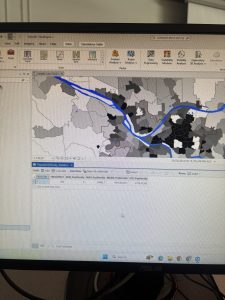
So far throughout the first tutorial chapter, we are working on just some of the basic understanding of where different things are within the GIS program. An example of this is learning how to turn on and off features. Something I was really struggling with was trying to figure out how to move the features. After some time, I ended up looking it up to see and realized I had to go to the list by editing tab so I could actually move the features I needed. So far, throughout a majority of the assignment, I’ve had a really hard time orienting myself to GIS since computer systems are not very easy concepts for me to understand. So throughout a majority of the assignment, I’ve had to look up how to find things since the tutorials have been hard for me to follow.

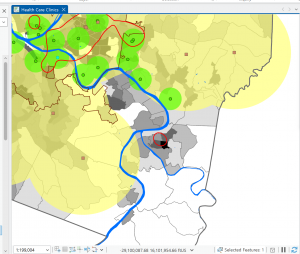
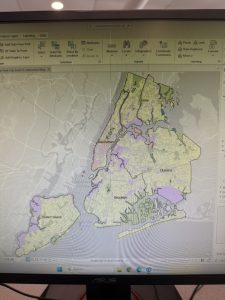
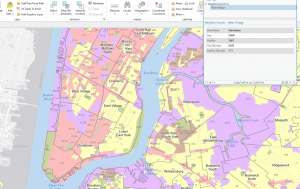
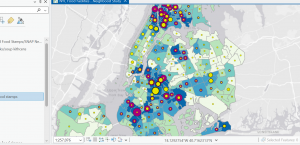
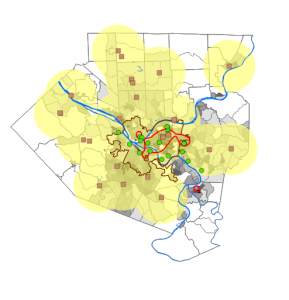
Here’s a picture after the First (1-1) section of the tutorial. 

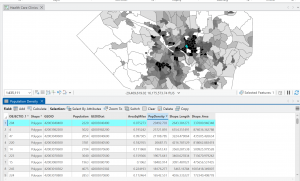
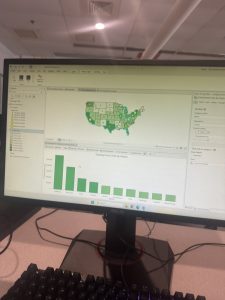
Once I got past the first section of the tutorial for chapter one, it actually got a lot easier, and the instructions felt clearer, so I was able to move through the assignment more easily. For example, the bookmark and zooming in and out part of the tutorial was pretty easy to do. It was also interesting to see the actual information for the vectors in the attribute table (at least for 1-2). Overall, once I got through the first section of the tutorial, it became a lot easier to work with the system. In 1-3, working with the statistics summary part was kind of fun, initially I clicked the little circle plus at the top of the bar for it and ended up having to redo it because after seeing the screenshot in the tutorial of what it was supposed to look like but it was not too complicated so I wasn’t too stressed out about it. 

Chapter 2

For the first 2-1 Section of the second chapter was really easy to work through, and I also quite like how colourful the map ended up being. I think it adds quite a bit of fun to the assignment. When we got to the labeling part of 2-2, I got kind of confused, and it took me a while to figure out where to go to actually get that part done. 

I’m still really struggling with the labeling part; it also still looks very overwhelming in comparison to the tutorial instructions, and I’m not sure how to fix that. Throughout the tutorial for chapter 2 theres a ton of aspects that were centered around symbology, which was quite confusing for me,e but it was kind of fun to also work withcolors schemes. 

2-5 I thought this section was really fun, seeing the overlap of data and trying to find the correlation between them. Overall, this section definitely had very confusing parts, but once I got about halfway through it, most of what I was doing was related to symbolog,y with new parts added to it with each section, so having the same basis to work off of made this chapter a lot easier as I progressed. 

Chapter 3 

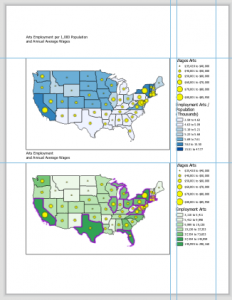
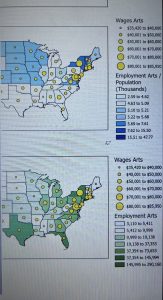
Initally adding the maps to the arts layout was a little frustrating because when i had added them they wee completely different sizes which I did not think was going to be an issue since we were going to resize them anyways, but it did end up being an issue because through that process one of the maps had gotten cut off on both sides so I ended having to start over on that section. Overall, it was not too hard to do, but it did take me a little extra time. I know they were also supposed to resize, but it didn’t seem to work for the map that ‘cut off’. I was also initially really confused about how to get rid of the label name because in the instructions, it just said click show, which was quite confusing because what it meant was a tab called show properties. 

In the section after this, it was quite a bit of a struggle to work on the charts because there were so many little tedious steps, but after that, I didn’t have too much trouble.

Obenauf Week 4

Chapter 1:

This chapter was not very difficult as I have used most of these features before. Instructions were generally easy to understand but I did have some issues with buttons being greyed out (among other things) when I was told to click on them. I am sure this is due in part to user error. I had other issues like things not appearing that were supposed to. I like that they go through a lot of the features just to show us how to use them and turn them off so we know where they are and how to use them. I like that we can toggle different layers to get different mixes of information. 

Chapter 2: 

I had more issues with this chapter. For example, it says “In the Contents pane, drag Over Age 60 Receiving Food Stamps above the 3D Layers heading.”, which is impossible because Over Age 60 Receiving Food Stamps is a subheading of 2D (again, I was probably just doing this wrong). I like how many different ways there are to customize your map and make it accessible. 

Chapter 3: 

I could not get the text box to work for some reason, I couldn’t figure out how to write in it, I tried in multiple places. I also could not figure out how to get the ruler to work. I like how many options for map elements and surroundings we have. The instructions for all three chapters were confusing and at times difficult to follow. 

Deem Week 4

Chapter 1:

Chapter 1 was overall not very difficult, there were a few hiccups at the beginning just getting used to the software and where everything is located in the UI. The instructions were at times vague and difficult to follow for someone who has never used this software before, but were at least substantial enough to get by with.

Chapter 2:

This chapter was significantly more difficult than the previous chapter. I really struggled following the instructions on the ‘your turn’ sections. There were a few times when I could not understand what the instructions wanted me to do/where to find the UI elements they were referring to. Most chapters were not too difficult, but I wish the instructions would have been clearer at points.

Chapter 3:

I was not as confused on this chapter on the whole, but on the first tutorial I got hung up on some of the ruler directions and didn’t really understand what they wanted. Other than that, it was a pretty simple chapter that I didn’t have too much trouble following. I felt like I was better able to follow the ‘your turn’ sections in this part. I can tell that I am getting better at navigating this software from just these 3 chapters, so hopefully I won’t have as much trouble in the next assignments.

Uible week 4

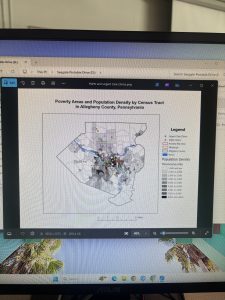
Chapter 1 –  this chapter shows how GIS maps work and how they work and how to run them. in the first example they show the real basics of the map works as well some of the things we can do the GIS map. At first glance it looks really off putting and  but how they set up the tutorials is really simple in how they structure it. They ask us first  to look at the population of the Allegheny county.  They point out if you move some things in a different order they GIS map dose not work when we move it over we cant see the other things like roads or river that are their. They as us to movie it back so we can add more things to they map. They do as us to put the city of Pittsburgh on their were the greatest  part of poverty are. They also tell us we can remove layers so we can get a better view of the things around the city or the population around it . In the second exercise they want us to do is just more around the argpro and get use to doing this in the program. it shows us how to zoom in and how to get really specific to get the best information. shows us how to add date into it and how it should look like when we add it into the software. it also shows how to put symbols  on for point like the health centers .it also shows how you can see things like density in a different way. Before reading this chapter i was very worried about doing GIS stuff because i have never done anything like it. After reading this and doing the tutorials it feels like i can do this and it would be to hard.

Chapter 2

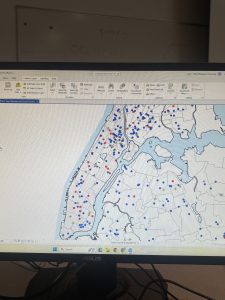
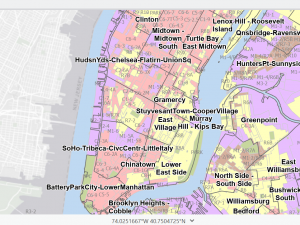
Chapter 2 was a very fun yet somewhat interesting chapter. For the first part, we split the Bros into many different colors to determine exactly what they were, which, in my opinion, was very fun yet somewhat difficult after a long day of classes. It asked us to put multiple of. Each part of the city is a different color which trying to figure that out. Was very interesting because the colors had unusual names and were not the usual ones. In example 2 of Chapter 2, we got to label different parts of the city. Doing this made understanding parts of it much easier and simpler to label, such as the lower part of the east side. Doing this made it much simpler for me to understand and to know exactly what to do with it.  Hudson put labels of specific things, such as Soup kitchens or food pantries. This was simpler than I thought it would be, yet it still had some difficult parts. The other examples I found very interesting after splitting up the Manhattan area into. Where certain things are, you can see the graduation size based on the data we received, which I thought was very interesting. It took a lot more time than the other ones, but it was still very helpful and made it easier for me to understand what was going on with this map One of the other examples was that we got to do the population of New York in the small area of Manhattan and you got to see how spread out the population was, specifically in The southeast part, closer to the Jersey area where it was super dense and it was. The last example I taught us was ranges for the Manhattan area and the other areas around New York City.  


chapter 3

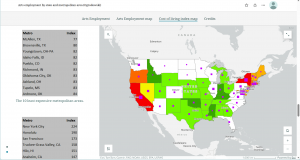
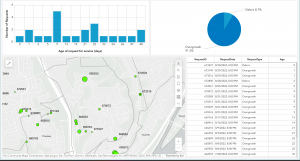
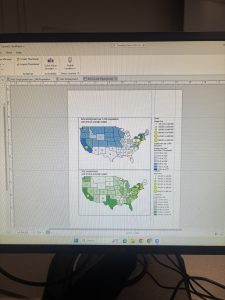
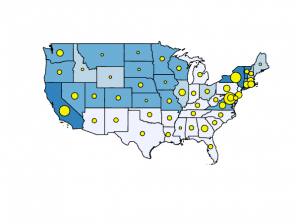
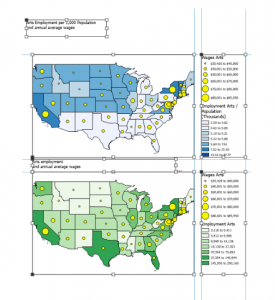
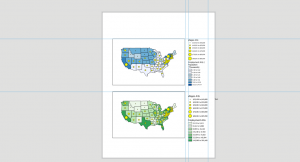
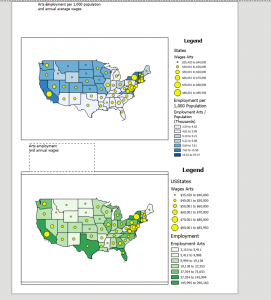
Chapter 3 was a simple, easy-to-understand process. The first part of what we did was create our own map layout. The first part is that we got both maps. Into one page and put it next to both of them. The instructions on this were very simple, making it easy to complete quickly. After you put the two maps on the page, we added guides explaining what each figure meant, population-wise and in monetary terms, for the first map. We did the same things as for the first map, but for the second map. Three put both maps onto the page and made legends for them. We then made charts for each map. We had to enter the X&Y for each state to calculate where they would be pinpointed on an X&Y graph. The second exercise in this chapter was to share our own graph online and explain exactly how to do it. The process was very simple to understand, and it took me very little time to figure this out. Showed us how to share it publicly or privately with specific people so that people from all over can see what we worked on. Also, once we are done sharing this object, we can view it and change how people see it or how they want to view it. They can either zoom in on the feature or adjust multiple layers of the map itself. The last example of Chapter 3 was how to make a Dashboard in GIS Pro. There are a lot of steps to this, but each is very simple and shouldn’t take you long to understand, and it explains exactly what to do for each step. These three chapter have been fun to work on but can be time consuming 


Pichardo – Week 4

Chapter 1 Tutorial Reflection

Chapter 1 was my introduction to ArcGIS Pro, and at first it felt overwhelming due to the number of tools, panels, and data layers involved. I initially struggled with navigating the interface and locating the correct tutorial files, but after rereading the instructions and becoming more familiar with the project structure, the process became much clearer. Once I understood how projects, maps, and data are organized, the software felt far more manageable.

This chapter helped me understand that GIS is more than just map creation—it is a way to organize, analyze, and visualize spatial data. Learning about feature classes, raster datasets, file geodatabases, and projects gave me a better understanding of how environmental data is stored and accessed. Being able to view attribute tables alongside spatial data reinforced the idea that GIS links environmental information, such as land cover or population data, directly to geographic locations.

From an environmental science perspective, these skills are especially important because many environmental problems are spatial in nature. For example, understanding where pollution sources are located, how land use changes over time, or where vulnerable ecosystems exist requires accurate spatial organization of data. The ability to turn layers on and off, switch basemaps, and use bookmarks can help environmental scientists focus on specific regions or environmental factors.

By the end of this chapter, I felt much more confident using ArcGIS Pro and less intimidated by the software. This chapter provided a strong foundation that I can build on in future environmental science coursework and research.

Chapter 2 Tutorial Reflection

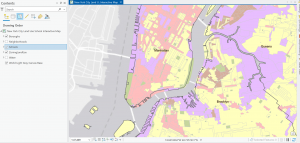
Chapter 2 focused on creating thematic maps and working with symbology, which made GIS feel more creative and analytical at the same time. Using zoning and land-use data helped demonstrate how GIS can display multiple variables simultaneously and reveal patterns that are not obvious in raw data. I found it interesting to see how different land-use categories were visually represented and how color choices affected interpretation.

This chapter was particularly relevant to environmental science because land use plays a major role in environmental health. Mapping residential, commercial, industrial, and park areas helped me understand how development patterns can impact ecosystems, air and water quality, and access to green spaces. Thematic maps like these could be used to study urban sprawl, habitat fragmentation, or areas at higher risk for environmental pollution.

Learning how to create choropleth maps and work with census data also has clear environmental applications, especially when analyzing environmental justice issues. For example, mapping households receiving food assistance alongside environmental risk factors could help identify communities that are more vulnerable to environmental hazards. Definition queries were especially useful because they allow data to be filtered without permanently altering datasets, which is important when comparing environmental conditions across regions.

Overall, Chapter 2 showed how GIS can be used as a powerful visualization and analysis tool in environmental science, helping connect human activity with environmental impacts.

Chapter 3 Tutorial Reflection

Chapter 3 emphasized sharing GIS results with broader audiences, which is a critical skill for environmental science. Environmental data is often used to inform policymakers, researchers, and the public, so learning how to present maps clearly and effectively is extremely important. This chapter focused on layouts, charts, and online sharing tools, which helped translate technical GIS work into accessible formats.

I found the layout and chart creation sections to be challenging at first, particularly when arranging map elements and legends. However, these skills are essential for presenting environmental data in reports, presentations, and publications. Being able to create static maps with map surrounds helps ensure that environmental information is communicated clearly and professionally.

Using ArcGIS Online and ArcGIS Story Maps was especially valuable from an environmental science perspective. Story Maps provide a way to combine maps, text, and visuals to explain complex environmental issues, such as climate change impacts or conservation efforts, to non-experts. This is important for public outreach and environmental advocacy.

Overall, Chapter 3 helped me understand how GIS can bridge the gap between data analysis and real-world environmental decision-making. It reinforced the importance of communication in environmental science and showed how GIS tools can be used to share environmental data in meaningful and accessible ways.

P.S. I wasn’t sure if the photos were supposed to be of the final product or just a part of the process so I just snapped photos when I remembered to.

Rhoades Week 4

Chapter 1 Tutorial

Starting off, this chapter was very confusing for me. I logged in on GIS online at first, but quickly found the GIS Online shortcut on the desktop and this quickly resolved all of the issues. Moreover, I downloaded  the tutorials online, but forgot to extract it. I had issues trying to figure out where the chapter 1 tutorial was, but I reread the instructions and realized that I had forgot to extract the chapter files. I found this tutorial very interesting as it relates to public health, because the locations of urgent care clinics are important to reduce mortality. This is a great way for public health officials and policymakers to see where locations are needed, so they can advocate for the construction of more clinics in areas of need.  I also found it very interesting how you can look at various factors- like population density, poverty risk areas, and households per square mile. This visualization also allowed me to realize that healthcare clinics are usually placed where the population desntiy is highest, which means that areas of lower population density have lower accessibility to health care clinics. I found the book to be very helpful and was very straightforward with instructions, which I appreicate as GIS is a brand new skill for me. I had learned valuable skills about feature class, raster dataset, a file deodatabase, and a project. Moreover, I learned how to bookmark, locate contents in a panel,  how to save a project, how to add and remove a base map, and how to turn layers on and off through contents pane. After completing this chapter, I feel more comfortable with what GIS is, and I feel less anxious and overwhelmed while working. I am happy that I was able to experience the basis of GIS and start honing my skills in hopes I can apply this to my future profession.

Chapter 2 Tutorial

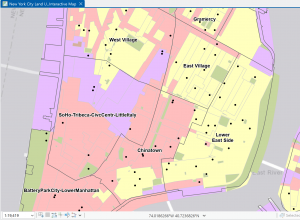
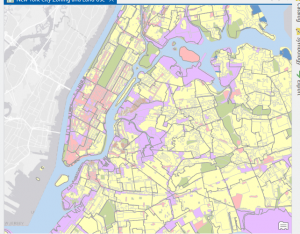
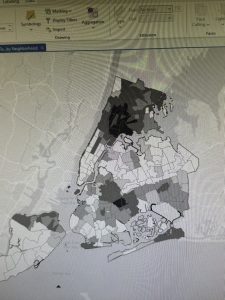
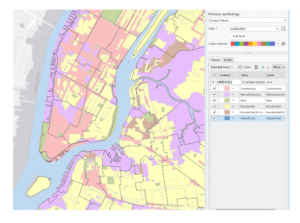
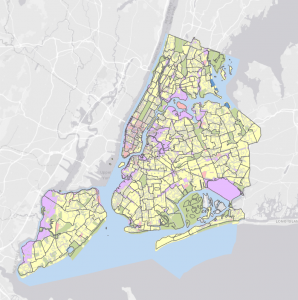
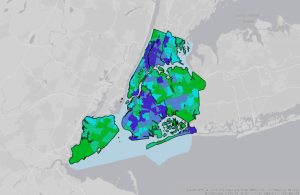
For this tutorial I was able to choose layers for a thematic map through a New York City Zoning and Land Use Map. Thematic maps consists of a subject layer or layers (the theme) placed in a spatial context with other layers, such as streets or politicla boundaries. This allows the viewer to see many elements at once, for example, during this tutorial I saw: commercial, manufacturing, park, residential, residential/lt mtg, and waterfront zoning land use all at once based on different colors. The first part of the tutorial was very interesting, as it was interesting to see the contrast between colors and how we can make use of aesthetics. I had a lot of fun with this, and futher went on to play a lot more with the colors. I did have issues with the water not turning blue. Tutorial 2 wa about labeling features and configuring pop-ups, which are used to identify graphic elements and/or detailed information and included data from several fields, as well as possibly images and charts. I also learned about what a defintiion query is, which is used to filter the features of a layer rather than select a temporary subset of eatures to work with, even though they both use a similiar SQL interface.

I found this tutorial to be fairly straightword, and I enjoyed participating in the “your turn” sections, as it was challenging and allowed me to connect prior steps and definitons from the book into practice. This tutorial did not take too long, and I found it very interesting. I really enjoyed creating choropleth maps for households recieving food stamps. It was interesting working with US Census Bureau data, as I have never worked with that dataset before, but I forsee myself using it in the future.

Chapter 3 Tutorial

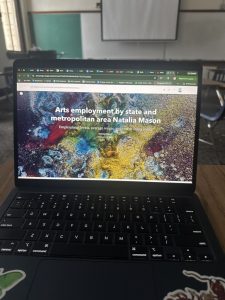
Chapter 3 is about sharing maps with people who do not have ArcGIS Pro or GIS skill beyond map navigation.  Tutorial 3-1 focused on building layouts and charts. I found this to be the hardest tutorials, as I got stuck on creating a layout and adding maps to it. After consulting help, however, I quickly understood what was going on and was able to move-on. This section was particularly important for creating charts, inserting legends, and adding guides and snap maps to the guides. Tutorial 3-2 was interesting as we were able to utilize ArcGIS Online. I noticed a grand difference between ArcGIS Online and ArcGIS Pro. ArcGIS Online is very useful for smaller projects that require a laptop, and ArcGIS Online is useful for larger projects that may require lots of detail and must be done on a desktop. Tutorial 3-3 was my favorite, because I can see myself creating a storymap through ArcGIS StoryMaps. I have utilized this software before, but I did not realy recnognize its importance. ArcGIS StoryMaps allows you to create briefings that consist of a series of slides with bulleted talking points, interactive maps, and other content for a presentation to an audience. Also, this can be shared online with others through a URL- while it may be more difficult to share a project on ArcGIS Online with somebody who is not familiar with the software. I particularly enjoyed this section, because it combined everything we have previously learned and talked about and allowed us to apply it. Overall, this chapter allowed me to see the more accessible side of GIS and how it can be shared with others. My favorite part of this chapter was creating statis maps with map surroundnigs and the online interactive maps through ArcGIS StoryMaps. Overall, I am excited for next week to learn more about GIS and how this can be applied to public health.

Ramirez Week 4

Preface +Ch.1: Before reading the book I was very nervous to start using ArcGIS Pro because I am not very good with technology. However, after reading the preface I felt reassured primarily because the book was set up in a step-by-step format. Therefore, I was very relieved when I noticed that chapter one was specific with its instructions and how to use the app, especially with finding the tabs, panes and other items. Despite these specific instructions I still struggled with finding these buttons but that could be due to my eyesight. That made the tutorial longer, but eventually, I believe I was able to manage most of the GIS settings and projects. Nonetheless, I would like to start working ahead with the other tutorials in order to avoid feeling overwhelmed. 

In this chapter, I learned that the file geodatabase is a folder that stores features and raster’s etc., meanwhile a project is a file that contains maps and related files. I also learned that the GIS software is able to detect certain features depending on the order they are displayed. Thus, the feature at the bottom of the pane is displayed first and then the layers above it are displayed afterwards. I learned that features that cover larger areas should be at the bottom of the list. I also believed that having buffers available was a good way of demonstrating the relationship between features, especially because they are transparent. Another interesting part of ArcGIS Pro was being able to see some features when you zoomed in on the map. This reminded me of Google Maps, where you can see individual street names or locations the closer you zoom in. Despite my technological struggles, I was happy to experience the basics of GIS and I hope to improve both my GIS and technological skills. I was able to improve on them throughout the other chapters, but I could always use more practice.
 

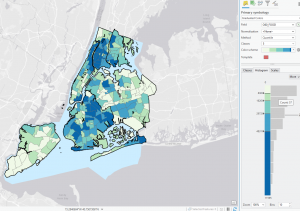
Ch.2: In chapter two I was able to learn how to add symbols and characterize my map. I learned that a thematic map can be used for solving a problem and consists of many layers. The importance of this map is to ensure that the features are identified as figures since it makes up the majority of the map. Otherwise, if a feature is not identified then the GIS will count it as ground. Part of the first tutorial was to display symbols for the New York map, which was fun because I really like colors. Although, for some reason the water on my GIS map was not turning blue, everything else was fine. In the third tutorial I also learned that a definition query is used to limit the features to a subset for a large collection. It is used to filter features of a layer instead of temporarily selecting features to work with. Throughout the chapter, I also noticed that some terms such as natural breaks, and quantile from the first book are mentioned. Furthermore, I also learned how to create a histogram which was interesting.

Even though this chapter was fun to explore especially with the colors, I still had technological difficulties. Throughout the chapter the instructions began to be less specific, especially when it came to the “Your Turn” exercises. I understand that these were meant to put into practice what we learned from the tutorial but since I don’t understand computer software and have bad vision, it was hard to complete it. Other times, the system would not allow me to fully complete my tasks so I had to skip some of the instructions. I still read over them to get an idea of how the features were supposed to work, so I would not fall behind. 

Ch.3: Throughout this chapter, I still struggled with the software at times but I still read through what I needed to do to make sure I understood what was going on. I also noticed that at this point the instructions were a lot less specific compared to the first chapter. Personally, I noticed that the wording for some of the instructions were complicated and it did not make much sense to me. Especially when it was referring to the sizes of rulers, guidelines or legends.  Another confusing part of the tutorial was when the instructions mentioned zooming in on a specific area on the map. Sometimes I would forget to use the bookmark system to zoom in on a location, which led me to manually do it and I would get confused when comparing my map to the example map. I do not think it was entirely required, but it would have been useful to have the same map section as the reference. 
I also thought it was useful to learn how to create a story and post a map on the website. This is useful because it may be helpful to share information with others, especially when it comes to expanding research. I believe that being able to have this source is helpful for students overall,when it comes to sharing data, giving credits and  asking for help during the research process. Towards the end of the chapter I was also able to learn how to create a bar graph using the map. At the end of all the chapters and tutorials I realized that there was a lot of statistics and graphing involved with GIS. As well as repetitive actions in order to change a certain symbol or feature. Nonetheless, I enjoyed the creativity allowed within the software and I hope I will continue to enhance my knowledge.
Gist Week 4

Chapter 1- Tutorial 1.1

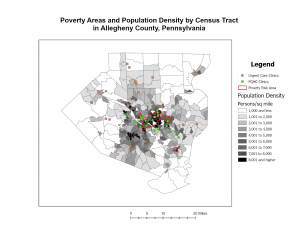
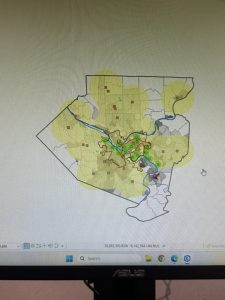
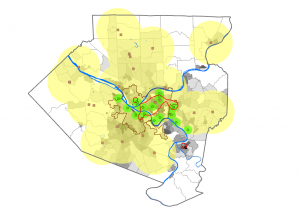
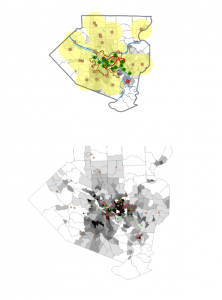
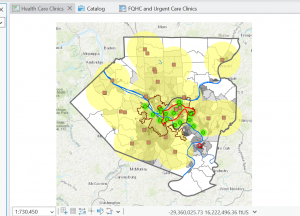
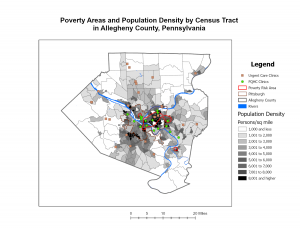
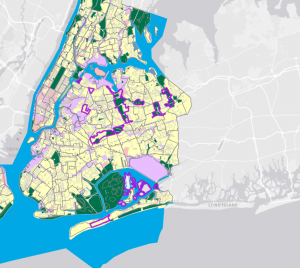
This tutorial was the easiest, and relatively self-explanatory in my opinion. However, it took much longer than needed as I started figuring out the software and where everything was. I also had trouble with connecting my hard drive into the computer to save, but ended up figuring that out with some help from a classmate. Once I got through the set up portion of GIS it was much more smooth sailing. The actual tutorial began by showing how to overlay maps with the other included data in Allegheny County. What I found interesting was how you could clear everything that is outside of the map to just show what is inside. It made it much cleaner to look at. This reminded me of the previous chapters read of how when creating a map it is important to think about the audience and what would be easy for them to understand. This map ended up being very easy to read and understand while I was constructing it. The left sidebar that lets you turn the specific layers on and off. For this one specifically, it had you select the Urgent Care Clinics, FQHC Clinics, and Poverty Risk Area, as well as the landforms and streets in the area. It also lets you reorder to have specific layers be on top of each other. One part I had trouble with here was right clicking rather than left clicking and the difference between the two. The book was very helpful in explaining when right clicking was needed for the next step. One specific question I had during this tutorial was how the data was already included into the system. I was wondering if we will be shown how to input our own data in the future of this class. Overall, this chapter was explained very well in a step-by-step manor that allowed me to create the graph inputted below.

Chapter 2- Tutorial 2.1

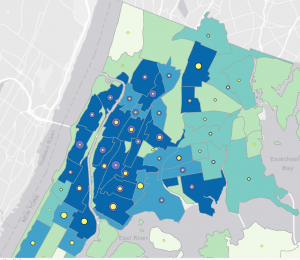
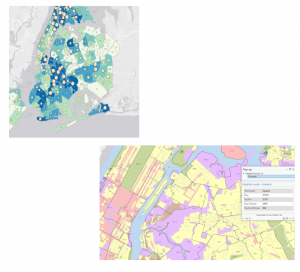
This tutorial was my favorite of the three done this week. I liked all the customization options and colors shown to put onto the graphs. I really liked how we did the whole process ourselves of going from a blank, black and white map to the colorful one inserted below. I also found it interesting how you can change the border thickness, color, and even the color of the water. While doing the extra step of choosing the water color, I scrolled through and saw all the different customization options, and I enjoyed seeing all the options it gives. I thought this was a really cool way to get the information across in a clean way. This part of the chapter left me wondering how GIS is able to know the information and tell what is land and what is water. My guess is that is has something to do with the information inputted into it for each tutorial and the data behind the scenes. However, I found it extremely convenient that the software is smart enough to already know the options that can be selected. The only issue I had at this point was knowing where everything was. The coloring step was very repetitive, but I still needed to refer back to the instructions multiple times to remember where everything was. Into the next few tutorials of this chapter it showed how to label different features, create a definition query, and create a choropleth map. When adding the labels, I liked how they used the pastel colors, gray borders, and bold labels. This made the map very aesthetically pleasing, and it was easy to see each of the components. This chapter was a lot more complex than the previous two, but I was able to complete it in less time than the last one.
Chapter 3- Tutorial 3.1

This tutorial was the hardest one of the three in my opinion. This one took more time than the last two tutorials together, and was not super smooth sailing. I first had trouble with getting the two specific maps and accidentally grabbed two of the blue ones multiple times. When deleting to try and get the green, I accidentally deleted the new layer portrait and had to completely start over. To do this I had to delete the entire tutorial and resave a new one from the original chapter three folder. Once I got back into the new tutorial, I had an easy time redoing it and going back into the New Layout tab to select the size for the background the maps are placed on. I also was having trouble getting the maps into the right spot, before I realized that the rulers are available to use. Once I put the guides in, looking at the picture and the rulers made it a lot easier to get the pictures into the place the tutorial wanted. I also liked how you could go to each specific map and choose the specific dimensions rather than guessing on the size. I also was confused on whether or not I did the Legend right. I think I did it right, but I moved on to the next part of the steps. The easiest part of this map was adding the text above each map, I had no trouble with this part! That was the last step I did on this tutorial after being frustrated by all the mistakes and troubles I kept having. However, I read the rest of the tutorial and the next steps made sense on how to continue. This chapter had multiple examples that I would not expect to be done on GIS, and it was really cool continuing to see all the options and customizations that are possible. Overall, in the three chapters this was a good introduction to GIS and the software. While I had lots of confusion, most of the steps were understandable with the steps in the books.


Njoroge Week 4

Chapter 1:

The first chapter of the ArcGIS Pro Tutorial textbook went over the basics of using the application. I found the chapter easy to understand and extremely helpful, as it was the foundation that helped me better understand the rest of the textbook. I was able to understand the layout of the app, as well as how to navigate maps within the app. One of the more useful sections to me was the one on working with tables on attribute data and how to manipulate said data from within the application. I also found the section on working with 3D maps, because I didn’t think we would be covering that material in this chapter. Overall the chapter had a lot of good foundational knowledge, and it prepared me for covering the rest of the assigned chapters.


Chapter 2:

This chapter was more content-heavy than the first, and focused more on how data can be manipulated within ArcGIS. I did enjoy it, and found it easy to understand. I found it easy to grasp the use of definition queries to make a subset of map features, creating 3D scenes and dot densities. It did make me wonder if there is a maximum number of queries that can be applied on an attribute at one time. We also covered the use and creation of bookmarks, and I wondered if there was a maximum number of bookmarks that could be applied to a map.


Chapter 3:

This chapter went over how information processed in ArcGIS can be presented and shared to those who do not have the application. It also allowed me to get acquainted with the ArcGIS website and how to share data there under your account name. It also covered how to create and customize legends, charts and graphs within GIS as well as how to share them in a way that is viewer friendly and easy to understand. My favorite section was the one that covered the creation and customization of dashboards. One question about the different ways we will be using the ArcGIS website in the future, and if 3D data could be shared on the site.