Isaacs Week 5

Chapter 4:

This chapter pushed me a bit more than the earlier chapters, but I still enjoyed working through it. I thought it was really cool how the chapter showed different ways to control what you can see and can’t see on the map, especially when sorting layers or adjusting visibility settings. Some of the steps were a little harder to follow compared to previous chapters, so I had to slow down and double‑check what I was doing. Even with that, I liked experimenting with the symbology options and seeing how those choices changed the look and meaning of the map. Overall, the chapter helped me think more about map design and made me feel more confident using ArcGIS Pro.

Chapter 5:

This chapter focused on finding what features fall inside a specific area, which made the analysis feel more practical and straightforward. I worked through exercises that involved selecting features within boundaries and summarizing what was inside each region, and I liked how clear the results were. Compared to the previous chapter, I found these steps simpler and easier to follow because the workflow felt more direct. It was satisfying to see how quickly you can answer real questions just by defining an area and using the different tools. Overall, this chapter helped reinforce the basics of spatial analysis and also wasn’t too hard to follow. 

Chapter 6:

This chapter covered comparing features across different layers, which made the analysis feel more detailed and data‑heavy. I worked through exercises that involved joining tables and looking at relationships between datasets, and it was interesting to see how much information you can uncover when layers are connected. I found this chapter harder to navigate because some steps expected you to remember tools and menus from earlier chapters really well. A few times I had to look back or look up how to get to a certain table or window, which slowed me down. Even with the extra effort, the chapter helped me understand how powerful table relationships are in GIS and why they matter for deeper analysis.

Spurling Week 5

Chapter 4

I found this chapter a little hard to navigate solely because of the “adding clauses” section of the tutorial. However, other than that, I was able to do the rest successfully. I now feel more comfortable working with GIS in general, and I feel capable finding and completing basic tasks.

Chapter 5

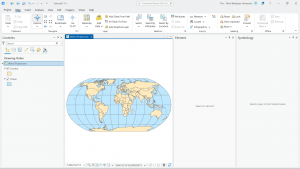
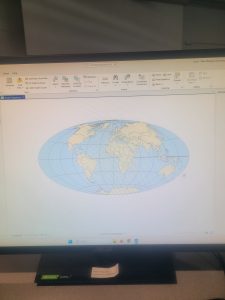
After Chapter Four’s difficulties, this chapter and tutorials made me feel a lot better. This chapter was all about spatial data. The Hammer-Aitoff projection is also pretty cool to be able to create. The only discrepancy I had was specifying the display units for the map, however, other than that, it was fine.

Chapter 6

This chapter is about geoprocessing. This chapter was also a little harder than I anticipated as well. The pairwise dissolve tool was okay at first, but the more I used it the harder I found it to navigate. Overall, I feel good about this week’s chapters and feel more confident in my GIS abilities

Whitfield week 5

Chapter 4 (3.4): 

In this chapter, I was able to gain more insight into working with File Geodatabases throughout the different exercises and learning modules. I learned more about spatial databases and databases as a general skill and tool used when working with maps and GIS. In the first chapter, I learned more about importing data into a new ArcGIS project as a means to create a map and input data for different skills. I had issues in this section when it came to importing data as well as in some ways following the directions given to me in the book and project manual. Even though I understand both that I need these methods to learn and later create my own maps and images using data, I still get confused. I then learned how to modify attribute tables, with attribute tables being used to portray and display a lot of what is used in GIS ( in columns of data in tables). While doing this chapter, I felt more equipped when dealing with maps, that’s not the say that confusion didn’t arise at different points, especially as I was navigating between the instructions and the actual assignments, trying to get my work to match everything that I was in the readings while not knowing if it was entirely right or not. Later in the chapter, I learned more about carrying out attribute queries which is the use of linking tabular data to the spatial features in feature classes. In the actual lesson, I used SQL criterion with the attribute name as well as other factors. I hadn’t previously realized that coding or script could be use in GIS as a means to symbolize attribute values that are found in maps. 


Chapter 5 (3.4)


In this chapter I learned about world map projections and the different map windows that can be used in GIS to display and show information. One of the maps that was demonstrated to me was the “fly to Hammer-Aitoff (world)”. I was initially confused on how this information was resourceful to me but then assessed by situation and again understood that any and all information that I am learning in GIS is useful to me, seeing as I didn’t know anything about GIS or mapping before taking this class. I then started working with US map projections that are used commonly in the United States. Connected to this, I learned about using a projected coordinate system and the subsequent parameters that are associated. Lesson two was one of the easier sections from this chapter, which I  was very glad about. I then learned about projected coordinate systems which are used for medium and large sized maps (localized). I personally had issues adding layers and importing data, and came to find out I had been saving and putting data in folders wrong that entire time I was doing these assignments. I didn’t want to restructure my approach to everything after having come so far, so I had to change my approach and understanding of importing and naming data that is being put on my map. When talking about importing data, I also had issues with the fifth lesson in this chapter when I had to export data from an outside source for the first time to then bring it back to the map. In this chapter I also had to work with excel and tables from that which I was confused on, I had a hard time figuring out how to find my data in my files while also trying to properly insert it into my map. 


Chapter 6 (3.4) 


In the last chapter of this section I was sleep deprived while working on it so I made it harder and more frustrating than it had to be. In the first tutorial, I had issues with understanding the instructions while simultaneously getting error signs and messages saying that the data was not being inserted correctly. In the second tutorial where we were extracting and clipping features, I first had issues with learning how to properly select the areas and regions that I needed from the map to then be used for more information. I will say that it most definitely feels liberating when you understand what you are doing or when you finally get the issue sorted out that you were stressing over for an hour. I will say that I was glad I didn’t have to go out onto the web as much for this chapter while doing the tutorials, that’s not to say that it made the assignments easier or took less time to do. In this chapter, I also had issues when trying to interpret the directions both outwardly and incepted in the “your turn” sections. I’m not sure if it was because I was working on this until 5 am or if I was just extra angry, but every time I couldn’t find a function or feature within the first maybe 15 seconds of reading the instructions, I immediately began clicking harder on my computer and having to take deep breaths. This was especially true for when I was working with the different tools in the tool box and I continued to get error signs while my data and codes were processing because I was inputting something incorrectly. 

(I also again forgot to take pictures of my work and I fear its to late to go back and capture pictures of anything, trust and believe I’ll add pictures to next weeks work though 🙂

Obenauf Week 5

Chapter 4

I had similar issues as last time with the instructions not being specific enough. For example the text said to “Search for and open the Export Table tool,” when I searched for it three different “Export Table” tools came up and the text did not specify which one was the correct one. I had to go through each tool to figure out which one was the right one. After trying the two tools that were still active I got error messages for both of them. There were times where I had to guess what the textbook wanted me to do. I had a really hard time with this chapter. It was very confusing. After meeting with Dr. Krygier I realized that it wasn’t as much the content in the “Your Turn” section that was confusing me but just the way they worded the instructions that I had no idea what to do with. 

Chapter 5

This chapter went a lot smoother but I did have some issues with instructions telling me to open something with no other instructions and I had no idea how to proceed. This chapter has been the easiest for me thus far with little snags. It is really interesting how many applications GIS has and the many different ways it can be applied. 


Chapter 6

We learned a lot of different tools in this chapter. We learned how to combine and dissolve data. The pairwise dissolve tool was easy to use. This chapter went over how to merge, extract and add features. 


Gustav week 5

Chapter Four:

Chapter four primarily discussed opening previously edited GIS files within ArcGIS pro as well as converting data to suit the needs of the project. I will admit this was a very intimidating thing for me to work on, I’ve mentioned I’m not one for computer science. Interestingly this was actually the easiest part of the chapter as the tutorial was very clear on where/how/whatever to do to import the data into a new map and converting it accordingly.

The latter half of the chapter discussed different ways to interpret quantitative data specified on the map. I absolutely hate mathematics with a passion so naturally this was not a very fun thing for me to do. This was especially evident given that the tutorial has the rather uninteresting example of making census records which did not help. (It was like getting a word problem in a math class.) Though this was somewhat remedied later when example turned to different types of crimes committed in the area in question.


Chapter Five:

I absolutely loved this chapter! It was an absolute breeze to get through and I very much so appreciated the amount of different projections the software offered. It was absolutely fascinating to read about the  different practical applications for each projection and how they will influence the geographic results. Then the chapter when on talking about adding data layers and used another census example, this one was significantly easier to get through then the previous one given the lack of quantitative data however.


Chapter Six:

This chapter was rather trivial in my opinion. (My opinion might change when I start working on my own project within this software however) The labeling of land use characteristics as well as assigning the different fire department precincts to the neighborhoods was a very interesting example and a welcome change of pace. I feel like the whole tutorial on merging water features could have been significantly shorter and I really wanted this chapter to elaborate more on what the potential benefits are of just having one “area” of water. I hope my mind will be changed on that opinion as I progress but at the moment I am struggling to see a useful application for that feature.

Deem Week 5

Chapter 4: Not a terribly difficult chapter, although I had some issues with the tools on the last two tutorials.

Chapter 5: Significantly more difficult chapter, the first few tutorials were not hard and could be completed relatively quickly. Tutorial 5 took almost 45 minutes to complete and a number of instructions were difficult to follow. Tutorial 6 was also lengthy and difficult. On a more positive note, I feel like I am gaining a lot more familiarity with this software.

Chapter 6:Chapter 6 was the easiest for me, I had no trouble getting through any of the tutorials and was able to understand the instructions well enough to complete the tutorials in a timely manner.

Fry- Week 4

I was excited to get into the real GIS work last week and ran into some technical difficulties, so I apologize for the delay in this post. This group of chapters was extremely helpful in understanding and navigating the ArcGIS Pro app. Initially, I thought the app would be simple and easy to use, but there is much more to it than I expected. However, all these tools are very useful to engage in the full application of GIS. The ability to change formatting as needed and control the layering of each aspect is impressive for creating the perfect visual, regardless of the need. The step-by-step style and many tutorials, including very simple steps is a very nice way of learning GIS programs and helpful for me personally as a very hands-on learner. I really enjoyed how interactive the maps remained even after creation. Being able to zoom in, click on points, and review specific information on an area with a click of a button really shows how incredibly useful GIS is to a multitude of different applications. I also did not know that GIS can be used to make graphs or informants other than maps. Chapters one through three covered a lot of information on the basics of GIS, and it was a very helpful introduction for someone who has utilized very little of these programs before.

Hughes Week 5

Chapter 4

I learned more about attribute data tables and how to manipulate them to see what I want to see. I also learned how to create attribute queries. This was the more practical use of the software I have experienced yet. I learned how to create new attribute information. I also learned how to join and relate information. I think that 4-3 was the more difficult part, as I had a lot of difficulty locating the files and getting it to open properly. That part took me longer than any of the rest of it, even though that was a shorter part.

Chapter 5


In Chapter 5 I learned how to edit geographic data. There was a lot of focus on creating and modifying classes. I learned to add new classes. I had trouble at first selecting the correct layers before making changes and had to go back a few times. I had some trouble at first because my files kept saying that it had to fix errors. This chapter took me longer than any other because of this. I had a lot of trouble undoing mistakes and had to keep going all the way back. This chapter really focused on the reliability of the data. 

Chapter 6


Chapter six focused a lot on the different tools. This is where it really felt like we were getting into the things that ArcGIS can be used for. It was more fun to do than the other chapters too. Within the attribute tables, I learned to analyze information. Selecting by location was also helpful to know so that I could look at features that intersect and distances. I learned more about combining data and dissolving data. I was able to learn to use the merge tool. 

Rhoades Week 5

Chapter 4

Chapter 4 was about working with spatial databases. I learned that a database is a container for the data of an organization, project, or othre undertaking for record keeping, decision-making, analysis, and research. I found this chapter to be more difficult than the previous chapters, but  I found it very interesting who individuals can utilize GIS to import databases directly into ArcGIS Pro. To me, this chapter was the most useful chapter that we have done yet. I can see myself importing data into the database and using it to analyze trends. I did have a bit of trouble importing the map, as it did say that there was a network error. I did have to switch over to another computer and this was resolved.

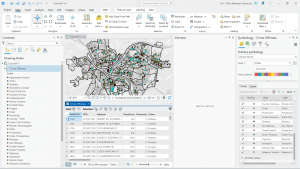
I also was able to learn about carrying out attribute queries. Linking tabular data to the spatial features in feature classes allows you to symbolize maps using the attribute values found in tables and enables you to find spatial features of interest using attribute data. An attribute query selects attribute data rows and spatial features based on attribute values. Something that I did have a question about was what SQL is. The chapter discusses how attribute queries are based on SQL, which is the de facto standard query language of databases and many apps, including ArcGIS Pro. I am interested in learning more about what SQL is what it entails. One of the more interesting parts of the chapters was viewing crime incidents. I found this to be very interesting. I never thought about how public health officials/law enforcement may be able to map criminal activity in order to look for areas of need and implement appropriate interventions. I did find the “your turn” on page 116 to be specifically hard, as I had a hard time locating the SQL view to remove the parenthesis.

Chapter 5

Chapter 5 was about spatial data, and I was able to change the geographic coordinate system to a projected coordinate system by setting the map properites, change the projected coodinate system to a different projected coordinate system by setting the map properites, and set the projected coordinate system for a local-level map by adding a first layer to the map an d specifying the display untis for the map. In 5-1 I learned more about world map projections. I discovered that geographic coordinate systems use latitude and longitude coordinates for locations on the surface of the earth, whereas projected coordinate systems use a mathematical transofmration from an ellipsoid or a sphere to a flat surface and two-dimensional coordinates. This section was very inetesting to learn about the various types of map projections- such as the Hammer-Aitoff projection.

I also found 5-3 to be very interesting, as I was able to change a map’s coordinate system. 5-4 allowed me to examine a shapefile. I was a little confused reading this section on page 134, and was wanting more clarification onn what a shapefile is and why they are important. I understand that a shapefile consists of at least three files with either .shp, .dbf, or .shx and each file uses the shapefile’s name but with a different extension, but I am not too sure how I would use it or what the importance is. I found tutorial 5-5 to be the most interesting, where I was able to work with US Census map layers and data tables. I learned that the advantage of downloading spatial data is that you have more flexibility in modifying it. I was able to download census TIGER files, and process tabular data in Microsoft Excel. I thought the process of adding and cleaning data in ArcGIS Pro was very interesting, and I would like to use this feature in the future, because it would be easy to analyze and interpret data within the same software- and not have to switch around programas.

Chapter 6

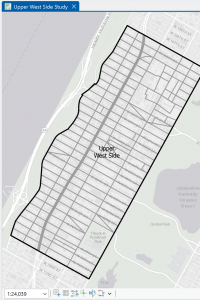
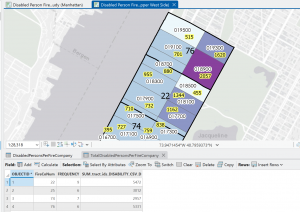
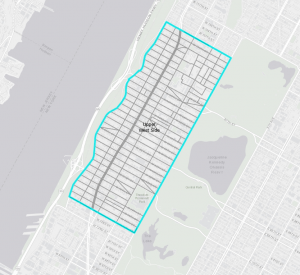
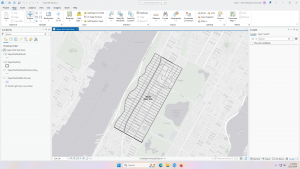
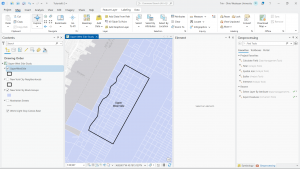
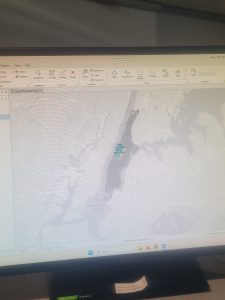
Chapter 6 is fundamentally about geoprocessing- which is a framework and set of tools for processing geographic data. 6-1 was about dissolving features to create neighborhoods and fire divisons and battakions. I learned about the pairwise dissolve took, which can aggregate block group attributes to the neighborhood level, using statistics such as sum, mean, and count. In 6-2 I was able to use select by location to create study area block grops. I found this to be very interesting, because the “your turn” was very interestnig I was able to interact within multiple layers. I was able to use the pairwise clip tool to cleanly create street segments. This was useful because clipping Manhattan streets with the Upper West Side boundary cuts off the dangling portions of the streets and creates a clean layer for display purposes. My personal favorite was doing 6-7 where I was able to understand study tracts and fire company polygons. It was very intersting to learn that responsbility for the tract’s population of persons with disabilities should be spilt approximately 50/50. I was able to select tracts to open the disability field, which showed that the population of persons with disabilities in tract is split 50/50 between fire companies 22 and 75, each with 400 persons. Census tract 019300 retains its full population of 1,620 persons with disabilities.

At the end of this weeks tutorial for chapters 4, 5, and 6, I feel as if my GIS skills are improving. At the beginning of the semester, I had no clue what GIS would look like in practice, and using map projections was a big surprise to me- because I did not envision this being a large part of GIS.

Njoroge Week 5

Chapter 4:

I found this chapter to be quite content heavy, but it was very interesting as it covered how geographers can import data into a geodatabase and manipulate it from within the app. This manipulation can be done in a myriad of ways, such as directly within the field view table or with the use of python expressions to combine or calculate fields. The chapter also covered the use of different tools such as the Calculate Field tool as well as how to select specific fields using generated expressions. It also had a section on centroids (the arithmetic mean of all the points within the polygon), and how they can be manipulated to influence the presentation of data within ArcGIS. I found this chapter to be the most interesting one we went over this week, and the one I found the most useful.


Chapter 5:

Chapter 5 went over the use of different map projections and how some can be more useful and cause less distortions in the display than others. The chapter also covered how to use and add coordinate (x,y) data; GPS units and many databases provide coordinate data, and said data can be used in GIS from a table to create point feature classes, such as libraries in Chicago. It also covered how exactly to work with outside sources like the US Bureau to import and work with spatial and tabular data. I thought this exploration of spatial data sources was interesting and the chapter explains it very well. I am excited to apply the information covered in this chapter to the final project for the end of the course.


Chapter 6:

This chapter focused on explaining how block groups, layers and features can be extracted and moved depending on the data needed. It covered how to dissolve block group polygons using the Pairwise Dissolve tool, extracting neighborhoods using attributes from a study area and intersecting features on different attributes. The chapter also went over how to merge, extract and append features using tools within ArcGIS. My favorite part of the chapter was learning how to use the Union tool on the different boundaries to create more detailed polygons. I thought it was a cool feature of ArcGIS to learn about. It did make me wonder about how many features can be merged at one time, and whether said features need to relate to each other or not.


Delaware Data Inventory:

Data Layer Name: Parcel
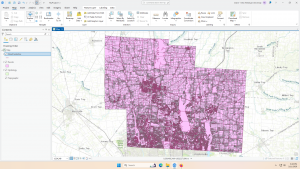
Description: This dataset shows the extent and ownership of parcel lines within Delaware, Ohio. It is a feature service, and is maintained by the Delaware County Auditor’s GIS Office. When viewed in GIS, it shows the boundaries of different parcels, particularly within the study area.

Data Layer Name: Hydrology
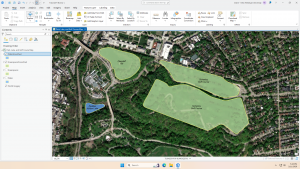
Description: This dataset contains all the major waterways within Delaware, Ohio. It is updated on an as needed basis and is published monthly. In GIS, using a different symbology from the rest of the parcel data can make it easier to distinguish and work with.

Data Layer Name: Street Centerline
Description: This data depicts the center of pavement of public and private roads within Delaware County. It falls under the Feature Service type, and appears with a simple line symbology when viewed within GIS.

Screenshot: