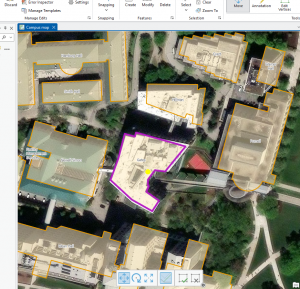
Chapter 7 is much easier than some of the other chapters we have done in this GIS program. For the first tutorial, we had to move specific buildings to align them with the building shapes on the map we were looking at, which was very easy and took only a few minutes. Example two of Chapter 7 began by creating a specific point in the University parking lot, ensuring it was a specific color and could be shown on the map. The other part was that we were deleting specific things and making sure they stayed deleted. In tutorial three, we had to use a smoothing tool to smooth out Flagstaff Hill, which was very confusing at first because I couldn’t find the specific tool they asked for. I looked it up, found it, and it didn’t take me much longer. After that, the specific tutorial asked me to smooth out the specific areas it specified. for tutorial for we had a specifically put the colors on the specific building and have them make sure they were correctly color coordinated at first they didn’t come through due to the layering on top of it, but the tutorial showed us how to make sure that the layering didn’t cover them completel., this one was specifically really fun to figure out as it made identifying specific things in the building more interesting and you could figure out an office space a classroom hallways restrooms and this kind of shows out how building planning works, which is very interesting. Out of all the other chapters we have done, I think chapter 7 is probably one of my favorites. It adds onto things that we’ve already learned how to do, exactly as well as adding some new things on top of what we’ve already learned, and keeps expanding the specifics of what other chapters already showed.
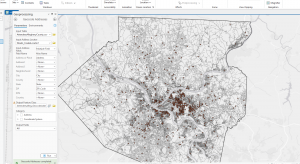
Chapter 8 had only two tutorials, but both were somewhat long, especially the first, which asked us to build specific features based on ZIP Codes in Pennsylvania, Ohio, West Virginia, and Maryland. in the tutorial, we may have started out very big with those four states, but it’s specifically broke down into defining the specifics in a very quick manner where we specifically went down into major cities like Pittsburgh, which was very interesting because we went from very large very quickly to very small, and I only a matter of minutes and only a few clicks between each one. Compared to the first tutorial, the second tutorial was a little easier but a little bit more tedious. We specifically had to put many things down, like our left address and the locator house address, which was very confusing at first when reading the specific tutorial. Compared to tutorial one, this one definitely took me a little bit more time, but it was definitely worth it. It was very interesting to see how, with just a few numbers, you can point out so many different places in such a major area. Both of these tutorials were a little confusing, but after a little bit of time, I figured them out with very little problem and felt like I completed a harder assignment compared to chapter 7, even though chapter 8 only had two examples; these two examples were a lot more complicated compared to the chapter 7 examples
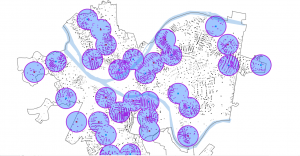
Chapter 9 is kind of like Chapter 7 in that the tutorials didn’t feel as hard, but there were many of them to do in tutorial one of chapter 9, we were trying to find the pools in the area of Pittsburgh, which was really interesting because at first we had a plug-in we were looking for pools directly and then we put them all into .5 of a mile which the map shows us and these giant blue circles, which areas in a .5 mile each other have a pool and some of these areas overlap with each other but certain areas have a pool to them in tutorial too we do almost the exact thing is tutorial one but instead of .5 a mile we switch it to a mile. This gives us another set of circles inside the larger circle we made in the first example. This adds an additional buffering ring to our original circle. in tutorial three of chapter 9 instead of having the circles it’s this time we have the map of Pittsburgh and each pool is labeled with its big dot and where it relates to all the other pools and we can kind of see any more colorful pattern, where each pool is compared to the other one in distance darker the color it has meaning it is the pool and the lighter color it is is how far it is away from a pool. It has to calculate the average of a pool of values that are not adjacent to each other. In Example 5 of Chapter 9, we did a data clustering analysis. We collected data from specific areas in the city of Pittsburgh on crimes committed by age and on how likely people were to commit those crimes in those areas.