Cherry week 4

 Chapter 5: 

On-premises and hybrid webGIS. The chapter begins by talking about the importance of these two features in GIS, stating how on-premises Web GIS allows users to actually use GIS within restricted situations, whether that be a lack of internet access or the necessity to use a specific internet connection. Hybrid Essentially allows organizations to keep their own information/data while still using services provided by ArcGIS Online. Although past this understanding, I was struggling to fully grasp the purpose and use of these services. Quite a bit of the explanations of different systems and services were very confusing to me. The chapter spent a lot of time explaining ArcGIS Online and Enterprise, but I’m still confused about the purposes of the two systems. It began to be a little easier to understand once I’d gotten to the parts talking about Raster and vector layers, and so on. Raster layers are beneficial for predominantly static information and basemaps. Vector layers work best as data maps that are customizable. These features seem quite similar to when we were learning about vectors and raster info in 291.

Tutorials: 

The tutorials within this chapter helped me quite a bit to understand map layers in a sense. We definitely crossed similar topics to map layers. 

Chapter 6: 

Real-time GIS is structured as a system that works with active data to consistently update said data. I initially thought the Internet of Things (IoT) was a really odd abbreviation, but overall it fits the latter topics the chapter talks about, including the smart cities and smart homes, which can exist through IoT, and the large variety of devices that this entails. Then the ingest and process parts of IoT seem to be essentially the communication aspects of interacting with smart technologies, ingest being the understanding of input information, and process being filtering and analysing possible responses, and lastly output being the final action. The chapter then later continues to talk about several GIS applications, or systems that are beneficial to different fields. One of these systems, which we’ve touched on the topic before, is ArcGIS Arcade, which is a simple expression language. I think this is interesting,g especially just because any kind of coding or system has always been really confusing for me. 

Tutorials: 

In the beginning sections, I’m able to see how real-time GIS is implemented and the tools that allow for maps to be automatically updated after a certain period, one of the examples being every 30 seconds. It was also interesting to learn how to make a dashboard. It seemed to make it an easy way to track the changes in different data systems, which is great for quite a lot of things. 

Application Ideas: 

I wanted to leave the application idea somewhat open so I could better decide how to apply it later on in the course, but similarly to some of the things we went over in the tutorials, I would be tracking deforestation ( based on my interests specifically around an expanding city) to see the further pollution impacts of it. I do this by using some of the features we used in chapter 5, and specifically in chapter 6,  the time-embedded feature layer. 

Cherry week 3

Chapter 3: 

In the very beginning, the chapter starts off with information and details about the experience builder app, which is what we would be using for pretty much the rest of the chapter. I thought it was interesting because it talked about it as if it were the “end all be all” of webGIS. I think it was somewhat of an understandable explanation because it has overall been pretty easy to use, quite similar to ArcGIS Pro, but quite a bit easier to use. Throughout the beginning of this chapter, it reminded me quite a lot of working with Adobe, which is a system that I always struggled to use, but with the detailed tutorials for this section, it wasn’t too hard to work through. I did have a slight hiccup at the beginning while trying to add the data for the map. I think GIS has definitely continued to be very tedious, and as I add in both the maps for the beginning sections of chapter 3, it was not a very complicated process, but I did accidentally skip over the parts where I needed to actually select the maps, which made it a little confusing, but I eventually figured it out.

Chapter 4: 

Throughout the beginning of the chapter, it talks a lot about the advantages of mobile GIS and the avenues that allow for the system to be used and curated in such a way. It mentions how beneficial it is, including how a wider range of people are able to use it, also with the wide range of technologies curated for it as well, mentioning the several apps and systems that were created to support it. On the other hand, it does mention how this creates some technological limitations for the systems as well. In my experience in this course, having a web GIS system has definitely made it quite a lot easier to do the work in this course. 

It was also really interesting to learn about the mobile aspects of field work and GIS, which I thought was just fun to learn about since I hope to do field work in the future. It was also interesting learning about Survey123 because I hadn’t really expected there to be a surveying component of GIS, although it makes sense. Also, the differences between web design and Connect that allow for different levels of complexity for the surveys themselves. Tutorials: I was a little confused working on the tutorials for this chapter, especially during 4.3, because the instructions were a little different from what they actually looked like, so I was kind of just clicking around trying to find different stuff in the instructions. 

Ideas: 

An idea I have, using mainly chapter 3, would be to use the mapping style to track rising water altitudes to also watch the impacts they have on communities, agriculture, etc., in the areas close to such.  

Cherry week 2

Chapter 1: 

At the beginning of chapter 1, it explains the logistics of how web GIS has enabled a much wider use of the system that wasn’t necessarily available before. It also references how important GIS is as a science because of its wide use by government programs, businesses, and among many other users. There is also quite a bit of contrast from ArcGIS Pro. It was interesting to see the parts of ArcGIS broken down, like explaining datasets and layers, which seem somewhat similar to Pro we used in 291. In contrast, something new that we learned about was the apps and app features, and the different user features, which allow you to see how GIS is used in different ways. Later in the chapter, it dives into the history of webGISs and explains the differences from previously used websites versus the now-in-use web services, then continues to explain Hosted and non-hosted, which was interesting because they kind of explain (hosted) already available data to look at Vs “user managed data” (non-hosted) which, allowed for organizations to create their own data to look at using GIS. This chapter also continues to talk about 2D and 3D Mapping throughout some of the tutorials as well.

 Chapter 2:

 At the beginning of the chapter, it was interesting to learn just how many different kinds of feature layers there are in detail, along with the purpose of each one, and hosted feature layers being the most common use, which makes sense. While this chapter is focusing on hosted feature layers,s it continues to talk about the many forms of mapping we will use, starting with smart mapping. It ultimately doesn’t seem very complicated, as it works as both a function in web GIS and something you have to work out yourself, a process to decide the best functionality in properly putting together your different kinds of layers within an individual map. It was also interesting to learn about popups and ArcGIS Arcade, as they’re both individual features within maps, and I just thought it was interesting that GIS basically has its own simple Expression language. The Living Atlas serves the purpose of easily accessible information for your basempaps and layers, making finding the necessary content for whatever you need significantly easier, so it is an incredibly important part of webGIS. A few other topics that were interesting to learn about were storytelling and express maps.  

Application: I think that an application that could be really interesting is mapping wildfires to potentially see where the most damage would be within the areas, and further seeing the range of effects on surrounding areas.


Cherry week 1

Hi, I’m Nicole Cherry, and I’m a first-year environmental science major. I’ve completed 291 and found it to be a bit of a struggle, but I’m excited to begin this section since I won’t have to spend so much time in the GIS lab as I did for the last section. I also completed the quiz for this week’s assignment.

As for the GIS online website, it was interesting to see information from previous sections on different concerns, and, at first glance, it seems easy to navigate. The section regarding floods in Delaware was new information to me, considering I’m a new-ish student here.

As for the  Get started: What is ArcGIS online section I thought it was cool that the first few sections of information was about collaboration and sharing your work with others, essentially public forums or several other options, mostly because I its important to share research information of course and I think moving past 291 which was mostly just followingntutoriala amd lwarning about the program its cool to see that aspect in the 292 section.

Tutorials: It was also really interesting to learn more in-depth in the tutorials about how organizations work and how they’re able to connect and share information with so many different entities. It also seems to be a lot easier to navigate than 291, and at least for me, easier than the ArcGIS Pro system we used previously. Mostly what I liked from the tutorial was just regarding the public accounts and such, and allowing to share so much data across so many fields, it really showed me how versatile and interconnected GIS is.

ArcGIS Online Basics_Certificate_03202026

Initially, I was going to search antifa but I ended up not being able to find any sources that had maps. This is kind of interesting to me because there’s so much emphasis arounf antifa in the political climate right now, even though ( at least from my understanding, it isn’t an actual organization), but on the other hand, the kkk still isn’t considered a terrorist group by our government( which it definitely should be).

I’m also a global scholars student and plan on going to Costa Rica primarily for the biodiversity in the region. I found an article that was also speaking about accurately mapping/representing forest coverage in Costa Rica while also managing the complications of fragmentation.
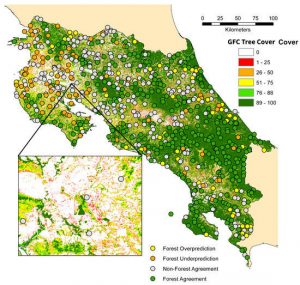
 

Evaluating Forest Cover and Fragmentation in Costa Rica with a Corrected Global Tree Cover Map