Bulger Week 3

Chapter three talks about the Experience Builder app. This app can work with 2D and 3D data, has a lot of pre-made widgets, and is very customizable. To make a web experience, you pick a template and theme, add data, add and customize widgets, and then share it. A web experience has a single theme, and each page has a template. A window can be added to a page, and it only has body content. A widget is a JavaScript or HTML component that executes specific functions. Basic widgets perform as app tools such as map, query, and survey. A layout widget helps organize widgets such as sections, rows, and a sidebar. A widget can perform message or data actions. A message action performs actions automatically when triggered, while data actions require users to click and select an action to perform. A message action has a trigger, a target, and an action. The tutorial for this chapter took me much longer to complete. There were a lot more discrepancies in the textbook versus the actual interface. I had an especially hard time figuring out the triggers, but I eventually did. Besides the setbacks, I had a fun time creating a web experience.

Chapter 4 talks about mobile GIS, how to build mobile apps, and use Survey123. Phones do not need wires and can be used anywhere. Feature layers are read-only on Mobile GIS. To be able to edit them, you have to enable editing on the feature layers. You can make a view layer from a hosted feature layer, which allows you to have specific people able to edit, so the public sees any edits immediately. A feature layer can contain a feature template, which makes editing easier and ensures data integrity. You can have preset symbols, data, and default attribute values, which help make sure that no invalid values are entered. Mobile app development includes a browser-based approach, a native-based approach, and a hybrid-based approach. A browser-based approach uses HTML, Java, and CSS. This costs less but has a limited number of features. A native-based approach requires development skills. They are more expensive, cannot run on multiple platforms, but have deep-level access to the hardware of the device. A hybrid-based approach combines browser-based and native-based. Field maps capture locations. Track viewer allows administrators to manage the security of those locations. Survey123 provides two ways to design forms: Survey123 Web Designer and Survey123 Connect. The web designer is easier to use, but connect supports more advanced questions. LBS provides information or entertainment. VGI is spatial data produced by citizens rather than data producers. VR is a computer-generated simulation of a 3D map that can be interacted with. AR overlays computer-generated information on the live view. I had a lot of trouble with tutorial 4.4.

Idea: I could use chapters 3 and 4 to create a survey for people hiking in Colorado to report Mountain Pine Beetles. Chapter 4 can be used to create the survey and map with POIs, and chapter 3 can be used to make an infographic about Mountain Pine Beetles and include maps of where they are located.
Bulger – Week 2

Chapter 1: Web GIS allows users to share geographic information with anyone. It is also low-cost, easy to use and maintain. It has many uses, such as data management, analytics, and supporting decision-making. Each user can create and join groups, share content, and include specific metadata to help further their content reach. Data is published to web layers, which are added to web maps and scenes, which, along with tools, are used in apps. Types of data include CSV, shapefiles, and JavaScript. There are also a multitude of layer types: feature layers, vector tiles, image layers, and OGC standard layers. Web maps are 2D and scenes are 3D. They can have multiple layers. Tools perform the analytical tasks, such as geocoding and summarizing data. Apps are the map-centric programs that can be used on all devices. ArcGIS Pro is an app. There are multiple types of users: viewer, storyteller, editor, and creator. Each map is composed of basemap layers and operational layers. Basemaps provide map context, and operational layers are layers you can interact with. Feature layers are the most common type of operational layers. Feature layers have vector data and can be hosted or non-hosted. Hosted data is directly from ArcGIS. Non-hosted data is from the user. When completing the tutorial, I had a bit of trouble finding certain features because the instructions didn’t exactly match up with what I saw on my computer, but after a little bit, I was able to easily find everything. I really enjoyed being able to do this on my personal computer, and the tutorial was very helpful in using ArcGIS online for the first time.

Chapter 2: ArcGIS smart-mapping allows you to change the style of a map so it can support your message. The map styles are heat map, color and size, compare A to B, relationship, dot density, predominant, type and size, continuous timeline, and vector field. A pop-up shows geographic information and defaults to a list of attributes and values. You can format the pop-ups to be in the style that you want. ArcGIS Arcade allows you to alter data when you don’t have access to do so. It is a language written for ArcGIS to style, label, and add values to pop-ups. For example, to calculate the weekday of the crime events, you type “Weekday($feature.Reported_Date_Time)”. It is similar to Excel formulas. ArcGIS Living Atlas provides content for operational and basemap layers and has thousands of options. Stories have maps, a narrative, and multimedia (who, what, where, when, and why). In the StoryMaps Builder, there are blocks and the block palette. A block is a component in your story, such as text, image, or a sidecar. The block palette combines all blocks into a menu so you can add any block to your story. A sidecar creates a side-by-side reading experience. A slideshow block uses horizontal scrolling and allows your content to fill the screen. A map tour block allows you to create a guide of locations. A swipe block allows you to compare two maps. A timeline block creates a series of events. Express maps allow you to quickly create reference maps on which you can draw features. The tutorial was a little longer, but the result was really cool. I like the swipe map.

Application idea: I could use chapters one and two to create a story map that talks about soil attributes and how they differ on hills and near water sources. The story map would include a map with the location, texture, and elevation.

Bulger Week 1

Hello, my name is Kathleen, and I am from Dallas, Texas. I am a junior majoring in astrophysics with a minor in environmental science. I plan to work in meteorology or compact object research.

I took the quiz, and I did the ArcGIS online account setup in GEOG 291.

When exploring my account, I found that the help section has a multitude of resources, such as blogs, tutorials, and setup help. Also, the online community is active and has a surprising amount of community types, such as Python and roads and highways.

While reading through the get started pages, I noticed that there are a lot of keyboard shortcuts for Mac when editing map layers. I also learned about floor-aware maps, which can show floor plans and are helpful when looking at optimizing large spaces.

I am glad the training course went so in-depth on the types of sharing. I really enjoyed the activities they provided; they helped me solidify the content from the readings.


The two courses I found most interesting are the field-led data collection and management using ArcGIS course and the ArcGIS field maps migration guide course.

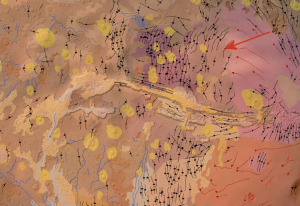
Application 1: Spatial analysis using ArcGIS of the Valles Marineris region of Mars during the 2018 global dust storm
Description: They used ArcGIS to superimpose their data onto a geological map. This shows the distribution of dust with the Valles Marineris terrain.
Link: http://www.jsussenbach.nl/Mars%20en%20ArcGIS_JBAA.pdf

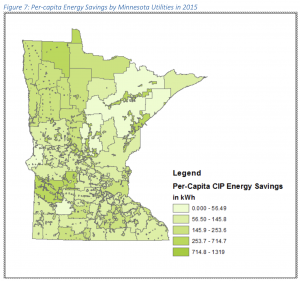
Application 2: Conservation Improvement Program in Minnesota: Addressing an Organization Challenge with ArcGIS Online
Description: This study focuses on creating a story map in ArcGIS online “to benefit Commerce staff by presenting easy-to-understand CIP quantitative and qualitative information for a legislative or general public audience”.
Link: https://conservancy.umn.edu/bitstreams/7ac2d94a-20a3-4255-ab24-c8f978f54e48/download