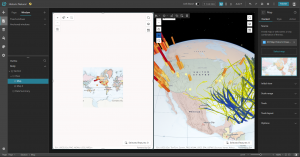
Chapter 3 introduces the ArcGIS Experience Builder, aka ArcGIS Webapp builder. This platform is designed to be an all-encompassing tool for GIS creation, enabling flexible, easy production of visual aids for a wide variety of cases. ArcGIS Experience Builder is defined in a few simple steps, including choosing options from pre-made templates and layouts or creating your own to suit your situation. This tool, like ArcGIS Online, also has a sharing function and can be designed to work with a variety of different devices, including mobile phones. I find this really neat, as I feel, or have always thought of, GIS tools as needing heavy software or desktop computers to function properly, but this opens up a whole new world of GIS capabilities and use cases. It was interesting working with this area of GIS, as it is not something I typically think of when I think of “GIS,” but the presentation and digital uses of GIS mapping are just as important.
Chapter 4 goes on more with this topic, explaining why GIS accessibility, especially on mobile devices, is important and how it can be used for a slew of different cases. Interestingly, I have always thought of GIS as some kind of big, scary program, but things we use daily and carry around with us in our pockets, like smartphone GPS apps, are GIS too. I’m surprised at just how many simple things that I would not have thought of before include GIS programs and are a utilization of GIS results. Chapter 4 reviews some of these uses and how GIS can be implemented using mobile devices flexibly and conveniently, allowing for GIS production on the go. ArcGIS Online on mobile devices allows for simple editing and layering, which is a very neat and convenient tool. I think these tools can be very useful for things like environmental scientists tracking landforms and future business owners marking possible shop locations.