Alyssa Gregory Week 1
Hey everyone! I’m Alyssa Gregory, and I’m looking forward to continuing my experience with GIS in this course. I have already taken GEOG 291, because of which I already have some familiarity with ArcGIS Online and its user interface. This week, I finished the required tasks which included reviewing the syllabus and schedule and completing the training course. Because of my experience in GEOG 291, navigating ArcGIS Online felt somewhat easy and familiar. Also, while looking through my account, I noticed that the My Profile section can be used to organize and present projects in a more discrete and professional way, which seems important beyond just this class and in the workplace too. I also looked at the Training and Help sections, which showed how learning GIS is an ongoing process, with a wide range of resources available depending on how proficient you are. The reading “What Is ArcGIS Online” reintroduced some ideas I had seen before and also helped clarify the bigger picture within those ideas. One key point is that ArcGIS Online is a cloud-based platform, which makes mapping more accessible and flexible compared to traditional GIS software (so many files to download!). Another important note of ArcGIS Online is its focus on sharing and collaboration. This software shows how maps function not just as tools for analysis, but also as a way to communicate information and connect people.
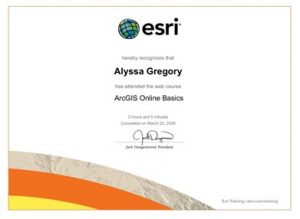
In addition to looking over the website, I completed the ArcGIS Online Basics training course. This course served as a review, while also providing a deeper knowledge of certain features. In the training, I practiced adding and styling layers. These actions showed how presentation of data can influence how it will be interpreted. The course also emphasized that maps are not neutral, and that design choices play a role in shaping understanding (this idea was presented in various sections throughout GEOG 291.
While looking through other ESRI training options, I found a few that seemed especially useful in the future: Spatial Analysis with ArcGIS Online and Getting Started with Mapping and Visualization. These courses seem like they would help build more advanced skills and a stronger understanding of how GIS can be applied. Exploring GIS applications through Google and Google Scholar showed how widely this technology is used in different fields.
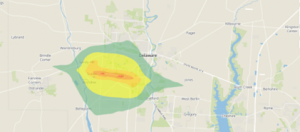
Noise pollution mapping uses GIS to measure and put numbers into visual images. The mapping data will include variation in sound levels throughout different areas. This will be especially clear in cities with heavy traffic or even just a high-density population. These maps help identify high-noise zones and guide decisions like adding sound barriers or planning where to construct roads. Source: Slabbekoorn, H. (2019). Noise pollution. Current Biology,29(19), R957–R960. https://doi.org/10.1016/j.cub.2019.07.018
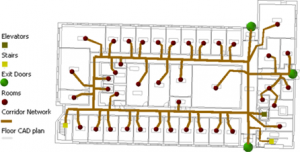
Indoor GIS focuses on mapping spaces inside buildings like airports, hospitals, and malls, where GPS and the internet doesn’t work well. This helps with navigation and emergency response services. This is done by using detailed floor plans and spatial data. Source: Li, Y., Kong, N. N., & Hum, K. (2021). Indoor GIS Solution for Space Use Assessment. Papers in Applied Geography, 7(1), 104–116. https://doi.org/10.1080/23754931.2020.1843526