Mason Week 3

Chapter 3:

Chapter 3 covers the basics of creating a web experience, which consists of multiple pages and or windows. I think the level of customization is cool, as you can add different aspects such as widgets. There are two types of widgets, basic ones, which act out app functions such as legends and layers. The other type of widget is called a layout widget, which spreads the widget out across different pages. The web experience can also display widgets consisting of 2D or 3D features, and they can be set to perform their actions either automatically, or manually through the use of a button. The format of the web experience is quite user friendly in the way that one can create them using templates, preset themes, and can access data from ArcGIS online, which offers a very large selection of datasets to choose from. The platform that the experience is created on is called an experience builder, which can come in the form of multiple different versions. The chapter goes into these different types of experience builders in a very general sense, but I wonder what the differences would be like if I tested them all out on my own. My time with the web experience creation was quite smooth, and the tutorial was quite clear. The web experience builder made it very easy to download and import data to manipulate it. Overall, I liked the web experience creation, and I like how visually clean the widgets turn out.  

Chapter 4:

The fourth chapter delves into the existence of a mobile application of ArcGIS, which I think is really interesting to offer, as last semester I knew GIS as a hefty software that required a PC just to run. To me, it begs the question of the overall benefit of desktop ArcGIS over ArcGIS Online, which has struck me as much more user friendly and convenient in terms of its extreme mobility. The features that ArcGIS Online offers are pretty cool too, as you can pinpoint your exact location on a map, increase efficiency when conducting data collection by replacing paper datasheets, up to date special monitoring, and an easy mode of communication. I really liked that the chapter included the limitations of this seemingly perfect convenient platform, which makes a lot of sense that it does have limitations, as it is adapted from such a large application. Some of these limitations include CPU speed, network connection, and limited screen size. On online GIS, one can still edit layers, delete layers, and make general actions as allowed by the organization owner of the map or dataset. This chapter also reinstates how the different modes of ownership work within an ArcGIS map, as public, and different levels of city staff have differing amounts of accessibility. I remember this concept being brought up from the introductory tutorial from week 1. There are also different types of approaches that can be used for the ArcGIS mobile apps, such as browser based approach, native based approach, and hybrid based approach. 

Applications: 

I could use the formats covered in chapter 3 and 4 to potentially create a map that features the distribution of monarch butterflies around different urban agricultural plots versus natural growing pollinator gardens, as I think it would be interesting to see what kinds of areas their adaptability can be seen. Monarch butterflies are heavily migratory species, and I was curious to see if their migratory patterns change over time based on the development of agriculture, and if so, how drastic that change is. In order to measure that change, I could even compare newer data with data recorded from a much longer time ago. Another idea of mine was to capture the distribution deer roadkill reports and their adjacence to different dense urban areas, because I think that it would be a valuable display of data in the context of land management, and conservation of predators. It would also presumably be an easy project to obtain data from, as drivers are instructed to report a vehicular deer kill whenever they occur, and I would assume that data is public domain. I probably would have to include the landmarks of the cities for reference, so the only data I would be manually entering would be the deer roadkill data.
Mason Week 2

Chapter 1: 

I find it interesting that the first GIS application was made in the 1960s, since I’m so familiar with it being such a technologically advanced application. It’s hard to picture it as anything other than the computerized web application that it is, which makes it intriguing to imagine it starting out as a singular computer database. This chapter did a good job of highlighting the benefits of ArcGis Online’s existence, particularly the increase in accessibility and collection of data from multiple mapping resources. It also seems to aid in the up to date nature of data, as there is a continuous inflow of data being inputted by various different studies. I thought it was nice to have a refresher on the basics of map creation, as many features are similar to desktop gis. Through the tutorial that chapter 1 had me run through, I am already recognizing the immense convenience of being able to create maps on a more mobile device rather than a PC. I would even argue that the formatting of the map curation in web format is much more user friendly and easy to navigate. 

Chapter 2: 

I find the distinction between hosted and non-hosted layers quite interesting, as it highlights the different ways the data from maps can be used. From what I gathered, hosted layers seem to be layers in which the data is all existing within the published layer, managed by ArcGIS and ready for other users to access, while non-hosted layers are published layers in which the data is managed by a user. There is a feature called smart mapping which I like the idea of, as it makes my job easier in this class. It is a user base that essentially aids in creating professional grade map visualizations without the need for expert cartography background knowledge. It can be in a range of styles and forms, such as dot mapping, heat mapping, vector field, etc. I found it interesting that there were so many strong similarities between web and desktop GIS, as many of the features being described in the chapter were aspects I was familiarized with when working with the desktop application, with one of these features being popups. I was not surprised to see storymaps mentioned, as it is an important aspect of GIS that helps share the visualizations you make. The storymaps were actually the first feature of ArcGIS that I had been introduced to while in another class. The tutorial that the chapter ends with was pretty easy to get through, using demonstrations revolving around population data as well as creating a story map. So far this formatting of GIS chapters has been much more manageable. 

Applications: 

I am heavily interested in Entomology, so I figured that I could gather data on Chinese mantids or lanternflies, as I find that those would yield some pretty interesting and valuable information to explore in spatial mapping. I could use some type of regional map, maybe limited to an area known to have one of the listed invasive species, and create a simple dot density map to display the data. Another interesting topic to look into would be Emerald ash borer sighting data and ash tree distribution, to look at the degrees of severity in different areas. I could even get more creative with the creation of that map because it would have multiple different features included. 

Mason Week 1

My name is Natalia Mason, and I am a freshman majoring in Zoology and environmental science. I have an extremely strong interest in entomology and it is something I really enjoy learning about; although, zoology as an entire umbrella term is something that I find cool too. I had taken the desktop ArcGIS class and admittedly found it a tad bit difficult, but I have heard this class is more manageable, so I am looking forward to that. I have taken the Geog 292 quiz, looked through the ArcGIS online webpage, read through the Get Started: What is ArcGIS Online page, and all other things required of me. 

Upon looking through my ArcGIS online account I had found two things of note. The first thing I found was the community and forums tab that was attached to the account panel. Through it, one can find many resources that mostly seem to be geared towards offering map creation tips, and remedies for issues one might encounter when creating their own map. I feel as though this could be a vital resource, as it offers support in many different issues I may encounter, or helps me prevent possible mistakes in map creation. The help tab also seems to be a useful tool, as it offers support, without being generalized like the community and forums tab had been. It allows the user to search specific information and issues they might have encountered, while pulling data from existing tutorials. 

I had read through the entirety of the get started page, and I found it to be relatively informative. A very interesting feature that the web design of GIS offers is offline accessibility. This feature is particularly geared towards field workers that collect data, so they are able to view and add data to their maps without having direct connection to wifi. I think this is a very smart feature to add because ArcGIS is geared towards a large population of natural science researchers. It also prompts me to wonder if this is a feature I will find useful in the future as I also intend to conduct field biological research. The second piece of information I found notable was the collaborative aspect of map creation. One way to do this is to set up groups that fall under the invitation only category in order to have multiple collaborators on a single map.

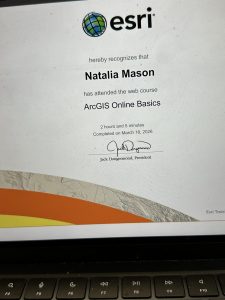
The ArcGIS Online basics tutorial showed me various things. One was that this application also offers base maps that an individual can apply to their map to convey a particular idea or to improve readability of their map. These basemaps can range from streets, to oceans, as the user has a large variety at their disposal. This is something that the Online GIS application has in common with the Desktop application. The second interesting feature to learn about was the distinction between a basemap layer and an operational layer. The former means a layer that acts the same as a backdrop, while the latter means a layer that contains some form of informational data.

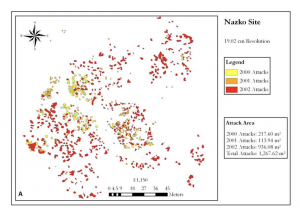
By searching up ArcOnline and beetles on google scholar, I found an interesting article that dives into the spatial distribution of Pine Beetles. The beetle in question is an invasive species in western Canada that gravely harms the forestry industry, so researchers had analysed their spatial distribution, in order to know which areas needed the most action in order to stop the infestation. The researchers had utilized ArcOnline to produce their maps.

Article Source: https://d1wqtxts1xzle7.cloudfront.net/48668176/19134-65422-1-PB-libre.pdf?1473331031=&response-content-disposition=inline%3B+filename%3DSpatial_Analysis_of_High_Resolution_Aeri.pdf&Expires=1773954442&Signature=HxGQITCBNeUakJtqs-LHLOl6PMBXMyqJNXhC-ChZQbswiod48JMZpG7w42WQ3Bgkua5Nbsm9OZlEAN-01QAC~W2nuQPNx1H2JzK57hwcDXWfUjxaoRmyAc7WOccnHdjakQoaHTUwlclzU4RmWNVxR8AoMJmwLij9NF-855E2MT~UIaq99J01oeA7b5IIyF8SI8yEbvnFO4LbSWDwfcZG8i7oPCgw~k9-1-n4R~r8MeqWwri5IybVXrUcsEEuRXeiLmCX3dFK3J8C~fK1FxDWExGuJprjE0nx00H1s5RIvE1V6555f1UoGR93o1XBJQJPqmc0X7YFkAswIqdVGR5Zng__&Key-Pair-Id=APKAJLOHF5GGSLRBV4ZA 

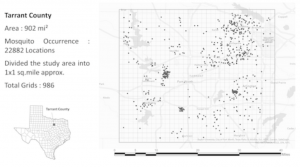
My second article was based on mosquito distribution in different temperatures and climates to see which areas their distribution was most dominant in.  I had found the article after searching “ArcOnline,” and “mosquito.” The goal of this study was to understand mosquito behavior better in order to prevent further spread of mosquito borne diseases. There is a large known correlation of mosquito prevalence near bodies of water due to their semi-aquatic lifecycle, and the study reflected that. 

Article Source: https://onlinelibrary.wiley.com/doi/full/10.1111/tgis.70009