Downing Week 5

Chapter 7 was neat in the sense that it taught us how to make our flat GIS map into a 3D one, and that was exciting! One of the main concepts was 3D Web Scenes, which is how the 3D maps are created. You can use WebGIS and ArcGIS Pro to create the maps, which can also be interactive. The chapter also explained how we can create, share, and interact with the geographic data through the different web platforms. From what I understood, the web scene is the 3D equivalent of a web map, which made it a lot easier to understand! You can use it to create different landscapes, such as elevation and topography, buildings, and even clouds! I did have to look through each tutorial carefully in order to get all this information, but it wasn’t bad once I did that. It seems like the web scenes are also really helpful for big data sets, which would be nice for large organizations to display their data; as discussed in previous chapters. 

Chapter 7 continued with talking about the application and the creation of certain 3D maps. You can create a 3D map using ArcGIS Online, and you can do that by changing the feature values of the height of different objects. One of the tutorials highlighted this, and that was helpful to see. I thought it was cool that you could also adjust the shadows of different objects! That is something I’d want to use in my project. Another thing that they discussed was analysis in 3D, such as shadow features and how the features interact in space. I think this would all be helpful in environmental planning and architecture, especially in urban environments. There are some really neat tools described in the tutorials as well, and I definitely did not know how to use them until I went through the tutorials, so that was something cool I learned. I think an application I would use from this chapter would be using the 3D Web Scenes feature to compare the height of trees and houses in close proximity within Delaware, Ohio. I think this could be useful because then we could see the amount of space that is being used for development and how those houses could impact sunlight exposure in different neighborhoods.
Downing Week 4

Chapter 5: Caching and on-premises Web GIS

This chapter goes into a lot of detail about two different types of GIS platforms, which are ArcGIS Online and ArcGIS Enterprise. We have already learned about ArcGIS Online – which is a large platform managed by Esri – so learning about ArcGIS Enterprise was a new thing for me. This platform allows different organizations to build their own private GIS systems within their own buildings or infrastructures. When organizations do this, it seems like they use it when they need greater security or if they have limited WiFi. I think that is helpful for organizations that do not want their specific data spread out to the world (even though they could keep it private). So that part was a little confusing to me but it’s still neat! There was also a lot of information on how the data can come together and make maps, layers, and applications, especially in the sense of an organization who wishes to keep that information under wraps. 

ArcGIS Enterprise has four main components, and all of those components had different examples at the end of the chapter which was nice! There is a Server, a Data Store, a Portal, and a Web Adaptor. It also included different ways that organizations can include their data and share it with others over the ArcGIS Enterprise Portal. It seems like they are able to improve efficiency and data control when using Enterprise, which would be helpful within a large organization. The chapter also focused a lot on how different web layer types can affect the performance of a GIS platform. I went through a tutorial that demonstrated this. Like we have learned in previous chapters, the layers you use matter for what data you have! The chapter ended with discussing how to create workflows in ArcGIS Pro, something that I think will be helpful for the future. 


Chapter 6: Spatiotemporal data and Real-time GIS 

I think this has been my favorite chapter so far, because it relates to real-life situations that GIS can demonstrate and help people visualize. Chapter 6 focuses on how the Web GIS platforms can support real-time data and also a time-based analysis, which is very helpful for understanding weather patterns, traffic interruptions, or even natural disasters. I think that is why this chapter was interesting to me; because I got to learn about and create real examples using GIS! This whole concept is called real-time GIS, and it involves data that is constantly being updated and changed in order for people to visualize current conditions. I think that this application of GIS is so cool and something that more people should be aware of. It is important to note that this is a step up from static maps and how they provide information, because these are always evolving. The examples for this chapter were really neat too!

Chapter 6 goes on with discussing how to interact with different tools and feature layers. There is not one simple map that is not static, it is a whole combination of charts, indicators, and filters that are used to create one large moving demonstration that illustrates patterns and changes. I also noticed that users can configure differences with interactivity, which basically means how the data is displayed to different viewers. The tutorials for this chapter were a little longer than the other ones, but were still useful in helping me understand how to visualize different types of data. ArcGIS Pro and ArcGIS Online are two platforms that help create moving images and datasets, which is neat to me. It just made me wonder how many things in my daily life are made from GIS? It’s cool to think about. The chapter discussed how make the real-time and spatiotemporal data analyses helpful in everyday life and how important they are for keeping up with changes in real time.

Downing Week 3

Chapter 3: It began with telling us about the ArcGIS Experience Builder, which appears to be an app that is more flexible, configurable, and functional than any other instant ArcGIS app. I did have to read through that a few times just to make sure I had all of the information right, then I noticed that they provided a similar table as they have in previous chapters, which displays all of the features we have learned about so far and compares them, which is really helpful. The chapter went on to describe how we can use code, 2D and 3D maps, and specific widgets to create different types of applications. I personally found this chapter really interesting because I did not know you could do all this on ArcGIS Online! An important thing that I noted was that a web experience has to have one page but can have multiple pages or windows, which are basically the building blocks of the application. I went through some of the examples and was able to play around with the different data, which helped me see how everything was meant to be displayed. 

The chapter continued with more information about the Experience Builder, and gave more tutorials on how to complete tables and maps using Widgets (which I never knew existed outside of the iPhone). Tutorial 3.5 focused on how we can configure the Filter and Chart widgets, which I found very helpful in terms of the applications we were given. This feature seems like it would be helpful for my project! There also seemed to be a lot of data you can use for the ArcGIS Experience Builder, which is cool because we don’t have to be limited in the data we find or what we want to examine. I also really like how they include questions and answers to those questions at the end of the chapter. I was curious about how some code can get embedded but not others, and that helped with my confusion. 


Chapter 4: Chapter 4 had a similar introduction as Chapter 3, except they focused on Mobile Gis instead of the ArcGIS Experience Builder. There are three building applications, which are browser based, native based, and hybrid based. This seems really convenient that there is Mobile GIS, and it does not have to be affected by any hard-drives, wires, or set WiFi systems. It seems super easy to use on the go. It also can be used on a bunch of different platforms and devices which is cool! They continued with talking about the different feature layers and how you can add, update, and delete features, and it also talked about how you can define a feature layer in ArcGIS Desktop or Map Viewer in ArcGIS Online. Then the authors defined the different building applications and how they can be used with different coding languages, such as JavaScript/HTML. There are different ways on how you can create a survey using tables and maps. 

Chapter 4 continued with more examples and tutorials! There was also a cool feature in there called ArcGIS Indoors, which is something I never considered that could be used with GIS. I had always assumed that it had to be used outside, but it totally makes sense for indoor use as well. It works with connecting to WiFi and Bluetooth inside specific areas, which allows for people to use it anywhere. I think I would tie this back into my bird breeding ground experiment somehow, and try to make the app useful for indoor use as well. I think I would make it so the locations of buildings or structures near the birds’ breeding grounds appear. I would compare highly occupied breeding grounds to unoccupied breeding grounds and see if the interior of the structures had any similarities or differences. I went through a few of the tutorials to finish up the chapter, and that helped my knowledge on how to work the Mobile GIS. This seems like a really helpful feature to be able to use, especially for using maps, data, and different applications needed in a mobile setting.

Downing Week 2

Chapter 1 consisted of a lot of similar entry points to GEOG 291 and the book we read for that. I like that at the top of every chapter they provide a list of what is going to be covered. They focused on a lot of definitions with the first part of the chapter which was nice. Web GIS is the combination and GIS (geographic information systems). They then discussed the advantages of using Web GIS, and one of the advantages was that Web GIS is more user friendly and easier to manage than ArcGIS and so far, that is absolutely accurate. They made a point to recognize that GIS is the science of locations: which means that GIS is a science and that GIS has been used for science as an effective tool for making scientific discoveries. I wondered if GIS itself would truly be considered a science? That point seemed interesting to me. 

I liked how in Chapter 1 they provided examples of common uses of Web GIS and ArcGIS Online and how those might show up on a map! That was helpful to see laid out. This whole chapter was very interesting and helpful to understand the background of the whole website and how to use it. There seems to be a lot of knowledge and thought that went into creating this platform, and I like how in depth they went into that. The rest of the chapter seemed similar to the training we had to complete for week 1. I liked how the content types were discussed too, which are data, layers, web maps and scenes, tools, and apps. I also liked how the book gave us step-by-step instructions on how to navigate the website and create different maps and layers. I also liked how at the end of the chapter they included some questions and answered them, so now I know how to do those things too; like finding the latitude and longitude. I think after viewing these things so far, I’d love to do my project on birds and their habitats in some way. One of my articles for week 1 was about birds in Hawaii and their breeding grounds, and it might be neat to do something like that. 


Chapter 2 started with explaining how smart-mapping and storytelling with GIS works. I learned that feature layers can be used and styled with different web apps on Web ArcGIS. Then there was a confusing table that I had to spend some time looking at and understanding, as I didn’t really know what it was at first. After doing that, I realized that the table was telling us how to create web apps, which was cool! The next step was describing the definitions of each type of feature layer, which was interesting because I did not know there were that many different types. You can also publish each of those different layers to the ESRI geospatial cloud. I did have to look up what exactly “geospatial cloud” meant, but it is essentially combining GIS with cloud computing. There are also different types of smart-mapping, which I think I can use in my project. I liked the look of the heat map as compared to density! The codes were a little confusing, but seem similar to R which I am comfortable with. 

I liked how in the second half of Chapter 2 they talked about “storytelling” and the ease of using Web GIS. It seems like the authors of this book know that people don’t appreciate complicated things, and they made it easy to understand and comprehend. It was emphasized that a Map + a Narrative + Multimedia = A Story. This was a cool way to visualize things, and I liked how it was made similar to crafting a story in writing. There are sidecars and slideshow maps, along with geocoding and ways to create a story that you want. They went into examples of how to make these layers using CSV files which I found helpful. The tutorials are so similar to GEOG 291 that they went by quickly and were easy to understand. I thought it was cool how they included information on how to insert and create images over a map! And again they included some questions and answers at the end, which I read through and I felt like that helped as well. After reading Chapters 1 and 2, I do think I’d like to do something with birds and their breeding grounds in certain areas.

Downing Week 1

My name is McKenna Downing, and I am a Zoology major/ENVS minor graduating this MAY! I am on the track and cross country teams as well. I have taken the first module of this course (GEOG 291), and found it enjoyable, so I am excited for this module too. I have completed GEOG 291, and therefore I’ve completed the reading of the course blog and activating my WordPress account. I have also completed the quiz and the necessary actions for this week!

One thing I noticed about the ArcGIS Online website was that there are examples of maps from previous years, including data about trees, wifi, censuses, and floods. I think that’ll be helpful in the future. Another thing I noticed was that the website as a whole should be easy to navigate. It already seems to be a lot less tedious and confusing than GEOG 291 was!

I read through the different sections of Get Started: What is ArcGIS Online and found some cool stuff! The first main thing I went through was the “Work with maps” section, as I thought that would be the most helpful. I found that it seems to be similar to the ArcGIS Pro from GEOG 291, especially with the Settings and the Content panes on either side of the map. I also found that there are keyboard shortcuts which are neat! The second thing I found helpful was the “Work with content and data” section; which again I thought would be the most useful. I found that I can manipulate data to make it visible to others, which is something we could not do in GEOG 291. This would be super helpful if I were to need help or advice on a project!

While completing the training for this course, I was able to notice two things that were the most helpful. The first thing was how to change the controls to edit who can view your work and data; which could be anything from private, group, organization, or public. I thought that was neat. The second thing I found helpful were the activities to do the maps. The one I screenshotted was thorough and answered any questions I had about it. The website seems user friendly and easy to navigate, and I was able to learn more from the training. I attached a screenshot of the map below. I could not get my certificate to show up, so I screenshotted the part of the website that said “Completed”. 

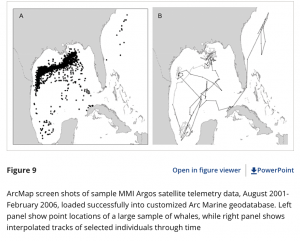
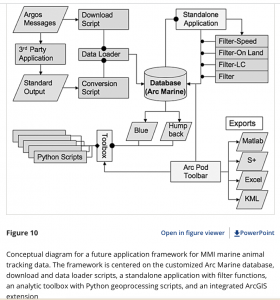
  1. “A Customization of the Arc Marine Data Model to Support Whale Tracking via Satellite Telemetry” – this involved changing the code of the ArcOnline system in order to track marine mammals, and the authors focused on whales. The model that they are creating is called Arc Marine, and when trackers were placed on whales, they were able to track the whales’ movement across the ocean, and know how to edit the format of the website to accommodate that. I have two screenshots for this paper. 
    1. Lord-Castillo, B.K., Mate, B.R., Wright, D.J. and Follett, T. (2009), A Customization of the Arc Marine Data Model to Support Whale Tracking via Satellite Telemetry. Transactions in GIS, 13: 63-83. https://doi.org/10.1111/j.1467-9671.2009.01159.x

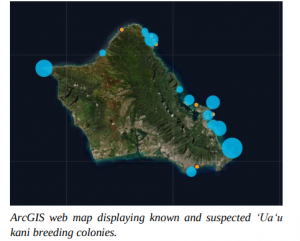
  1. “Using ArcGIS as a Conservation Tool for Wedge-tailed Shearwaters (Ardenna pacifica) on O‘ahu, Hawai‘i” – this study involved using ArcOnline to create a web map of the breeding grounds of the wedge-tailed shearwater on the island of O’ahu. The authors created a public map using the website and used it for educational purposes, as the shearwaters have seen a decrease in their population. I have one screenshot for this paper.
    1. Written by: Jennifer Urmston, M.S., Hawai‘i Pacific. Universityhttps://hiaudubon.org/wp-content/uploads/2021/12/Elepaio81.5.pdf