Koob Week 4

Chapter 5: catching and on-premises Web GIS

This chapter goes over ArcGIS Enterprise and “caching”, an important technique if you want a fast performance. For ArcGIS Enterprise, while it functions similarly to ArcGIS Online, Enterprise runs as an on-premises, user-managed component of the Esri geospatial cloud. It supports various configurations: organizations that may not have internet connections, organizations that want to keep their own operational layers on their own while simultaneously using ArcGIS Online with hybrid, and it also allows organizations to publish services on their own and have their own functionalities. Most of the skills learned in the previous chapters overlap with Enterprise, as well, which makes it even more handy.

For this chapter, we learn what raster tiles, vector tiles, map image layers, and feature tiles are/do. Raster tile layers basically deliver maps to clients as image files and are good for basemaps or maps that stay consistent. Vector tile layers deliver map data as grouped tiles and are rendered based on a style related to the data. The map style can be customized, such as hiding a layer’s visibility or changing symbols/fonts. They can adapt to the resolution of the display and appear sharper on high-res displays. They are also usually generated based on data density. Map image layers can be drawn dynamically by the server or using tiles. They are mainly for customers who need rendering capabilities that don’t exist in feature layers (ex. color shaded relief), or customers with large datasets. Feature services can generate feature tiles on demand and allow web clients to display more features. Caching helps achieve high performance for all of these options.

Tables 5.1 and 5.2 were helpful to visualize how these web layer types are important and which capabilities they fit into.

Tutorial 5: share a raster tile layer and a vector tile layer to ArcGIS Enterprise or ArcGIS Online, and create a web app to compare the two layers.
Chapter 6:

This chapter went over spatiotemporal data and real-time GIS. The basic concepts of spatiotemporal data, the values and challenges of IoT, and the ArcGIS products that can meet these challenges. The ArcGIS products include ArcGIS Velocity, ArcGIS GeoEvent Server, ArcGIS Dashboards, and ArcGIS Mission. spatiotemporal data is all about observations of objects and events that move or change over time. IoT is about physical objects or things, ones that can collect and exchange data. Geolocation provides that context, and GIS can transform the raw data into useful information.


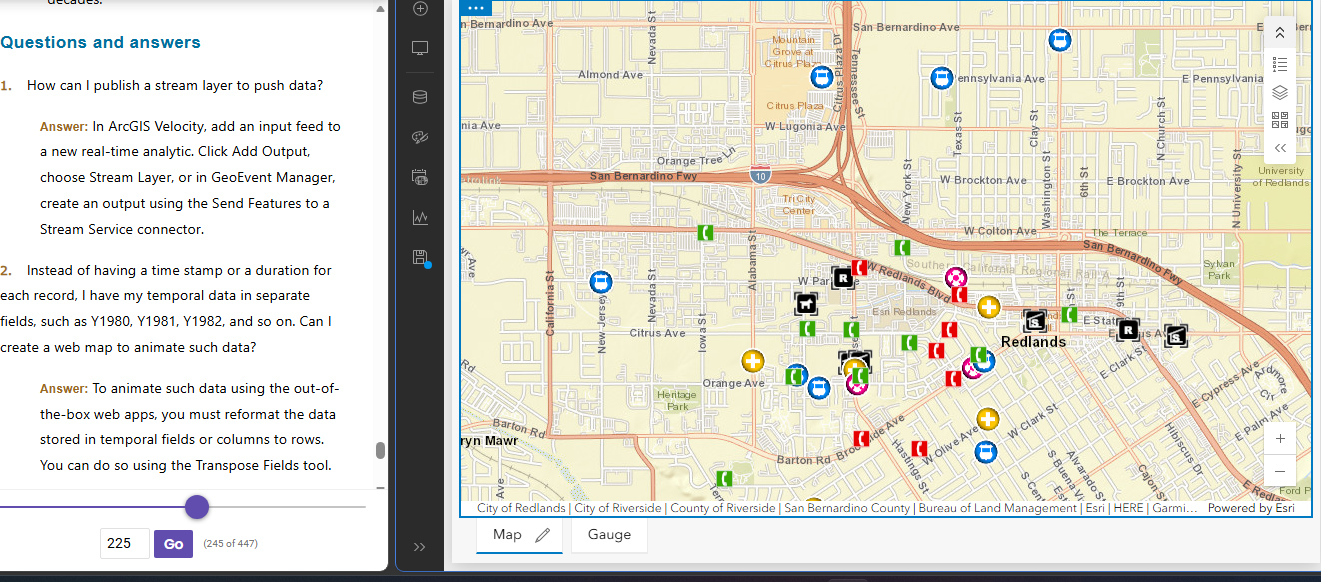
Tutorial 6:  Create a dashboard web app for the city of Redlands, California, to coordinate response efforts for the city’s medical, police, and fire departments.
Koob Week 3

Chapter 3 ArcGIS Experience Builder:

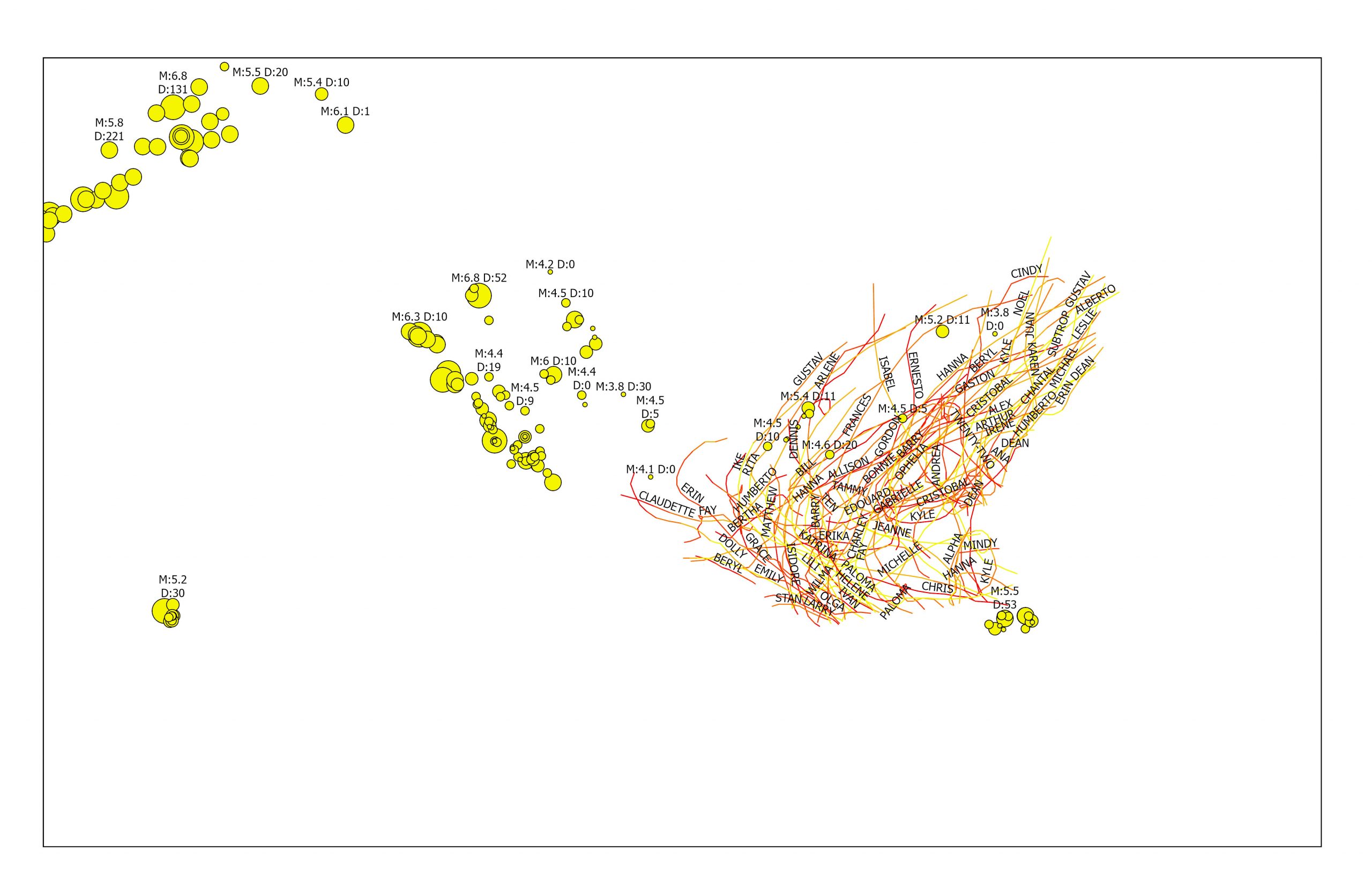
Completing the chapter 3.1-3.6 tutorials was actually really fun to do. I liked seeing the difference between 2D and 3D maps side by side; it gave me a much better perspective on how these kinds of apps can be useful to the public or for charting info. I ran into a small issue with my 3D map failing to download, and had to back track a lot to find a step I missed in order to fix it, but after that it was smooth sailing. I really liked seeing how natural disaster patterns can be charted. I would’ve never thought they could be displayed like this until I saw them for myself in this chapter. I also thought it was cool how many options for widgets there was, not just maps but a ton of different options for both basic things and layout, and even adding the text widget. I like how much info can be thrown into these apps and are able to be articulated to make complete sense to a user by the end.

Application:

From chapter 3, I could use Experience Builder to make a type of interactive map to visualize previous and real-time data on nutrient levels (like nitrogen and phosphorus), and bacteria counts across public ponds in Delaware. The app could have a whole ‘Health Index’ for each pond to help local residents here understand if the water is safe for fishing, boating, swimming, or anything like that. Maybe combine maps + charts + text + widgets? Dashboard style interphase? Also, by adding in data from the Surface Water Quality Monitoring Program, this app would allow its users to track how water quality changes seasonally and identify which ponds are most affected by runoff or algae blooms. (It was easy to pick this topic since I’m doing a research project over the summer that would tie into this data, too.)

Chapter 4 ArcGIS Web AppBuilder:

It first explains the advantages that Mobile GIS has over the traditional desktop version. These include mobility (being able to take the device anywhere), location awareness through GPS and cellular data, easy data collection, real-time information, more users, and being overall more versatile. Tutorial 4.1 4.9- first, I designed a survey, which was super cool and taught me a lot about Survey123 as well. I thought the section where I created a webmap using the line layer from before was helpful to learn and to see how different tutorials tie together. QuickCapture was really easy to understand and I could definently apply it’s use to my everyday life. I thought QuickCapture reminded me a lot of an app I have called “picturethis” which allows you to upload or take photos of any plant and will upload it to a data system that identifies what specicies it is, where its located, health, etc. These photos can be uploded to a group and be shared, similiar to the data in these tutorials. Overall I learned a lot from both of these chapters, and I think the fact they are so much more available to mobile users makes them all the more advanced. Both ArcGIS pro and ArcGIS Web have their pros, but the web version caters to a much larger audience and I can already see myself using a ton of these tutorials for other types of projects.


Koob Week 2

GTKWGIS Chapters 1 & 2

Chapter 1

This chapter reviewed the basic concepts of Web GIS and ESRI, its importance and the building blocks to it.

Web GIS is a combination of the web and geographic information systems. Since the first GIS was developed in the 1960s, it has evolved from a local file-based computer system to multiple servers. The web offers global reach using web technologies such as JavaScript, Web Graphics Library, Websocket, etc.  It also serves a significant purpose in our society, particularly in areas such as our government, businesses, scientific advancements, and daily life.

There are multiple patterns of Web GIS applications, such as: Mapping and visualization, data management, field mobility, monitoring, analytics, designs and planning, decision support, constituent engagement, sharing, and collaboration.

Web GIS is able to perform its capabilities thanks to ArcGIS Online and ArcGIS Enterprise, acting as software that the web can use from its multitude of hosts and platforms. These represent the new-generation of Web GIS, where users can search, discover, and use the layers, maps, and apps on desktops, in web browsers, and on mobile devices anywhere, anytime. Web GIS also provides the privilege to create and join groups, share content items containing data, and content items that have indexed metadata, as well as the option f keep their information private.

There are 5 types of content items: data, layers, tools, web maps + scenes, and apps. Data can be used to publish web layers; web layers can be used to create web maps and web scenes; web maps and scenes, and web tools can be used in apps or to create apps. Apps are what bring Web GIS to life. Bundles of apps are organized by ArcGIS to make it easier for the user.

Basemaps + Operational Layers + Tools = Web GIS map

I learned how to use these components back in GEOG 291 as well. Basemap layers are essentially the context for the app, a 2D or 3D background. Operational layers are simply interactive theme layers; they have a large range of uses. Tools are what perform the tasks beyond the initial mapping, like routing or geocoding. The tutorials in this book teach readers how to build Web GIS apps. One is Attachment Viewer- an instant app template to build an app. It has three main sections: map pane, attachment pane, and feature pop-up pane.

Tutorial 1: Introduces the main attractions in Redlands, California. This tutorial was very tedious, but it taught me a lot about the basics and mechanics of making an app. At times, the tutorial didn’t exactly line up with the app, so I had to guess through a lot, but it was overall fulfilling to see it up and running afterwards! https://owugis.maps.arcgis.com/apps/instant/attachmentviewer/index.html?appid=295da18970b44b6ba2b9d2aed5e6b194

Chapter 2

This chapter goes over smart mapping and storytelling with GIS. It explains web layers and how they are the building blocks of web apps. It also explains feature layers, being web services you can reuse in web maps, scenes, and apps. These will definitely be important to remember for any future projects. Hosted feature layers organize layers of data in ArcGIS- good for visualizing data on top of editing. There are many forms of hosted layers. The chapter also explains how to make your own feature layer from your own data, from an existing template, or even an empty feature, to have full control over each field. Moving on to smart mapping, intelligent defaults are used to allow for various results. It analyzes your data quickly in many ways, suggesting the right defaults when you add layers and change symbolizing fields (for example, a smart map using symbol color and size to show one or two numeric fields).

Storytelling using WebGIS, the experience a user has is extremely important and depends on factors such as how fast, easy, and fun an app is. (“dont make me wait” or “dont make me think about what button to click”).  Another part ot storytelling with Web GIS is the 5 Ws: who, what, when, where, and why.  Where is about location, when is about time, and what is about theme.

Maps + Narrative + Multimedia = Story

Tutorial 2 went much smoother for me, especially thanks to tutorial 1. It showed me how to create a Web GIS app that has spatial patterns of US population change, explore the reasons behind the patterns, and share what Ifound with the public using an ArcGIS StoryMaps story. I had no trouble making the feature layer as the geocoding wasnt super new to me. My favorite part was stylizing my layer  as the smart mapping was easy to follow. There was a point where I had to use Arcade, which confused me, it was to make pop-ups but I got lost at some points.  I also appreciated the questions and answers at the end, I used those a lot to fact-check myself.

Koob Week 1

My name is Jenny Koob, I am a freshman at OWU and an Environmental Science major with a minor in Geography, and I am hoping to add another minor in Economics as well. I took GEOG 291 in the first half of this semester, and I learned a lot about the basics of ArcGIS, how to operate its functions, and more about geospatial data in general! The information I gained from the course helped me feel more confident in my geography minor. As I completed GEOG 291, I read the text Getting to Know Web GIS 2022, 5th edition. I have also completed the quiz and all the preparation requirements needed for this week.

I spent a bit looking around the ArcGIS website and found a lot of previous posts from past years: OWU campus maps for both “outside wifi” maps and “teaching spaces”, as well as maps from Geography 353 with data for trees, water, census, etc. To my account, I added more to my Profile, such as my nickname, a profile picture, and a short description of who I am. Under “Training,” I found it really cool that there’s a place to go for an opportuties toward individuals and groups in GIS that can help better understanding and attain goals. Another thing I found was under the ESRI community, you have access to tons of people’s ideas, where individuals have posted ideas on skills or developments, and you can even add your own post idea to the community! Overall, it was pretty easy to navigate the website, not only because I have used it before, but all the mechanics are all easy to follow and to the point.

I also read the “Get Started: ArcGIS Online”. The reading explains everything ArcGIS Online includes, such as creating web maps, web scenes for 3D data, making web apps, notebooks, and more. I like the option of sharing and collaborating, allowing individuals to share content and work as groups if they want to, while also leaving room for those who want to keep their work private. WebGIS also allows the user to create map areas for taking maps offline, and allows editors to get the latest updates on maps. I lastly just really like how accessible ArcGIS Online is, being able to pull it up quickly on a web browser and mobile devices is really convenient.

I also completed the GIS training course in ESRI, and it took me longer than I anticipated! I learned a lot about what makes parts of the GIS mapping important, and the tests really made sure I was paying attention. I took a screenshot of my completion as well. 

I also found two articles in Google Scholar that I think are really interesting!

The first is an article called “Participatory GIS to inform coral reef ecosystem management: Mapping human coastal and ocean uses in Hawaii,” and basically discusses coastal ecosystem management as well as how GIS, or PGIS, is used to track human-caused effects on the corals! I found this article by searching “ArcGIS coral reefs,” and it was credible as a highly cited work. 

Here is the link to the article:https://www.sciencedirect.com/science/article/pii/S0143622814002884


The second article I found was on honeysuckle, a known invasive species in Ohio and many parts of the US. This article was based on research done in Cincinnati, OH. It discusses the importance of early detection in invasive species, as well as how remote sensing methods can be a valuable tool for increasing knowledge about spatial patterns and predictors of invasion!

here is the link to the article:”Detecting Invasive Amur Honeysuckle in Urban Green Spaces of Cincinnati, Ohio Using Landsat-8 NDVI Difference Images”  https://doi.org/10.3368/er.38.3.139

Figure 1.Figure 3.