Stratton- Week 6

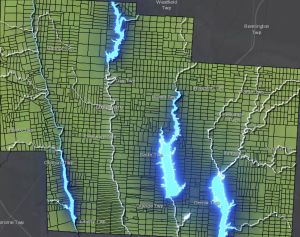
For my first app I decided to use basic ideas for chapter one to create a map that highlights the accessibility to water sources in the Delaware County in relation to the farm lots. I made added effects to make the water ways stand out against the farm layer, and emphasize their location.

https://arcg.is/0DWTbv0

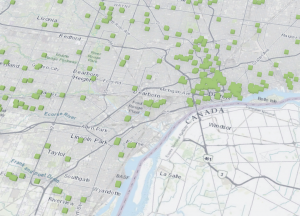
For my second app I decided to use ideas from Chapter 7 to create a 3D map detailing the locations of subsidized housing in the county I live in (Wayne County Michigan). The 3D pattern clearly shows the distribution and density of the housing, and how densely packed the housing is in the city of Detroit compared to other cities in my county, including my city Taylor.

Stratton- Week 4

Chapter 5-

This chapter starts by explaining the different organizations and components within Web GIS, on top of Esri and how some organizations must have ArcGIS Enterprise to function. This may be due to the lack of internet connection or restriction of connection, if an organization wants to keep their layers within their infrastructure while using online content, or if they want to use functions that are only available through ArcGIS Enterprise. It then defines ArcGIS Enterprise as “an on-premises, user-managed component of the Esri geospatial cloud” or basically a variation of ArcGIS Online with some specific differences. There are multiple components of this. There is Portal for ArcGIS, which is a content management system and can create hosted layers, create web maps and scenes, create host web mapping apps, search for GIS content in an organization, secure access to GIS content, and manage organization utility services. The ArcGIS Server allows the information to be available to other people in the organization or chosen, anyone with internet. Roles of this include, GIS server, Image server, GeoEvent server, GeoAnalytics server, Business Analyst server, ArcGIS knowledge, Notebook server, and Workflow Manager server. The ArcGIS Web Adaptor integrates the Enterprise into the organizations’ web server and security. Lastly, ArcGIS data store makes data available for storage. The chapter then details how to deploy Base ArcGIS Enterprise and the different deployment methods/scenarios.

Chapter 6-

Chapter 6 details how to use spatiotemporal data and real-time updating GIS. I think that it’s amazing that these maps and experiences can update data as needed. There’s different categories of these spatiotemporal data, Moving (like live feeds of vehicles) is basically something that moves, Discrete (like natural disasters) is basically something that “just happens”, Stationary (like highway speed or water levels) is something that stands still but changes as well, and Change (like land use) is just change and growth. These could be at a point in time or over a duration of time. While using spatiotemporal data, you encounter IoT. It’s a network of physical things that are embedded with sensors and network connection that collect data. These are found in a lot of devices like taxis or even sprinklers. There are billions of sensors modernly. Smart homes and smart cities are really helpful to this practice, as they are filled with smart devices that include these IoTs. I find it so interesting that you can use these data sets to animate a map, and create a moving interactive experience for users to convey your mission and findings. This seems to be really helpful to track important things like traffic patterns, population sizes, or natural disaster locations and frequency. This tool is my favorite out of all the functions of ArcGIS online.

Stratton- Week 3

Chapter 3-

Chapter 3 overviews the experience builder aspect of Web GIS. I learned that the experience builder tool is extremely helpful to create interactive maps and present data in more unique ways than the traditional map. To use the experience builder, there six steps. Pick a premade template or create your own, then select a theme, add source data, add and configure widgets, refine layouts for all devices, then finally save, preview and publish. It was really cool to me that you can make your experience have multiple pages, and interactive widgets that further help convey your data. There are two types of widgets, message actions (which perform actions automatically in response to triggers), and data actions (which users can use to perform actions). For more detail, Message actions have three components, triggers, targets, and actions. Triggers are events generated by the widget, targets perform actions in response to the trigger, and the actions are the specifics of what it performs. The tutorial was honestly confusing for me to follow and I had a hard time navigating the experience builder software but I eventually figured it out after a lot of time and struggle. I stopped struggling after 3.3, but after that it was just very time consuming for me.


Chapter 4-

Chapter 4 is about mobile GIS. It explained the advantages of mobile GIS, which include the following; mobility, location awareness, ease of data collection, near-real-time information, large volume of users, and versatile means of communication. The mobile GIS is built on mobile devices, mobile operating systems, wireless communication technology, and positioning technology. It also explains that although being mobile is a huge advantage, it’s also held back by mobile devices being limited due to their low CPU speed, memory size, battery power, network connections, screen and keyboard size. There are a number of strategies when developing a mobile app. A browser based approach uses HTML, JavaScript, and CSS, and can potentially reach all mobile platforms. These apps are usually cheaper and faster to make. Next the native based approach are apps that are downloaded onto the mobile device and require native developments skills, they have deep access to hardware and performs better than browser apps but are very expensive. Lastly the hybrid based approach integrates native components with native apps (This part didn’t make sense to me). These can be used for field maps and indoor operations which I find very cool and interesting. You can carry out surveys with this feature which is extremely helpful and gives a useful tool for people.

Stratton- Week 5

Chapter 7-

This chapter overviews 3D web scenes. There are two main types of them which are Photorealistic and Cartographic. Photorealistic use imagery and shows visible things like cities. Cartographic is used with the 2D mapping techniques but in 3D. You could do these scenes in local or global mode. There are four types of elements; surfaces, features, textures and atmospheric effects. Surfaces are continuous measurements and are either DTM ( Digital Terrain Model, bare ground surface without objects) or DSM (Digital Surface Model, ground surface with objects). Features are the operational layers, they are on, above or below the surface layers. Textures are exterior or interior covers of the features. Atmospheric effects are things like lighting or fog. The structure for creating a building scene layer includes the overview (optional) which allows you to see the building as a single layer, discipline which combines category layers into disciplines like plumbing or electrical, category layer is the individual categories like windows, and lastly filter which allows you to see details in complex buildings. There are also integrated mesh scene layers which are made using large sets of overlapping imagery, and point cloud scene layers which symbolize point cloud data. Point scene layers display large amount of point data and are thinned to improve visibility. To create a web scene you have 6 steps. First choose global or local, then a base map, then you add layers, configure the layers, capture slides if necessary, and finally save and share your scene. You could also use GIS in VR which I think is really interesting and cool.

Stratton- Week 2

This week I read chapters 1 and 2

Chapter 1-

This chapter was an introduction to Web GIS, including the history and what went into developing web GIS. It discussed the advantages to the use of GIS for web, which include global reach, low cost per user, easy to use, and so much more. I learned the common patterns of GIS which are Mapping and visualization, Data management, Field Mobility, Monitoring , Analytics, Design and Planning, Decision support, Constituent engagement, and sharing and collaboration. I also learned the five main types of content. Data, Layers, Web maps and scenes, tools, and apps. Apps are the “face of Web GIS”, and are offered in bundles such as office and field app bundles, that users can configure and work on their own. The chapter then defines the main user types and the privileges given to each, which include viewers (who can only view items), storytellers (can only create stories and express maps), editors and field workers (who can only view and edit data), creators, GIS professionals, and Insights Analysists (who can edit, create, share content, and do analysis). I then learned about the components of a Web GIS app. Base maps provide context, Operational layers are themed layers for use, and tools go beyond mapping and carry out common tasks like geocoding and routing. It then walks you through tutorial 1 which walked me through Points of Interest in Redlands, California.


Chapter 2-

This chapter introduced me to feature layers. I learned about the different types of hosted layers. Hosted feature layers (which are used to visualize data on top of the base maps), Hosted Web Feature Service (WFS) layers, Hosted tile layers, Hosted vector tile layers, Hosted web map tile service (WMTS) layers, Hosted scene layers, Hosted image layers, and Hosted map image layers. It then details how to publish those layers, and use smart mapping. I learned I could make many different map styles with smart mapping. I really like to heat maps, they look really pretty to me, but you can also make color and size maps, comparing maps, relationship, dot density, predominant, type and size, continuous timelines, vector field. I also learned how to incorporate pop ups into my maps for things like videos and graphs, and attribute values. The chapter then taught me “storytelling” with GIS apps, and exactly what the app should include to make the experience fast, fun, and easy. It’s a simple equation of maps, narrative, and multimedia that creates a story. It then took me through tutorial 2, which worked with US population change data. I really enjoyed this tutorial and working with the map and different layers to create a story.