Chapter 1:
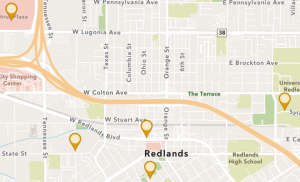
Chapter one starts off with a lot of background information from GIS and a lot of the common applications that are seen in GIS. It talks about the enhanced map database going from 2-D to 3-D. Sharing with groups and different organizations has become easier with ArcGIS online systems. For the actual activity, it was easy to follow the book to determine what specific maps and pictures/symbols needed to be created. I learned how to create an app using GIS and online software. Instead of using dots to describe the different locations within Redlands, using the government icon makes seeing the different locations easier. Within the GIS field, you also learn about these different cities and areas within the book. The only question I had with chapter 1 was what all of the things the chapter told us to do means? More on the fact of why this is helping us develop a map. Going back and reading the intro paragraphs did help with this question.
Chapter 2:
Starting off with chapter two, I enjoyed seeing the different colors and types of maps under the sample smart-mapping styles. Over time, I would enjoy trying to make these types of maps. Doing the actual tutorial part of chapter two was a little more difficult than chapter one because there were a lot of minute details that mattered and could not be missed for any reason. The expressions were a bit confusing, but once I re-read the directions, it made sense as to what they were actually doing for the map.
Applications:
One idea I had was mapping out wildlife sightings in a certain location or park. This would be a good idea to visualize where the animals were seen, and also could be used as a good educational tool for others to see.