Kozak Week 4

Chapter 5: 

Chapter 5 is about caching and on-premises(private) web GIS. One may need a private WebGIS for security, connectivity, or functionality. In order to create a private WebGIS, one can use ArcGIS Enterprise which includes a portal for ArcGIS, ArcGIS server, ArcGIS web adapter, and an ArcGIS Data Store. These different components work together to provide the best private network service. This chapter then discusses portal collaboration and the hierarchical structure of organizations. These organizations can share information with each other using groups, and Web GIS deployments are accomplished by using distributed collaboration. This helps to effectively organize, share, and network across organizations. 

The chapter then gets into raster tile, vector tile, map image layers, feature tiles, and publishing strategy. Raster tiles deliver maps to client applications as image files that are prerendered and stored on the server. Vector tile layers deliver map data as many grouped vector files, usually in PBF. Map image layers are used for visualizing operational layers and are drawn dynamically by the server or by using tiles from a cache. Feature services are used to generate feature tiles when requested by ArcGIS client apps. These feature tiles enable web clients to display more features from the service and provide a faster load time. Publishing strategy is a term for selecting an appropriate layer type for your data.

The chapter then discusses web services standards. Standards specify the interface that different vendors can use and are important in achieving interoperability among vendors. It specifies the parameters, values, and results. OGC is the main standard body and has defined a set of standards for Web GIS services. The last section of chapter 5 is about workflow to share web layers from ArcGIS Pro. This section talks about publishing web layers by using ArcGIS pro. This is done in three main steps:

  1. Preparing the data using ArcGIS Pro
  2. Authoring the map in ArcGIS pro by adding data layers to the map and configuring layer symbols and other properties
  3. Sharing the web layer

Chapter 6:

Chapter six is about spatiotemporal data and real-time GIS. Spatiotemporal data can come from many different sources  and includes observations of objects and events that move or change through time . It can be split into several groups including moving, discrete, stationary, and change. 

  • Moving→ something that moves
  • Discrete → something that just happens
  • Stationary→ stands still but values change
  • Change→ change or growth

The time value of an event can be a point in time (values are typically stored in a single attribute field) or duration of time (values are typically stored in two fields, one for the start time and the other for the end time). IoT is a network of physical objects that are embedded with sensors and network connectivity that enable objects to collect and exchange data. Some included devices are airplanes, security cameras, and refrigerators. Geolocation provides context to the sensor data collected in the IoT ecosystem. It can transform raw data into information that can be used. Smart city is a popular app that uses connected sensors to supply information that assists a city in managing assets and resources. Smart homes often involve using wifi connected sensors and AI to help control a home. This can include Amazon Echo, smart thermostats, automatic lights, and geofences. 

The next main section of focus is on cloud, server, and client-side technologies for real-time GIS. ArcGIS Velocity and ArcGIS GeoEvent Server can connect to multiple forms of streaming data to perform data processing and analysis. It can also send updates and alerts when prompted. Both of the programs are able to collect, process, and store high-volume- and high velocity real-time data that is generated by the IoT. ArcGIS Velocity has a few newer types of items including feed items, real-time analytic items, and big data analytic items. 

Another product talked about in this chapter is ArcGIS Mission. It provides managers, analysts, and responders with a comprehensive picture of the operating environment. It ultimately helps with the coordination of movement, and communication among team members. The three main components are Mission Manager, Mission Responder, and Mission Server. 

One possible application that I could make based off of chapter 6 is to create a dashboard web app for the Grafton County Dispatch in Central NH that coordinates fire and EMS response from the included towns. This app could show 911 reports, incidents, and categories of calls per county and per town. It would help visual emergency response in rural areas and show what calls are the most frequent. This could help with future training based on call volume.

Aqib Ali Week 3 Chapter 3 and 4

In Chapter 3 I worked with Experience Builder and how it can be used for turning web maps into interactive apps instead of just  maps. I learned how to choose or design a template, pick a theme, connect data, add widgets, adjust the layout for different devices, then save, preview, and publish. I also learned the difference between message actions and data actions . Even though the tutorial was confusing at first and I really struggled  with Experience Builder but after I was done i found the maps i created to be very fascinating.

In Chapter 4 I learned about using GIS on mobile devices and creating those appps. I worked on creating AR, adding incident reports with photos and details and surveys as well. I also learned about why when designing mobile apps we should keep limits in mind because mobiles are less powerful then computers and the apps have to be less complicated. These can be useful when doing field work which is why I found it really interesting. I found the AR AuGeo the most interesting because ARCGIS makes it very simple to create, it was very similar to an app I use called flight radar and now I understand how it works.

The biggest problem I had was that the UI for making these apps has been updated so its hard to find exactly the things the tutorial is talking about.

An idea for my project using these chapters would  be to:
– Create an AuGeo app that uses AR to show coffee shops in the direction you are pointing to

Becker- Week 6

https://owugis.maps.arcgis.com/apps/instant/countdown/index.html?appid=dac3a1e876244a25853f421692a11540

This map gives information on the various private schools in the Cuyahoga County area.


https://arcg.is/CbnHW2

This map shows my hometown Berea, Ohio and has the ability to toggle 3D building shapes to get a better idea of the configuration of the city.

White Week 6

Application 1).

For the final project, a cool thing I did pertains to tourism. I made a Web GIS app that introduces the main attractions or points of interest in Philadelphia. I am from Philadelphia and I focus on the top five sights to see. An instant app is the best case I think and most efficient for the user and visually compelling. This is what I did. I think this could be useful for tourists and or visiting parties of any capacity. I thought about this in light of the approaching holiday season in which people do a lot of traveling in general and traveling to see friends and family. Actually, a record of over 81 million Americans are projected to travel for this Thanksgiving. The Philadelphia area is a highly popular destination. While this is related to the economy and an industry at large, I think that it also reflects the daily life implementation and use of Web GIS. The book underscores the versatility of Web GIS in terms of applicability, accessibility, convenience, collaboration, and representativity and feasibility in use. With the increased significance of spatial location and analysis, Web GIS is adding more value perhaps now than ever before. Whether it be through government, business, science, or daily life in this case, Web GIS is considered and applied progressively. In order to do this, I first did some research on the data available at the state and city level. I then did some more detailed searches. Although the topic is deeply contested in terms of what may be the top five places to see in Philly, I am a true Philadelphian and I feel I have the best choices. Essentially, I pulled a subset of the data and crafted an excel spreadsheet containing the data with three fields: Name, caption, and address. I then converted this data to a CSV file. I published a hosted feature layer from a CSV file and added attachments. Next, I added a field to the layer and edited the attributes. I added an ID field to the layer so that I could display the photos in the sequence I want. Then, I formulated a web map through which I added the feature layer in Map Viewer, selected an appropriate base map (the community base map), and configured its style and pop-up. Finally, I transformed my web map into a web app using the Attachment Viewer template.

Here is my app:

https://owugis.maps.arcgis.com/apps/instant/attachmentviewer/index.html?appid=eb759364dc4a4fbda1bf152354a49e71

Application 2).

I have been learning Spanish all my life. I am currently minoring in Spanish. I’ve learned a lot about Hispanic culture and the Spanish speaking community. I’ve spent a lot of time in South Florida and home in the Northeast/Philly area. I’ve noticed more and more Spanish speakers wherever I go. I was curious about the growth of the Spanish speaking population in the United States and whether this growth has been sporadic or consistent. Turns out it’s been the latter. I faced various challenges when working with time-enabled data in GIS. In the end what I did was I used the U.S. Census Bureau which provides the official Hispanic/Latino population data for Metropolitan Statistical Areas (MSAs) only once every ten years through the Decennial Census (1990, 2000, 2010, 2020). I couldn’t efficiently find and use official annual data for the years in between for individual cities/MSAs. I wanted to use a time interval of one count per year on the time slider to show clear patterns and if there is any real change. And so I used Gemini to add to the data using linear interpolation to create annual estimates. For the purpose of the project I thought this would be fine since I am not using this in a professional workspace or to perform real analysis. The result was cool to see a steady increase all around the country. I first had to create the time-enabled feature layer. I made sure that there was a date field in the data. In this process, I published a hosted feature layer, and enabled time on this layer. My data was on an excel spreadsheet and I converted it to a CSV file. I then created a web map and a web app in which I animated the time-series data. I played around with the styling component and the time slider formation. The big S on each point on the map just stands for Spanish! Spanish speakers are indeed becoming more pervasive. 

Here is the web app:

https://owugis.maps.arcgis.com/apps/instant/slider/index.html?appid=5ab3c7ec2f054ed490ac5f2921c57ea0

Application 3).

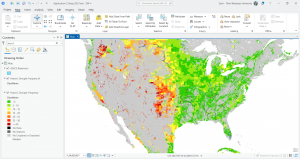
For this one, I was trying to work with vector and raster tile layers. I started out using ArcGIS Pro, gathering my data layers, formatting things with the map, and then publishing the web layer or sharing the map as a web layer using a portal connection. The screen shot I have from ArcGIS Pro is from the data I added that shows drought frequency levels and US Army Corps of Engineers reservoirs. Reservoirs play an important role in mitigating drought in terms of storing excess water during wet periods in order to use that stored source during dry periods They also provide a consistent water supply for agriculture, urban use, and hydropower, and more. The USACE owns and operates over 500 such reservoirs throughout the U.S. I’ve done some research on this federal government organization and previous efforts that have undertaken for example in my shore town community with flooding and flood infrastructure. I noticed a pattern here that drought occurs more frequently in areas where these USACE reservoirs are less pervasive. In the green sections you can notice an abundance and dispersal of these reservoirs that are the dark water bodies portrayed on the map. 

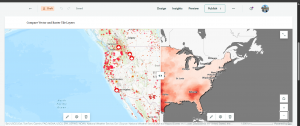
This is an unfinished thing I was doing and for the sake of time I moved on. I wanted to include it here because I did spend time on it but I did run into some issues with ArcGIS Online and the vector and raster tile layers. In the screen shot of ArcGIS Online, this is when I ran into issues and so I just started experimenting. I used layers for Living Atlas to do something similar in showing wildfire point data which is vector data and then drought intensity data which is raster data. The clear pattern that is confirmed by the map is that there are more wildfires where drought intensity is higher. Although droughts may not directly cause wildfires, they contribute to the conditions that create the risk and intensity of wildfires. 

Application 4).

I wanted to create a simple thematic web scene and so I played around with things for a while. I was going to create a web scene based on population in some capacity but I had experience with that already and so I focused on something a bit different. I looked into USA counties. I chose to focus on the attribute of area in square miles. The sizes of counties vary throughout the country. These county boundaries are interesting and they were formed by historical and practical factors, like population density, natural geographic features, state law, and more. The polygons on the scene represent the county boundaries and if you zoom in the counties are labeled. The darker colors symbolize counties with greater area in square miles whereas the lighter colors show less area. It was a local scene with a Living Atlas feature layer. This was cool to see not only how many counties there are but their size differentials. This scene allows you to visualize a major historical component that dates back to western expansion and the development of capabilities whether it be tech or infrastructure building. Ultimately the smaller and easily accessible administrative polygons went away that are seen in the Eastern part of the country today. As a result, counties in the West are larger geographically than those in the East, and this is shown via the web scene and the 3D GIS component. I am minoring in politics and government and so it was intriguing to put all of these things together and how for instance the East is more densely populated and therefore counties and even states had to be smaller for reasonable travel and governance. Westward settlement occurred in more unpopulated and remote areas where large areas of land were organized into these political and social boundaries that are counties. In all, knowing county areas can be helpful for planning and resource allocation, understanding the organization of census data, travel logistics, and much more.

Here is the web scene:

https://arcg.is/0L9Hz80

Application 5).

For this app, I was doing some park design work with 3D GIS and developing a web scene using feature layers and 3D object symbols but this was taking too long and I didn’t have the right layer. I am still in the process of doing this with particularly the Core Creek Park in PA, one that I am familiar with and have frequented. I wanted to make use of the data I did retrieve and the hosted feature layer I created. This was brought out through a CSV file I made through Excel. I added a field, added attachments, created a web map, and then created an instant app with an attachment viewer template. This was one of my original ideas but I modified it a bit. The web app shows the parks in Bucks County Philadelphia from the department of parks and recreation. Bucks County PA is where I went to high school, a bit north of Philadelphia. I have family that frequent these parks and family that are coming into town for the holidays and so maybe I’ll share this with them.

Here is the web app:

https://owugis.maps.arcgis.com/apps/instant/attachmentviewer/index.html?appid=4d8be33f19324fb59c89f1038fdba7b1

Application 6).

 I made a web map to show land use patterns across the United States. I enabled time settings and added a time slider but this is a bit off and I will need to go back in and rework it. I used gemini to acquire some land use data for all 50 U.S. states across the years 1959, 1974, and 2012. These three years were pulled from and approximated based on the U.S. Department of Agriculture’s Economic Research Service (ERS) Major Land Uses (MLU) reports. The values basically come from the real trends and approximate state-level totals, measured in thousands of acres, for those key years. There are some cool patterns that emerge just at first glance. For instance, most of the western portion of the country has a majority of grassland/pasture range land use spread. The middle section of the nation and the midwest is predominantly farmland. And then the eastern portion of the U.S. is dominated by forest cover. The size of the pie chart as the representation of each state is also proportionate to the size of the state. For example, the pie chart over Texas is the largest. Texas is the state with the most amount of total land. 

Here is the web map:

https://arcg.is/0eKTOT0


ZW

Aasim Weeks 1-5

Week 1

My name is Dua Aasim, and I’m a senior double majoring in Data Analytics and Politics & Government. This is my Week 1 post, and I’m confirming that I completed everything assigned for this week. I reviewed the course blog, the syllabus, and the schedule, and I’ve created this posting as required. I also took the Week 1 quiz & downloaded Getting to Know Web GIS.

I poked around the account for a few minutes the way the assignment asked. Two things stood out to me: first, I like that this isn’t a local software like some of the stuff I am used to for Data Analytics, and I can access my work from anywhere. Second, the Community and Forums page was shockingly active. I didn’t expect to see so many current questions, responses, troubleshooting threads, and examples from real users. I honestly assumed it would be more “archive-like”.

I also completed the “Get Started: What Is ArcGIS Online” reading. Two things I learned from that page: First, I thought it was really cool that ArcGIS Online lets you combine layers from your organization, the Living Atlas, and your own uploaded data all in the same place and I’m honestly really excited to have access to so many sources of data. Second, web maps and web scenes function as the central building blocks for almost everything else you create in ArcGIS Online, whether you’re making dashboards, instant apps, or more specialized tools. 

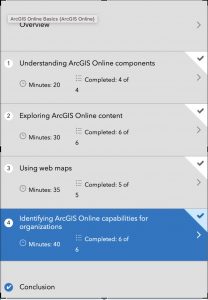
After that, I completed the ArcGIS Online Basics training course. I’ve attached my completion screenshot, and here are two comments on what I learned from the quizzes: first, I learned that there are so many specific sharing levels in ArcGIS Online which I assume is super handy when you want things to be a specific level of private. Second, I learned the distinction between basemap layers and operational layers: operational layers are the ones that allow editing, pop-ups, and analysis, whereas basemaps are for geographic context only and can’t be edited.

I also browsed additional ESRI courses under the Training tab and found a couple that looked interesting for later, and then I used Google and Google Scholar to look up GIS application examples by searching “ArcOnline” with different keywords. I found (https://utoronto.maps.arcgis.com/apps/MapJournal/index.html?appid=590a95cd059240388f003c49cd722dc9) this really cool Story Map titled “Sodomy and the City” which demonstrated the spatial proximities between taverns and consecrated grounds, and the religious ownership of transgressive spaces.
Week 2


In Chapter 1, I learned the basics of what Web GIS actually is and why it matters. The main idea is that GIS has moved onto the web, which makes maps and spatial tools way more accessible. Instead of having to install heavy software, everything can run in a browser. You also get the benefit of sharing maps with pretty much anyone. The chapter explains how the whole system works, starting with the portal, which is basically the home base where you store layers, maps, apps, and all of your content. I also got a clear picture of the difference between hosted layers and non hosted layers, and why hosted layers are easier to manage when you are working online. The chapter also talks about how apps, basemaps, and operational layers fit together and how all of this runs through the Esri cloud or ArcGIS Enterprise. It feels like a giant ecosystem that supports collaboration and makes GIS more flexible.

In Chapter 2, the focus shifts to how to actually make your maps look good and how to communicate your ideas. I learned about smart mapping, which is basically ArcGIS helping you style your data in ways that highlight patterns without you having to know cartography rules. I also learned how to set up useful pop ups, including adding photos and charts, and how to use Arcade to calculate values. The chapter also introduces StoryMaps and how they help turn a map into a full narrative. You can combine text, pictures, maps, and even swipe tools to guide someone through your topic. Overall, Chapter 2 is about taking your data and turning it into something people can easily understand.

My possible idea after reading these chapters is building a map that displays how fast fashion impacts a city, e.g. Columbus. Hypothetically, I would collect my own data on the locations of fast fashion retailers, thrift shops, repair services, and clothing donation points, and upload it as a hosted feature layer. Using smart mapping from Chapter 2, I can style each type of place differently to show the contrast between fast fashion concentration and sustainable options. I could also add photos as attachments and create pop ups that explain what I found at each location but not sure if this would be useful. Finally, if I desired I could pull everything together in a StoryMap to show how shopping patterns shape waste, affordability, and access to sustainable fashion in my area.


Week 3


Chapter 3 dives into ArcGIS Experience Builder, which honestly feels like the more modern, flexible option. What stood out to me is how Experience Builder lets you choose a layout first and then drop in widgets like maps, text, filters, sidebars, buttons, and charts. It’s basically a drag-and-drop website builder but built around GIS content. You can make single-page or multi-page apps, connect widgets so that selecting something in a dropdown updates the map automatically, and design the interface to look more polished and customizable. It feels more like building a real interactive dashboard instead of just a viewer.

Chapter 4 starts by explaining what makes Mobile GIS useful: it lets people view maps, collect data, and update features directly from a device, even offline. I didn’t realize how much depends on things like edit settings, feature layer views, and feature templates, which control what field users can see, add, or modify. The book also covers different strategies for building mobile apps such as native apps, hybrid apps, and web apps and how each fits different levels of customization or field needs. A big part of the chapter is about ArcGIS Field Maps, which combines map viewing, data collection, navigation, and form-based editing in one app. There are walkthroughs on making editable layers, preparing forms, and syncing offline edits. After that, the chapter introduces ArcGIS QuickCapture, which is more of a tap-to-collect app meant for rapid data gathering (like taking photos of damage or tagging assets while moving). Finally, it touches on AR: AuGeo, which turns GIS points into augmented-reality markers you can walk around and explore. I honestly didn’t know ArcGIS had AR tools built in, so that was surprising.

For my project, I could build a small Experience Builder app using a 2021 Freedom in the World dataset I have access to. It would have a world map styled by political rights or civil liberties, and a sidebar widget that shows each country’s full scores when clicked. I could also add a simple bar chart widget comparing regions. Using Experience Builder would make it feel more like an interactive data journalism piece rather than just a plain map.

Week 4

Chapter 5 focuses on caching and on-premises Web GIS. The biggest takeaway for me is that tiled cache layers exist basically to make maps fast. Instead of drawing every feature from scratch, ArcGIS stores pre-rendered images of map tiles so the map just snaps into place when someone zooms or pans. It makes a huge difference for high-demand apps. The chapter also talks about organizations that can’t use ArcGIS Online for security reasons (like government agencies or hospitals), so they run ArcGIS Enterprise on their own servers. Chapter 6 covers spatiotemporal data and real-time GIS, which was surprisingly interesting. Spatiotemporal layers store both location and change over time, so you can replay events like fires, storms, migration, traffic patterns, etc. The examples make it clear why you need a special data structure for this because normal feature layers can’t handle constant updates or streaming feeds. The chapter also explains GeoEvent Server, which ingests live data (like sensors or GPS trackers) and pushes updates to apps instantly. It’s basically GIS for anything that moves. 

Last year, I worked with 311 city data for an internship. I think it would fit really well with the ideas from these chapters. I could take a month of 311 calls of potholes, streetlights, trash issues  and publish them as a layer, then turn the density map into a cached tile layer so it loads fast. Since each request has a timestamp, I could also enable time on the layer and add a time slider to show how complaints rise and fall across the city. It would be a simple way to apply both caching and spatiotemporal concepts to data I’ve actually used.

Week 5

Chapter 7 of Getting to Know Web GIS, which covers 3D web scenes. This chapter felt different from the others because it shifts from regular flat maps to full 3D environments. The chapter starts by explaining what makes 3D important in GIS. Instead of showing only what is on the ground, 3D lets you show height, depth, and shape in a way that looks closer to real life. The book also shows the two types of scenes. A global scene is curved and works best for world or city scale projects. A local scene is flat and works better for small areas like neighborhoods or campuses. Chapter 7 also talks about the main kinds of 3D layers. These include point clouds from lidar, 3D objects like buildings, integrated meshes made from drone photos, and indoor layers that show rooms, floors, and hallways. I liked the examples where 3D scenes help people understand shadows, sight lines, visibility, and how new buildings might affect a place. The chapter also shows how 3D connects with newer tech like VR and XR. It is cool to see how GIS is being used in metaverse style tools, even if that still feels experimental. Another part I found interesting was indoor 3D GIS. I never thought about mapping the inside of buildings. The chapter explains how BIM data from architects can be connected to GIS so you can navigate inside hospitals, schools, or office spaces. To be quite honest, I didn’t even realize GIS softwares did that. My main question is how heavy 3D scenes are for normal computers. The book mentions level of detail and performance issues, so I wonder how realistic it is for small groups to use 3D regularly.

I could take my 311 data and build a simple local 3D scene where each neighborhood has a vertical bar showing how many requests it gets. Instead of a flat heat map, the bars would rise up from the ground to make the patterns easier to see. 
 

Duncan- Week 6

  1. This is my first application which is set in New York City and shows the correlation of population and the ages in that population to the many different traffic accidents that occur in Manhattan.

https://owugis.maps.arcgis.com/home/webscene/viewer.html?webscene=61116fe0a51c44fc9b499d91d22ce2c2 

  1. My second application is simply just some 3D buildings around the Delaware area additionally on the base map settings i put them to show the history between 1/1/1842 the first date of the year OWU was founded to this years first day of the year 1/1/2025

https://owugis.maps.arcgis.com/home/webscene/viewer.html?webscene=ea8656e4d54b45a99deb1a387db2fd46

Lindley Final

For my final I created a survey using survey 123. I basically just created a survey asking people what their favorite restaurants in Delaware are. I tried to make it more complex  by actually showing where the restaurants are on the map but after hours of trying I was unable to figure it out so this is what I was able to create.

https://arcg.is/yWOGf0

I also created a 3D map in experience builder. I created a 3D map showing population levels across the US.

https://arcg.is/yWOGf0

Stephens Week 6

My  first project is a little quick capture app with four metro parks I like, with popups of trail maps and the ability to add pictures of invasive species, wildflowers, trash, or animals.

My second one is a real time dashboard with a focused scene of my neighborhood and the adjacent park in Columbus, showing code enforcement cases (layer downloaded from city of Columbus public data portal)

https://arcg.is/1azvKr0